Installation
Before installing the extension, please make sure to Backup your web directory and store database
You will require to install MageDelight Base Extension first. If it is not installed then please download it from https://www.magedelight.com/pub/extensions/magedelight-base.zip and unzip the package file into the root folder of your Magento 2 installation.
Root Directory is - "app/code/magedelight/#YourExtensionName#"
- Unzip the extension package file into the root folder of your Magento 2 installation.
- Connect to SSH console of your server:
- Navigate to the root folder of your Magento 2 setup
Run command as per below sequence,
php bin/magento setup:upgrade
php bin/magento setup:di:compile
php bin/magento setup:static-content:deploy
php bin/magento cache:clean
- log out from the backend and log in again
If you are using Magento 2.3 or later then you do not need to activate license. Extension will be activated with silent activation mechanism and does not require activation keys to be entered manually.
Backend Configuration (Admin side)
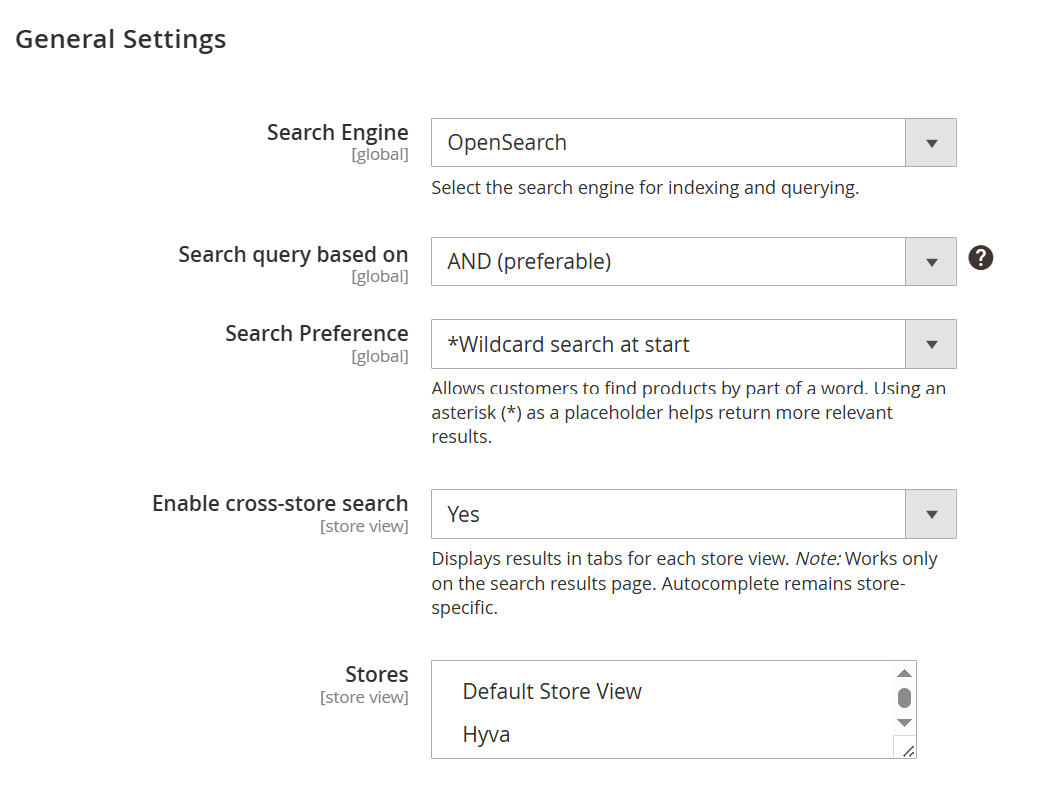
- This section allows administrators to configure the search behavior and optimize how products are indexed and displayed in search results across the store.
| Field | Description |
|---|---|
| Search Engine | Selects the backend search engine used for indexing and querying catalog data. Available options include MySQL, Elasticsearch (deprecated), and OpenSearch. OpenSearch is recommended for better performance and scalability. |
| Search Query Based On | Defines how multiple search terms are combined. AND (preferable) returns results containing all keywords, improving accuracy. OR returns results containing any of the keywords, increasing result breadth. |
| Search Preference | Controls how wildcard searches are applied to improve partial matching of search terms. Options include: • Wildcard Search – Matches terms containing the keyword anywhere. • Wildcard search at start – Matches terms ending with the keyword. • Wildcard search at end* – Matches terms starting with the keyword. • No – Disables wildcard search. |
| Enable Cross-Store Search | Enables displaying search results across multiple store views. When enabled, results appear in separate tabs per store on the search results page. Autocomplete remains store-specific. |
| Stores | Allows selection of store views where cross-store search is applicable. Only relevant when cross-store search is enabled. |
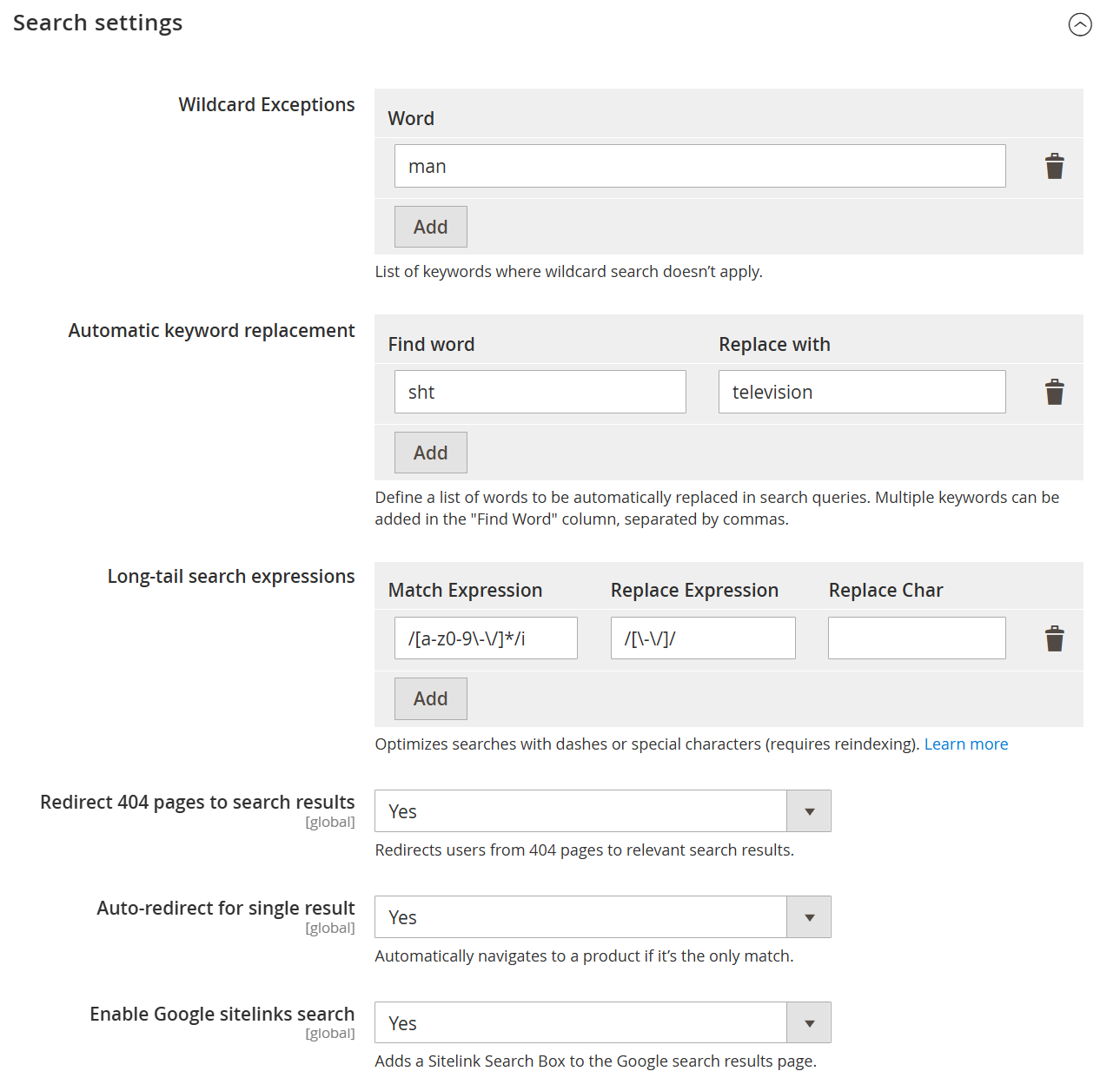
| Field | Description |
|---|---|
| Wildcard Exceptions | Defines keywords for which wildcard search should not be applied. This helps maintain precise search results for specific terms. |
| Word | Specifies the keyword to exclude from wildcard-based search behavior. |
| Add | Adds the entered keyword to the wildcard exception list. |
| Automatic Keyword Replacement | Allows automatic replacement of search terms to improve result accuracy and handle common misspellings or synonyms. |
| Find Word | Defines the keyword(s) that should be detected in the search query. Multiple words can be added, separated by commas. |
| Replace With | Specifies the term that will replace the matched keyword in the search query. |
| Add (Keyword Replacement) | Adds the defined find-and-replace rule to the list. |
| Long-tail Search Expressions | Configures advanced search patterns using expressions to handle special characters, formatting, or complex queries. |
| Match Expression | Defines the pattern (e.g., regex) to identify specific search query formats. |
| Replace Expression | Specifies the expression used to transform the matched query into a searchable format. |
| Replace Char | Defines a character used during replacement, if applicable. |
| Add (Expression) | Adds the configured long-tail search rule. |
| Redirect 404 Pages to Search Results | Redirects users from non-existent (404) pages to relevant search results, improving user experience. |
| Auto-redirect for Single Result | Automatically redirects users to the product page if the search query returns only one result. |
| Enable Google Sitelinks Search | Enables a sitelinks search box in Google search results for the store, improving SEO and navigation. |
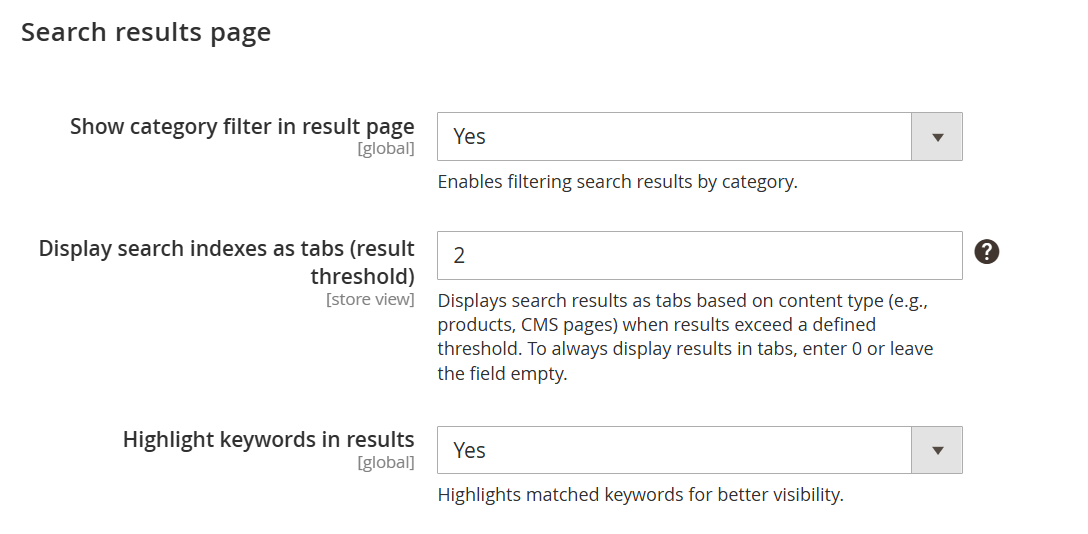
| Field | Description |
|---|---|
| Show Category Filter in Result Page | Enables category-based filtering on the search results page, allowing users to refine results by category. |
| Display Search Indexes as Tabs (Result Threshold) | Displays search results in tabbed format based on content types (e.g., Products, CMS Pages) when the number of results exceeds the specified threshold. Enter 0 or leave empty to always display tabs. |
| Highlight Keywords in Results | Highlights matched search keywords within the results to improve visibility and user experience. |
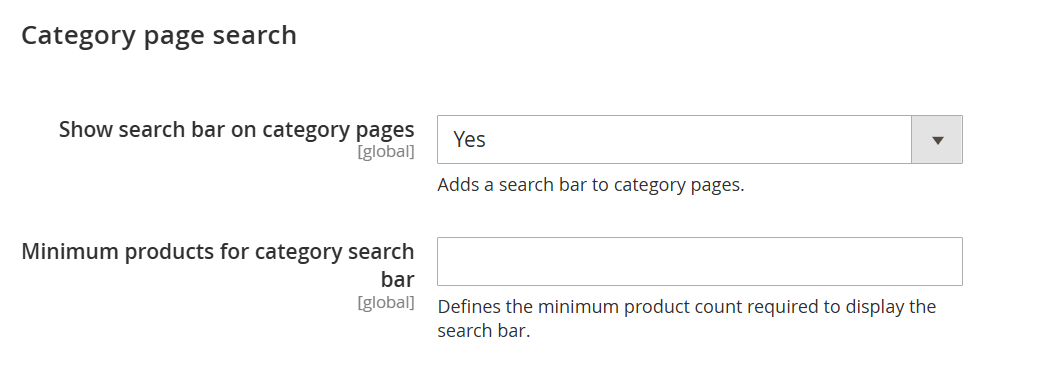
| Field | Description |
|---|---|
| Show Search Bar on Category Pages | Enables a search bar on category pages, allowing users to search for products within the selected category. |
| Minimum Products for Category Search Bar | Defines the minimum number of products required in a category for the search bar to be displayed. If the product count is below this value, the search bar will not appear. |
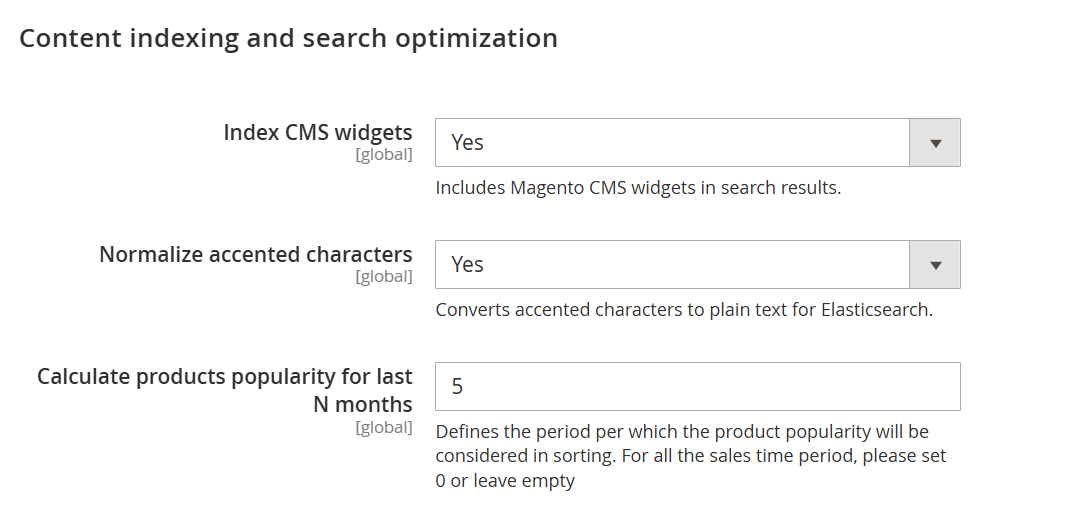
| Field | Description |
|---|---|
| Index CMS Widgets | Includes Magento CMS widgets in search indexing, allowing their content to appear in search results. |
| Normalize Accented Characters | Converts accented or special characters into standard text to improve search matching and consistency. |
| Calculate Products Popularity for Last N Months | Defines the time period (in months) used to calculate product popularity for sorting purposes. Set 0 or leave empty to consider all-time data. |
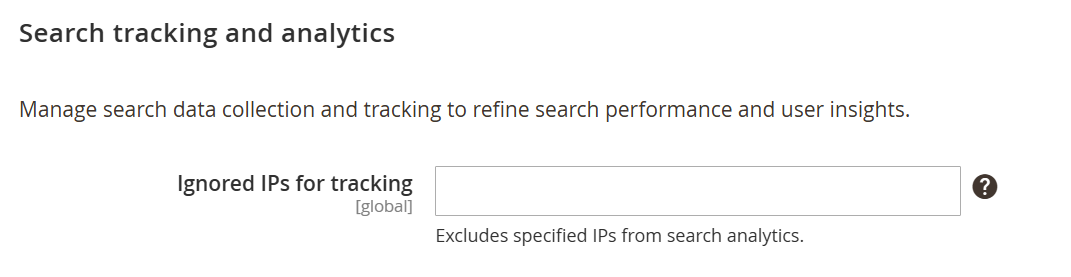
| Field | Description |
|---|---|
| Ignored IPs for Tracking | Specifies IP addresses that should be excluded from search analytics and tracking. This is useful for filtering out internal or test traffic to ensure accurate search data. |
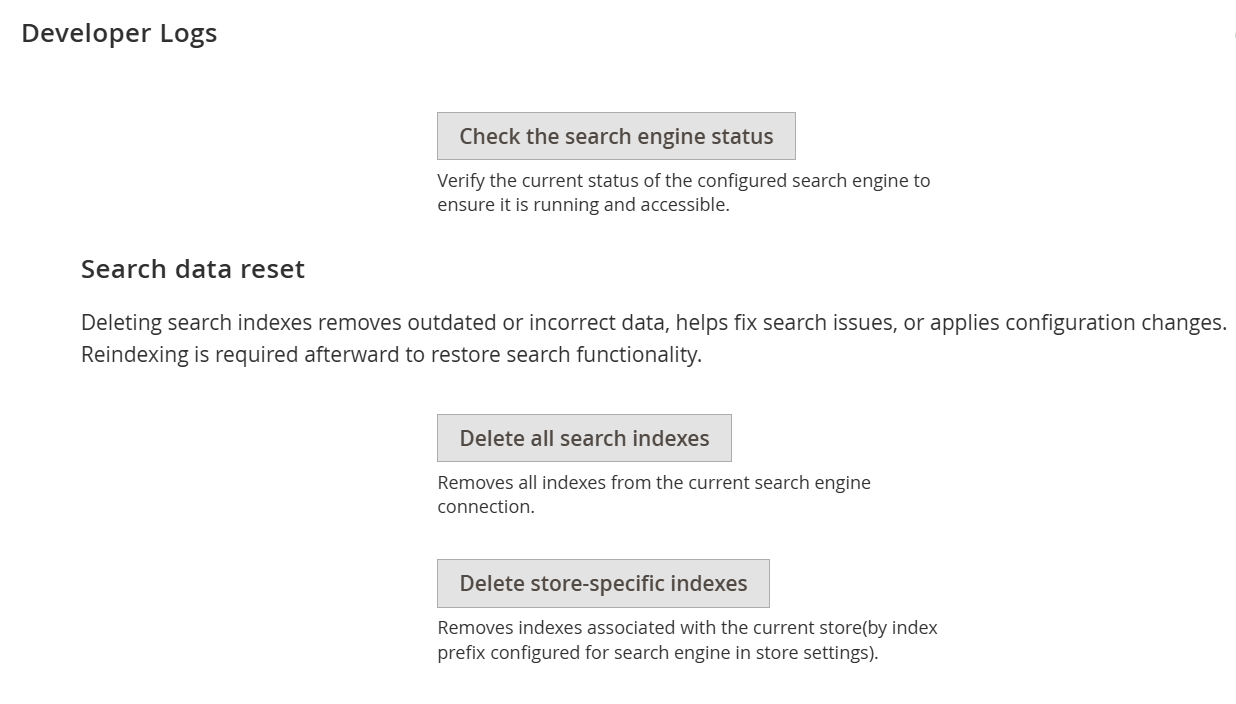
| Field | Description |
|---|---|
| Check the Search Engine Status | Verifies the current status of the configured search engine to ensure it is running and accessible. |
| Delete All Search Indexes | Removes all search indexes from the current search engine connection. This helps resolve outdated or incorrect data issues. Reindexing is required afterward. |
| Delete Store-Specific Indexes | Deletes search indexes related to the current store only, based on the configured index prefix. Reindexing is required after this action to restore search functionality. |
Backend Functionality
Search Indexes
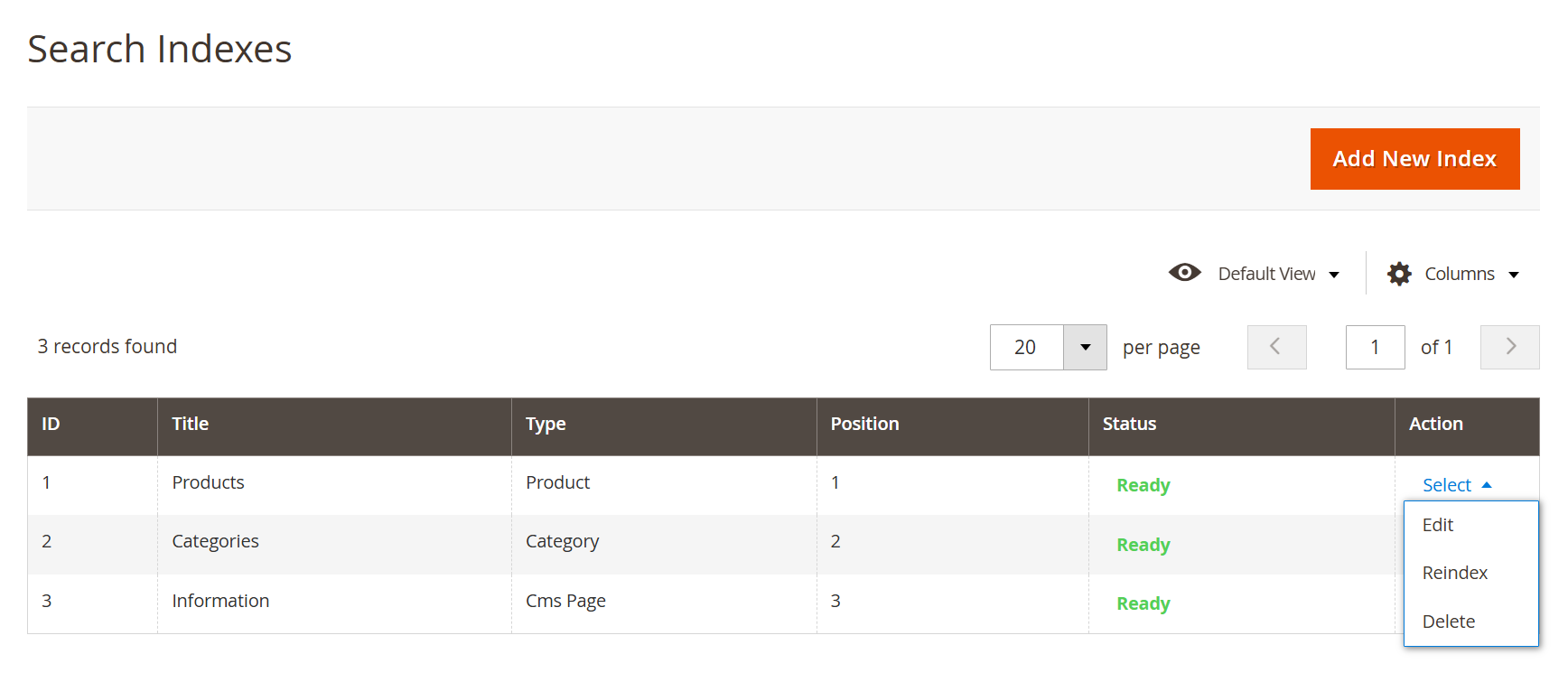
- Search Indexes allow you to manage how different types of content appear in search results. You can control indexing, update data through reindexing, and manage visibility and order of search result sections.
| Field | Description |
|---|---|
| Add New Index | Creates a new search index configuration for additional content types or custom data. |
| ID | Displays the unique identifier of the search index. |
| Title | Defines the name of the index (e.g., Products, Categories, CMS Pages). |
| Type | Indicates the type of content being indexed, such as Product, Category, or CMS Page. |
| Position | Determines the display order of indexes in search results or tabs. |
| Status | Shows the current status of the index (e.g., Ready), indicating whether it is properly indexed and available for search. |
| Action (Select) | Provides row-level actions to manage the index. |
| Edit | Allows modification of the selected search index configuration. |
| Reindex | Rebuilds the selected index to update search data and reflect recent changes. |
| Delete | Removes the selected search index from the system. |
Add New Index
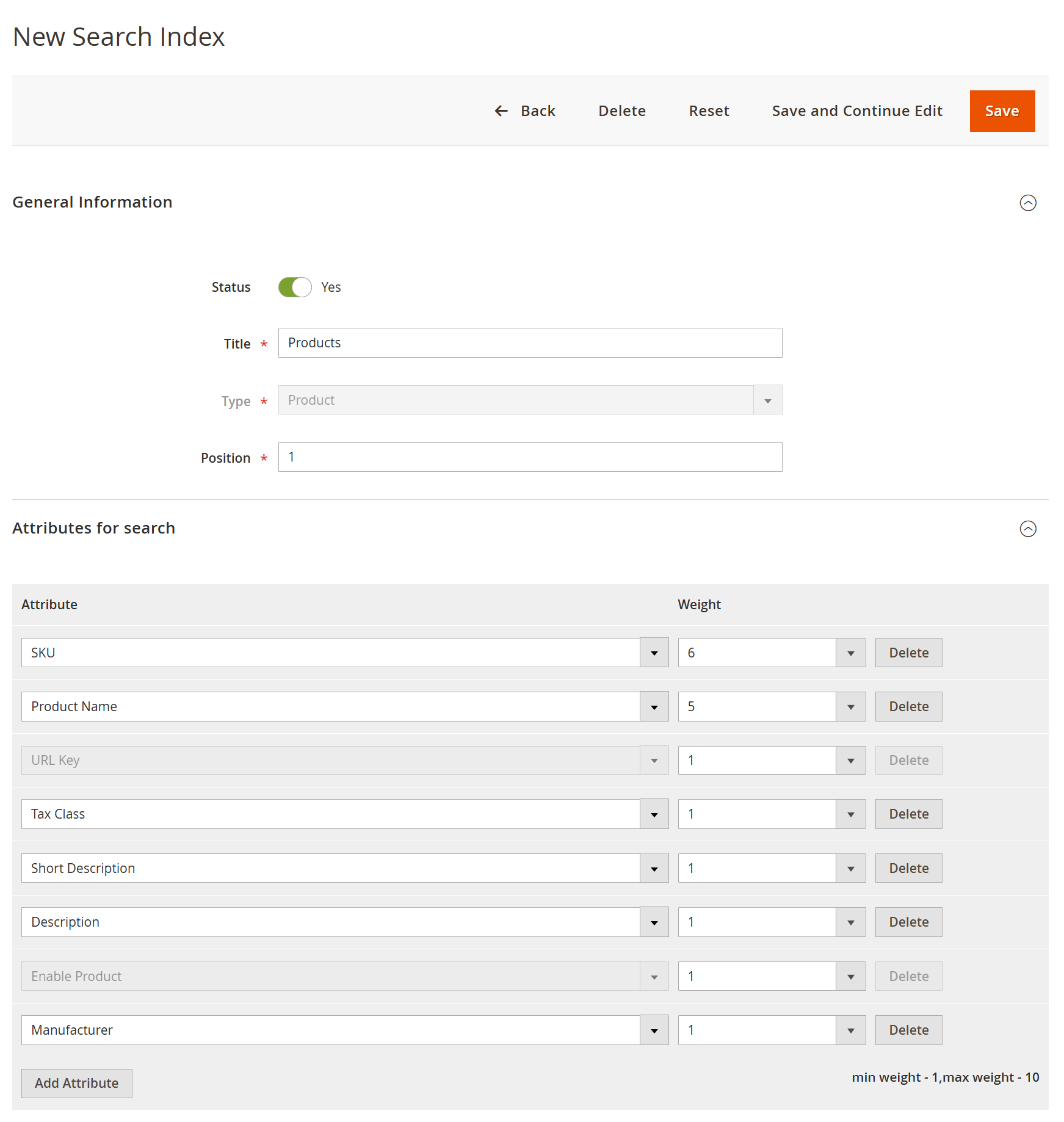
- This section allows administrators to configure how a specific content type (e.g., products) is indexed and prioritized in search results. You can control visibility, ordering, and relevance by assigning weights to different attributes.
| Field | Description |
|---|---|
| Back | Navigates back to the Search Indexes grid without saving changes. |
| Delete | Removes the current search index configuration. |
| Reset | Resets all unsaved changes and restores default values. |
| Save and Continue Edit | Saves the current configuration and allows further editing. |
| Save | Saves the search index configuration. |
| Status | Enables or disables the search index. Only enabled indexes are used in search results. |
| Title | Defines the name of the search index (e.g., Products). |
| Type | Specifies the content type being indexed (e.g., Product, Category, CMS Page). |
| Position | Determines the display order of this index in search results or tabs. |
| Attributes for Search | Lists the attributes included in search indexing and relevance calculation. |
| Attribute | Specifies the product attribute used for search matching (e.g., SKU, Name, Description). |
| Weight | Defines the importance of each attribute in search relevance. Higher values increase priority in search results. |
| Add Attribute | Allows adding additional attributes to be considered in search indexing. |
| Delete (Attribute) | Removes the selected attribute from the search configuration. |
Product Score Rules
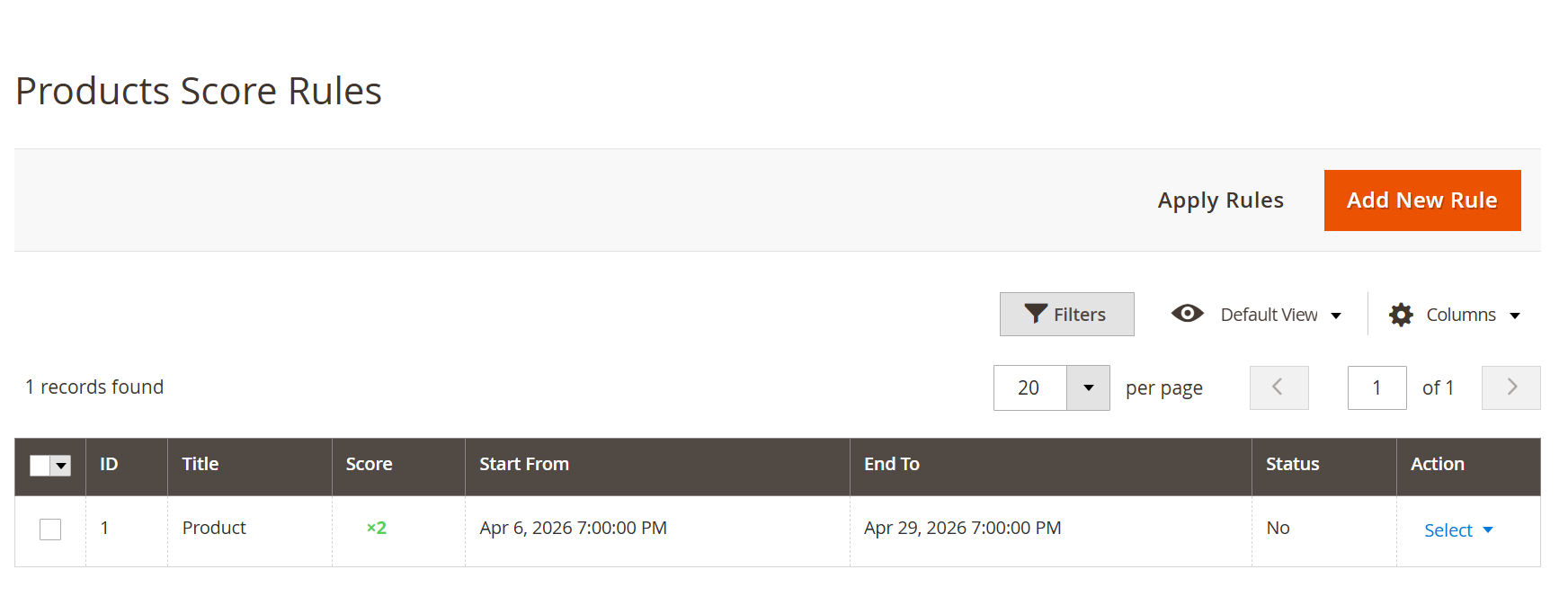
- Product Score Rules allow administrators to influence search result rankings by applying custom scoring logic. These rules help prioritize specific products dynamically based on conditions and defined time periods.
| Field | Description |
|---|---|
| Apply Rules | Applies all configured score rules to update product rankings in search results. |
| Add New Rule | Creates a new scoring rule to modify product relevance in search results. |
| ID | Displays the unique identifier of the rule. |
| Title | Defines the name of the scoring rule for easy identification. |
| Score | Specifies the score multiplier applied to matching products, affecting their ranking in search results. |
| Start From | Defines the date and time from which the rule becomes active. |
| End To | Defines the date and time until which the rule remains active. |
| Status | Indicates whether the rule is currently enabled or disabled. |
| Filters | Allows filtering the rule list based on specific criteria. |
| Default View | Enables switching between saved grid views. |
| Columns | Allows customization of visible columns in the grid. |
| Action (Select) | Provides row-level actions to manage individual rules. |
| Edit | Allows modification of the selected scoring rule. |
| Delete | Removes the selected rule from the system. |
Add New Rule
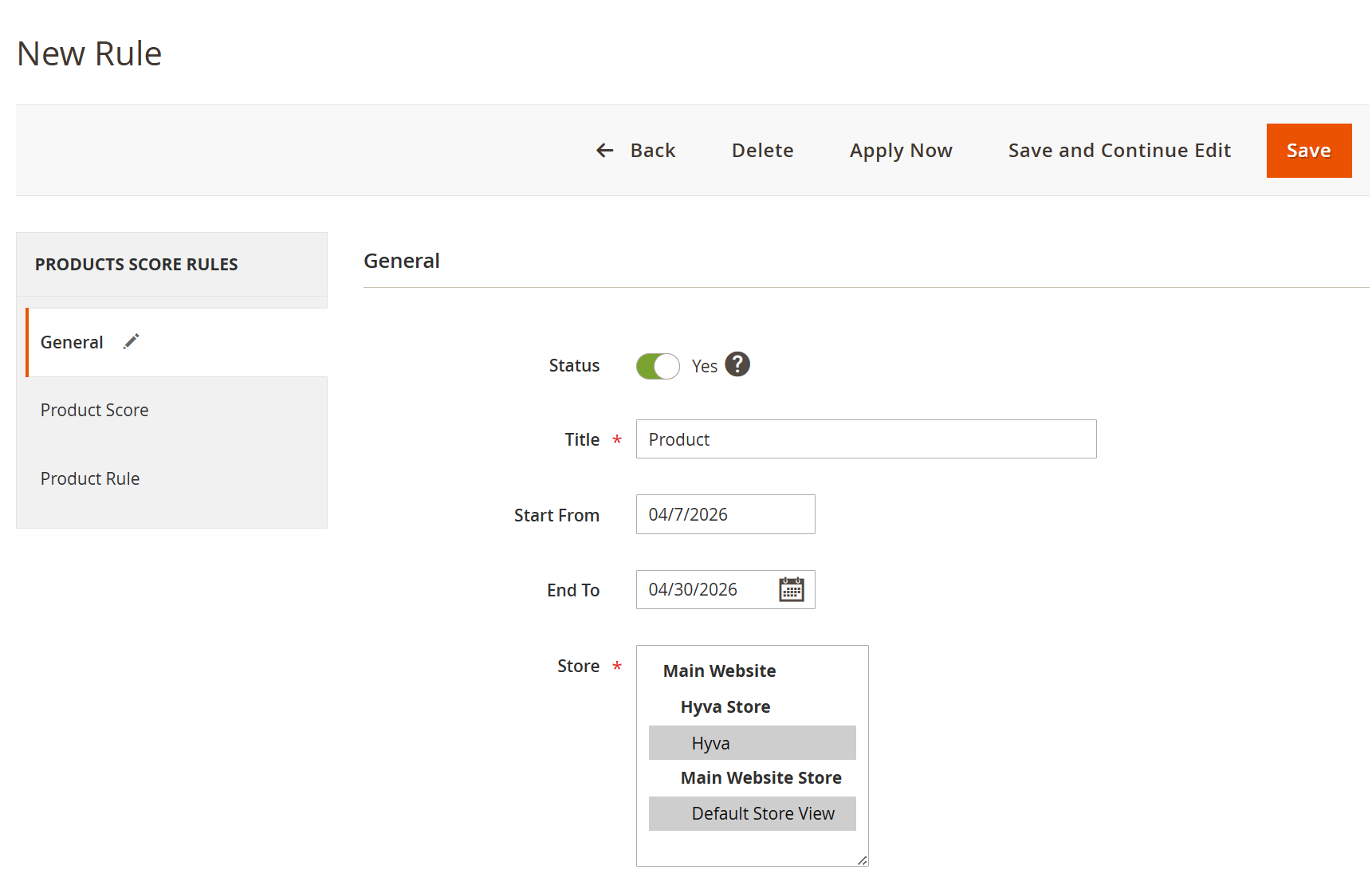
- This section allows administrators to create and manage product score rules that influence search result rankings. Rules can be scheduled, scoped per store, and applied dynamically to boost product visibility.
| Field | Description |
|---|---|
| Back | Navigates back to the rule listing page without saving changes. |
| Delete | Deletes the current rule. |
| Apply Now | Immediately applies the rule without waiting for scheduled execution. |
| Save and Continue Edit | Saves the rule and allows further modifications. |
| Save | Saves the rule configuration. |
| Status | Enables or disables the rule. Only active rules affect search results. |
| Title | Defines the name of the rule for identification. |
| Start From | Specifies the date from which the rule becomes active. |
| End To | Specifies the date until which the rule remains active. |
| Store | Defines the store views where the rule will be applied. |
| General (Section) | Contains basic rule configuration such as status, scheduling, and store scope. |
| Product Score | Allows defining scoring logic to boost or adjust product ranking. |
| Product Rule | Defines conditions to determine which products the rule will apply to. |
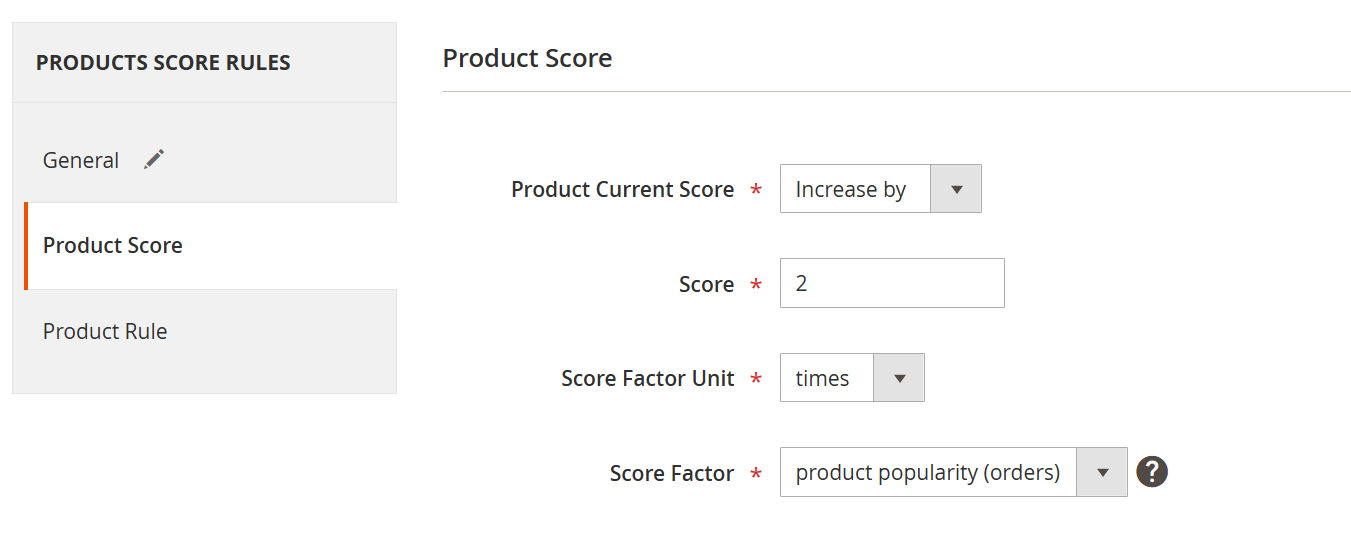
- Product score allows administrators to control how product ranking is adjusted in search results by applying scoring logic. You can increase or decrease product visibility dynamically based on selected factors such as popularity or ratings.
| Field | Description |
|---|---|
| Product Current Score | Defines whether the product score should be increased or decreased based on the applied rule. |
| Score | Specifies the value used to adjust the product score. |
| Score Factor Unit | Determines how the score value is applied, either as a multiplier (times) or as a fixed addition (points). |
| Score Factor | Selects the basis for score calculation, such as initial score, product popularity (orders), or product rating (reviews). |
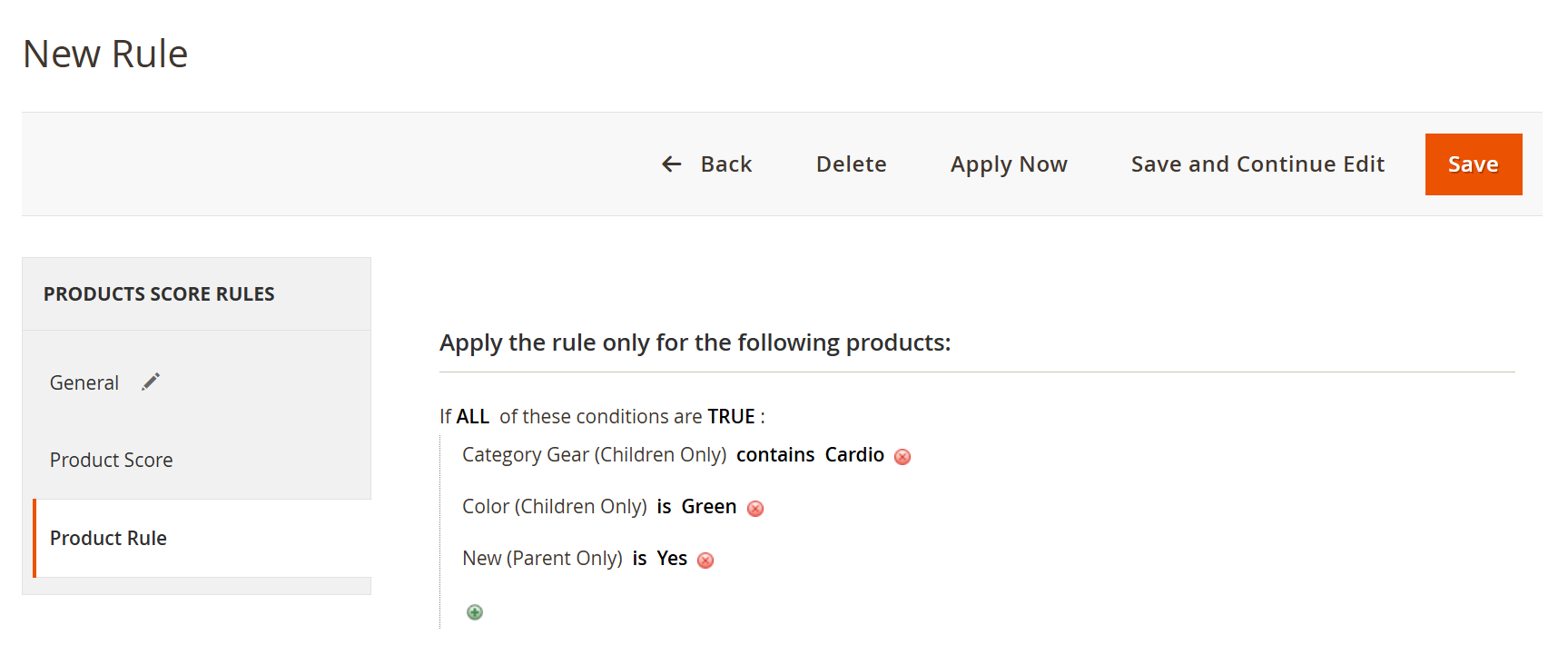
- Product rule allows administrators to define conditions to control which products the scoring rule will apply to. Rules are applied only to products that match all specified conditions, enabling targeted ranking adjustments.
| Field | Description |
|---|---|
| Apply the Rule Only for the Following Products | Defines the scope of products to which the rule will be applied based on specified conditions. |
| Conditions (If ALL of These Conditions Are TRUE) | Ensures that the rule is applied only when all defined conditions are satisfied. |
| Attribute Condition | Specifies the product attribute used for filtering (e.g., Category, Color, New). |
| Operator | Defines how the condition is evaluated (e.g., contains, is, equals). |
| Value | Specifies the value that the attribute must match for the condition to be true. |
| Add Condition (+) | Allows adding additional conditions to refine product selection. |
| Delete Condition | Removes an existing condition from the rule. |
Frontend Functionality
Demo
Click here to visit frontend.
Click here to visit backend admin panel.
Thank you for choosing MageDelight!