Backend Functionality
Search Indexes| Panel |
|---|
|
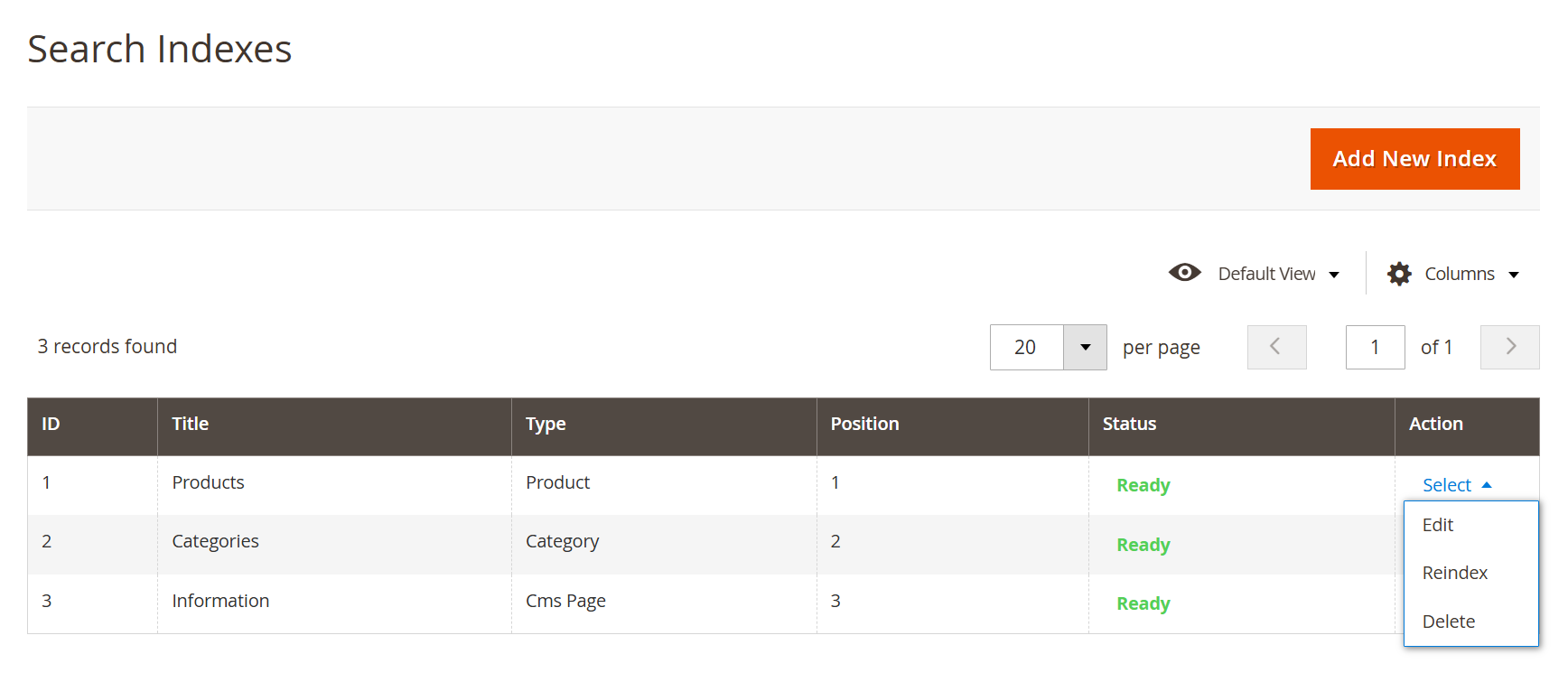
- Search Indexes allow you to manage how different types of content appear in search results. You can control indexing, update data through reindexing, and manage visibility and order of search result sections.
| Field | Description |
|---|
| Add New Index | Creates a new search index configuration for additional content types or custom data. | | ID | Displays the unique identifier of the search index. | | Title | Defines the name of the index (e.g., Products, Categories, CMS Pages). | | Type | Indicates the type of content being indexed, such as Product, Category, or CMS Page. | | Position | Determines the display order of indexes in search results or tabs. | | Status | Shows the current status of the index (e.g., Ready), indicating whether it is properly indexed and available for search. | | Action (Select) | Provides row-level actions to manage the index. | | Edit | Allows modification of the selected search index configuration. | | Reindex | Rebuilds the selected index to update search data and reflect recent changes. | | Delete | Removes the selected search index from the system. |
Add New Index| Panel |
|---|
|
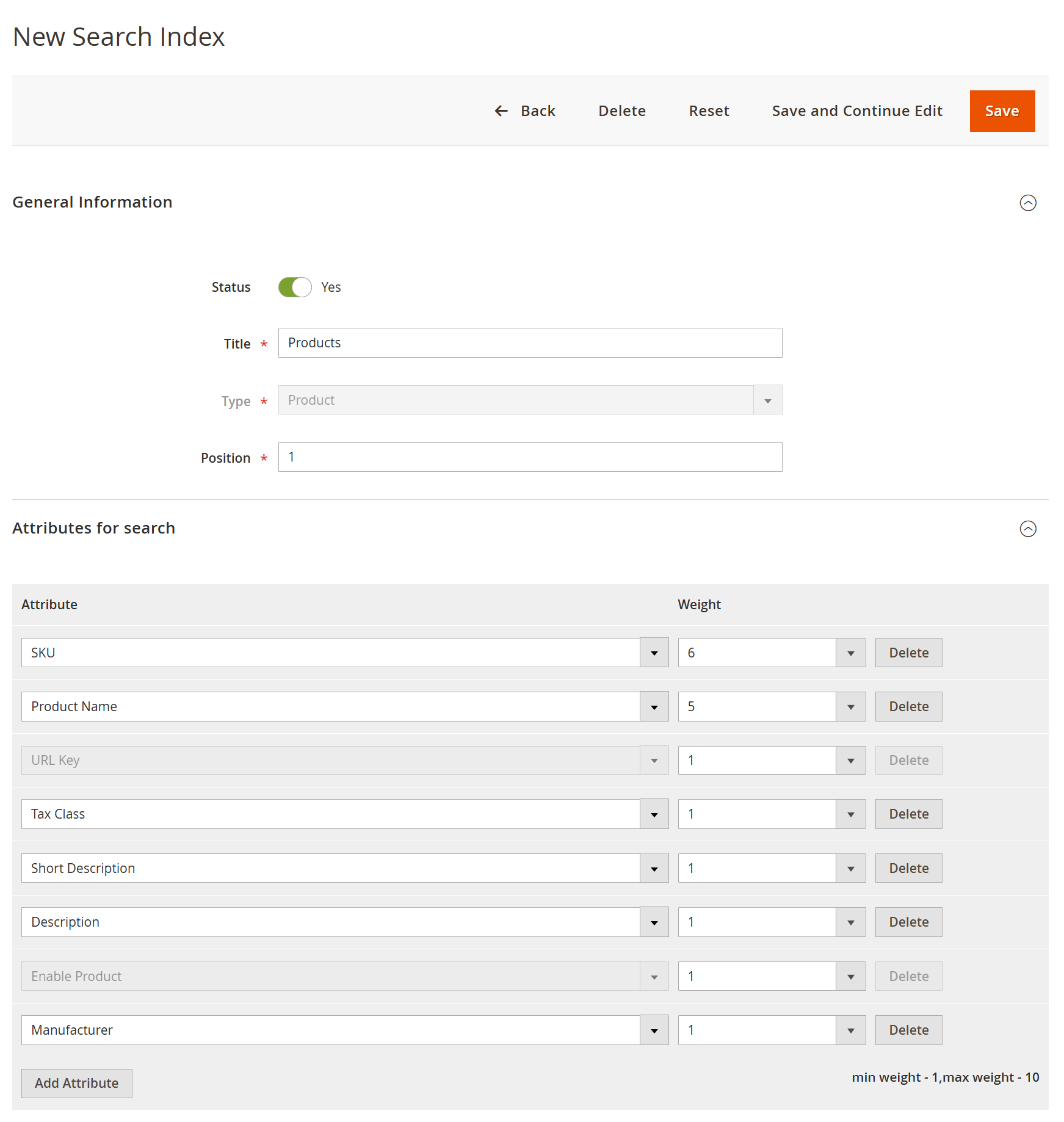
- This section allows administrators to configure how a specific content type (e.g., products) is indexed and prioritized in search results. You can control visibility, ordering, and relevance by assigning weights to different attributes.
| Field | Description |
|---|
| Back | Navigates back to the Search Indexes grid without saving changes. | | Delete | Removes the current search index configuration. | | Reset | Resets all unsaved changes and restores default values. | | Save and Continue Edit | Saves the current configuration and allows further editing. | | Save | Saves the search index configuration. | | Status | Enables or disables the search index. Only enabled indexes are used in search results. | | Title | Defines the name of the search index (e.g., Products). | | Type | Specifies the content type being indexed (e.g., Product, Category, CMS Page). | | Position | Determines the display order of this index in search results or tabs. | | Attributes for Search | Lists the attributes included in search indexing and relevance calculation. | | Attribute | Specifies the product attribute used for search matching (e.g., SKU, Name, Description). | | Weight | Defines the importance of each attribute in search relevance. Higher values increase priority in search results. | | Add Attribute | Allows adding additional attributes to be considered in search indexing. | | Delete (Attribute) | Removes the selected attribute from the search configuration. |
Product Score Rules| Panel |
|---|
|
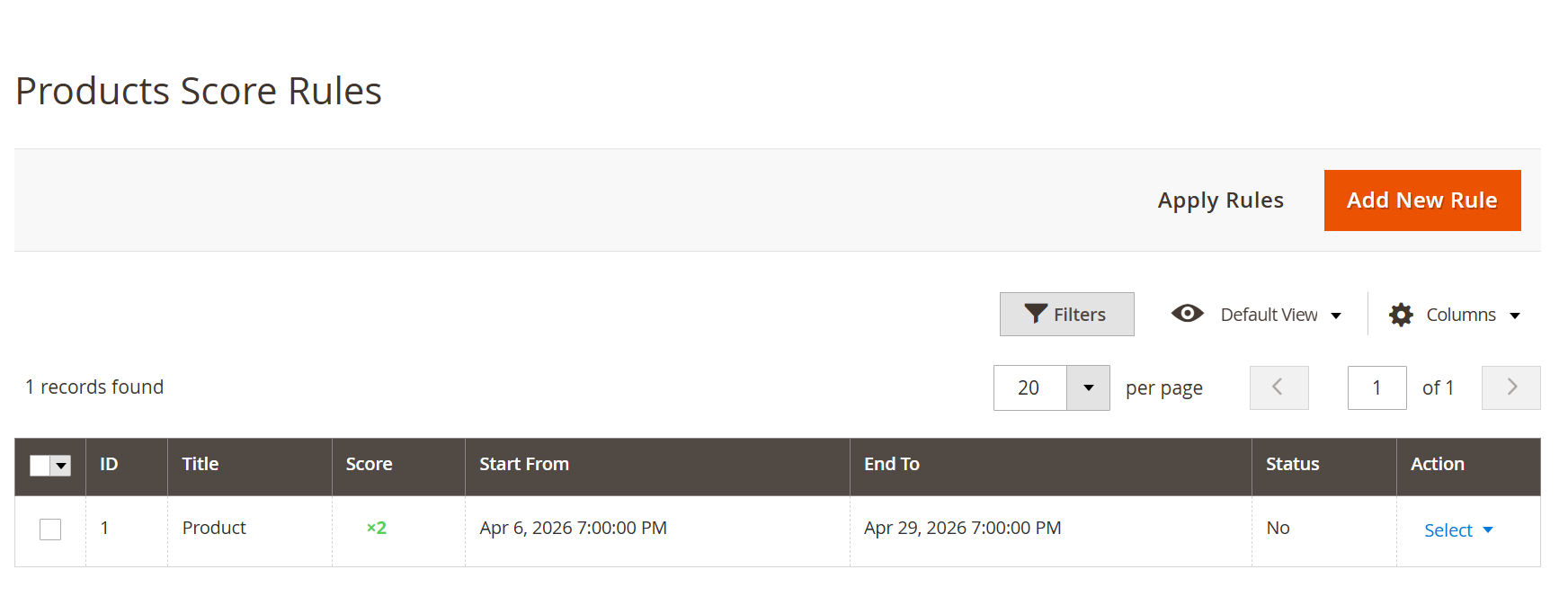
- Product Score Rules allow administrators to influence search result rankings by applying custom scoring logic. These rules help prioritize specific products dynamically based on conditions and defined time periods.
| Field | Description |
|---|
| Apply Rules | Applies all configured score rules to update product rankings in search results. | | Add New Rule | Creates a new scoring rule to modify product relevance in search results. | | ID | Displays the unique identifier of the rule. | | Title | Defines the name of the scoring rule for easy identification. | | Score | Specifies the score multiplier applied to matching products, affecting their ranking in search results. | | Start From | Defines the date and time from which the rule becomes active. | | End To | Defines the date and time until which the rule remains active. | | Status | Indicates whether the rule is currently enabled or disabled. | | Filters | Allows filtering the rule list based on specific criteria. | | Default View | Enables switching between saved grid views. | | Columns | Allows customization of visible columns in the grid. | | Action (Select) | Provides row-level actions to manage individual rules. | | Edit | Allows modification of the selected scoring rule. | | Delete | Removes the selected rule from the system. |
Add New Rule| Panel |
|---|
|
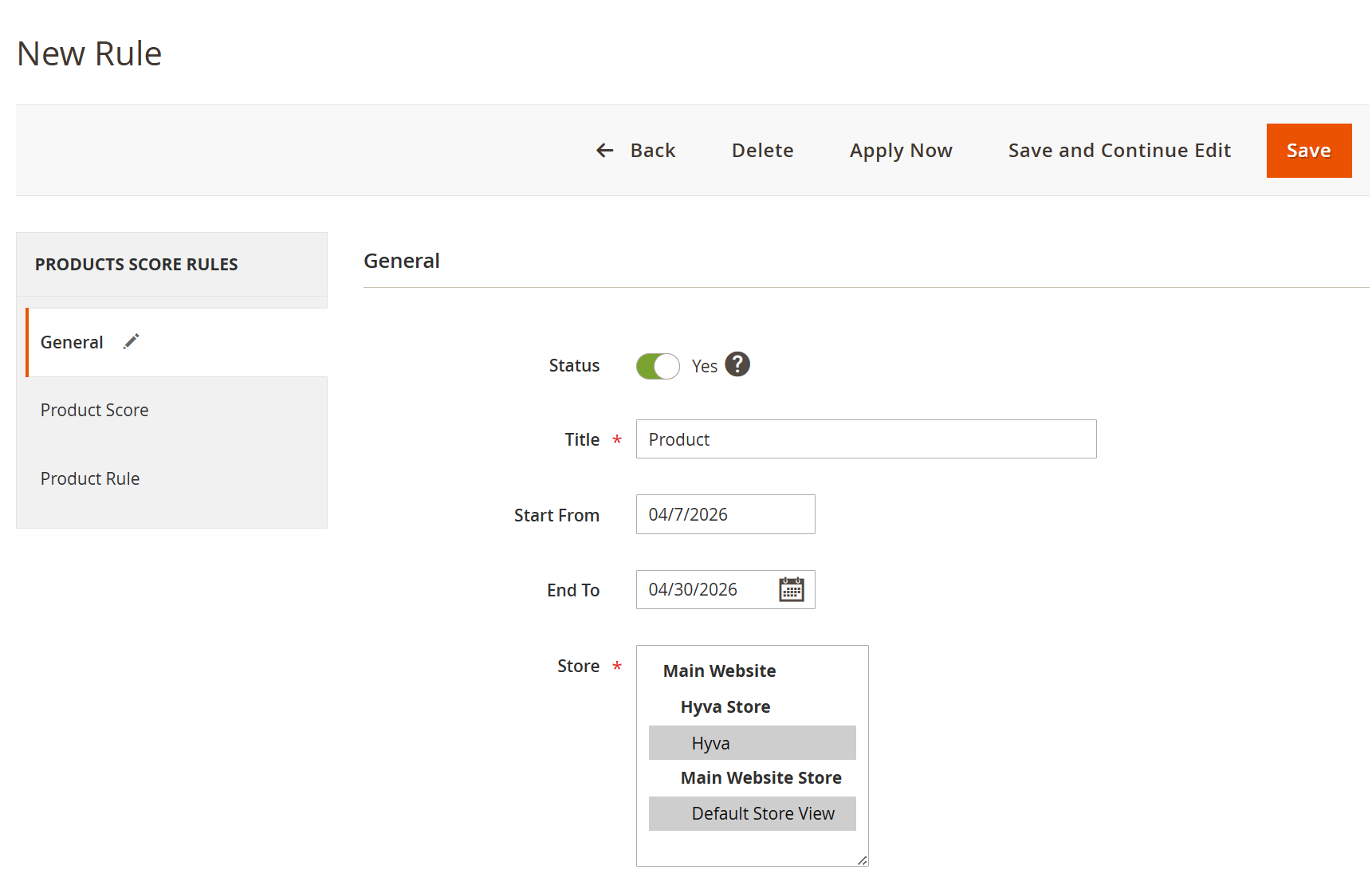
- This section allows administrators to create and manage product score rules that influence search result rankings. Rules can be scheduled, scoped per store, and applied dynamically to boost product visibility.
| Field | Description |
|---|
| Back | Navigates back to the rule listing page without saving changes. | | Delete | Deletes the current rule. | | Apply Now | Immediately applies the rule without waiting for scheduled execution. | | Save and Continue Edit | Saves the rule and allows further modifications. | | Save | Saves the rule configuration. | | Status | Enables or disables the rule. Only active rules affect search results. | | Title | Defines the name of the rule for identification. | | Start From | Specifies the date from which the rule becomes active. | | End To | Specifies the date until which the rule remains active. | | Store | Defines the store views where the rule will be applied. | | General (Section) | Contains basic rule configuration such as status, scheduling, and store scope. | | Product Score | Allows defining scoring logic to boost or adjust product ranking. | | Product Rule | Defines conditions to determine which products the rule will apply to. |
| Panel |
|---|
|
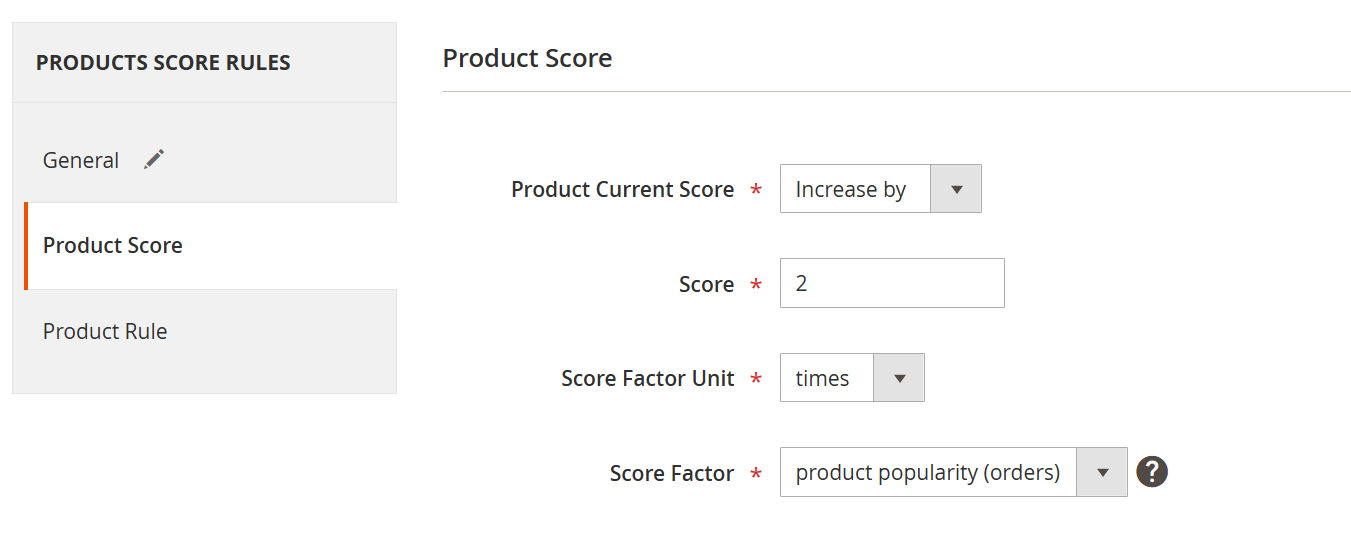
- Product score allows administrators to control how product ranking is adjusted in search results by applying scoring logic. You can increase or decrease product visibility dynamically based on selected factors such as popularity or ratings.
| Field | Description |
|---|
| Product Current Score | Defines whether the product score should be increased or decreased based on the applied rule. | | Score | Specifies the value used to adjust the product score. | | Score Factor Unit | Determines how the score value is applied, either as a multiplier (times) or as a fixed addition (points). | | Score Factor | Selects the basis for score calculation, such as initial score, product popularity (orders), or product rating (reviews). |
| Panel |
|---|
|
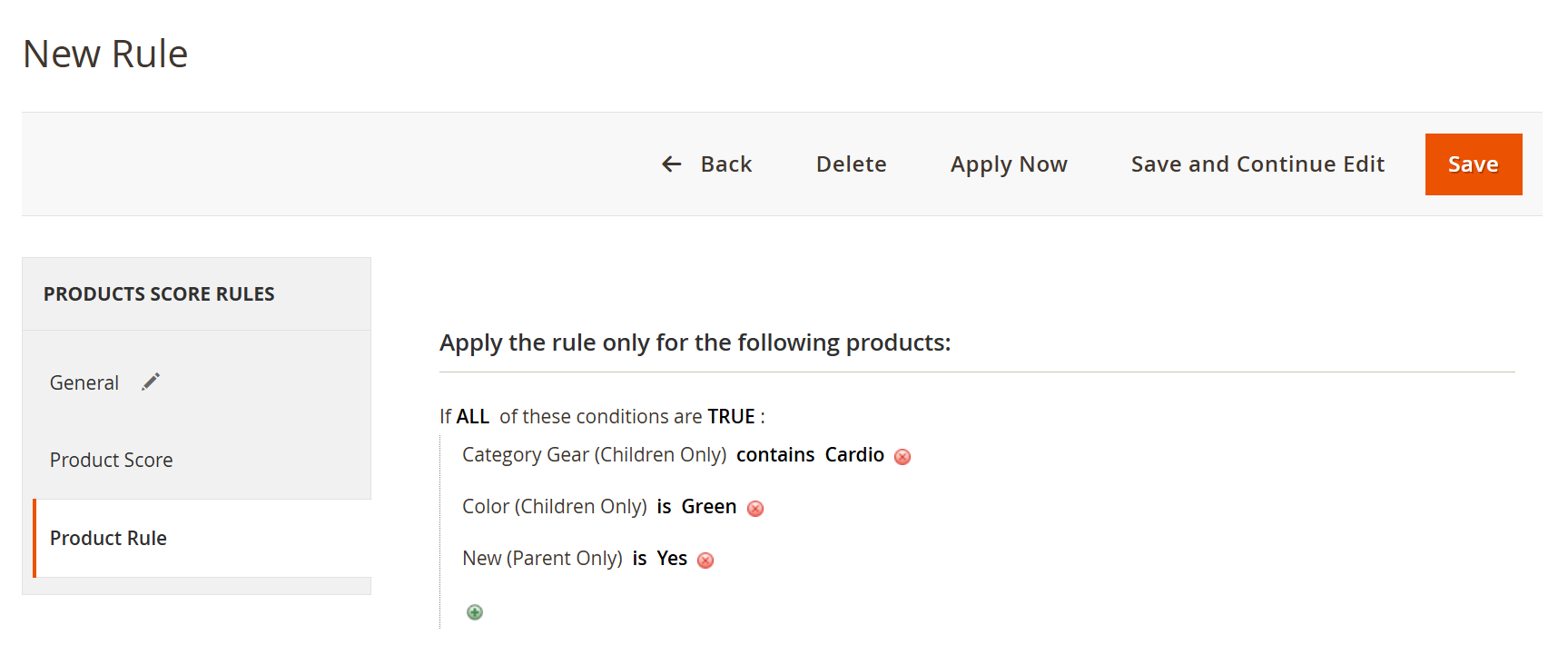
- Product rule allows administrators to define conditions to control which products the scoring rule will apply to. Rules are applied only to products that match all specified conditions, enabling targeted ranking adjustments.
| Field | Description |
|---|
| Apply the Rule Only for the Following Products | Defines the scope of products to which the rule will be applied based on specified conditions. | | Conditions (If ALL of These Conditions Are TRUE) | Ensures that the rule is applied only when all defined conditions are satisfied. | | Attribute Condition | Specifies the product attribute used for filtering (e.g., Category, Color, New). | | Operator | Defines how the condition is evaluated (e.g., contains, is, equals). | | Value | Specifies the value that the attribute must match for the condition to be true. | | Add Condition (+) | Allows adding additional conditions to refine product selection. | | Delete Condition | Removes an existing condition from the rule. |
Search Synonyms| Panel |
|---|
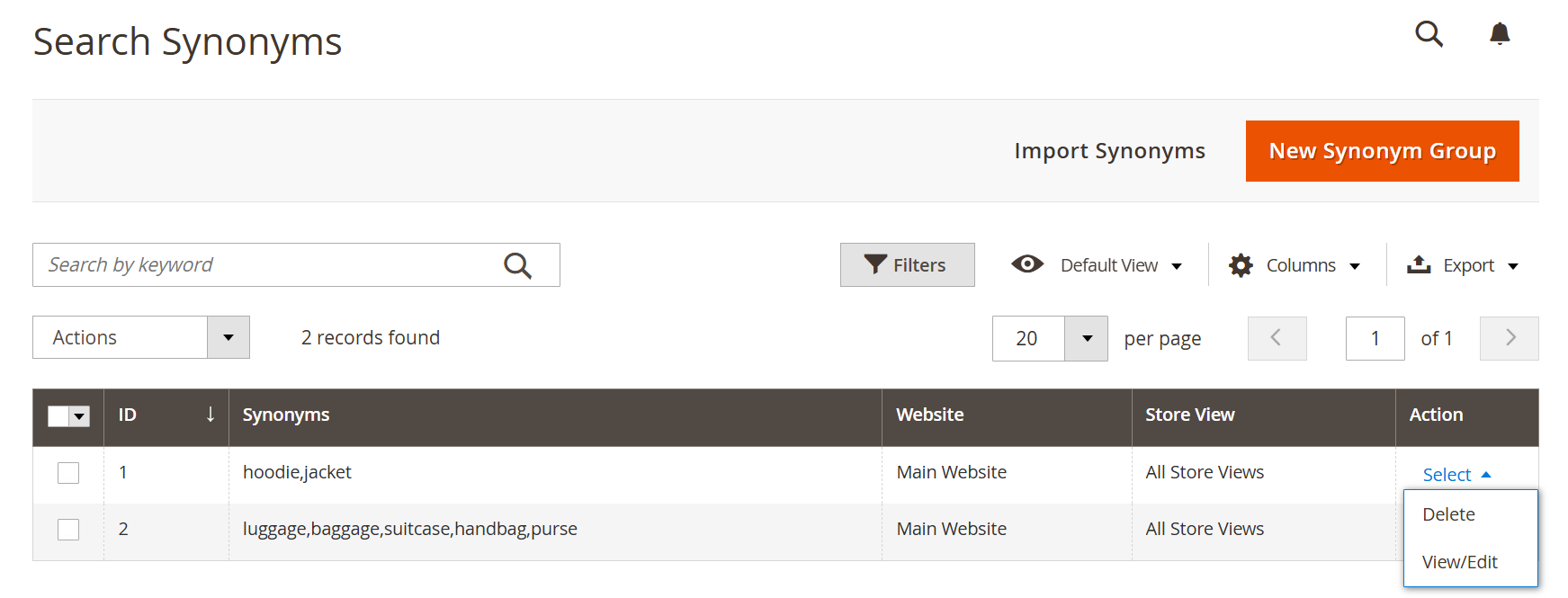 Image Added Image Added
|
- This section allows administrators to manage synonym groups to improve search accuracy and relevance. It ensures that different keywords with similar meanings return consistent search results
| Field | Description |
|---|
| Import Synonyms | Allows bulk import of synonym groups using a predefined format. | | New Synonym Group | Creates a new group of related keywords that will be treated as equivalent in search queries. | | Search by Keyword | Enables quick searching of existing synonym groups. | | Actions | Allows performing bulk actions on selected synonym groups. | | ID | Displays the unique identifier of the synonym group. | | Synonyms | Lists the grouped keywords that are treated as interchangeable in search queries. | | Website | Indicates the website scope where the synonym group is applied. | | Store View | Specifies the store views where the synonym group is active. | | Action (Select) | Provides row-level actions for managing synonym groups. | | View/Edit | Allows viewing or modifying the selected synonym group. | | Delete | Removes the selected synonym group from the system. |
Add New Synonym Group| Panel |
|---|
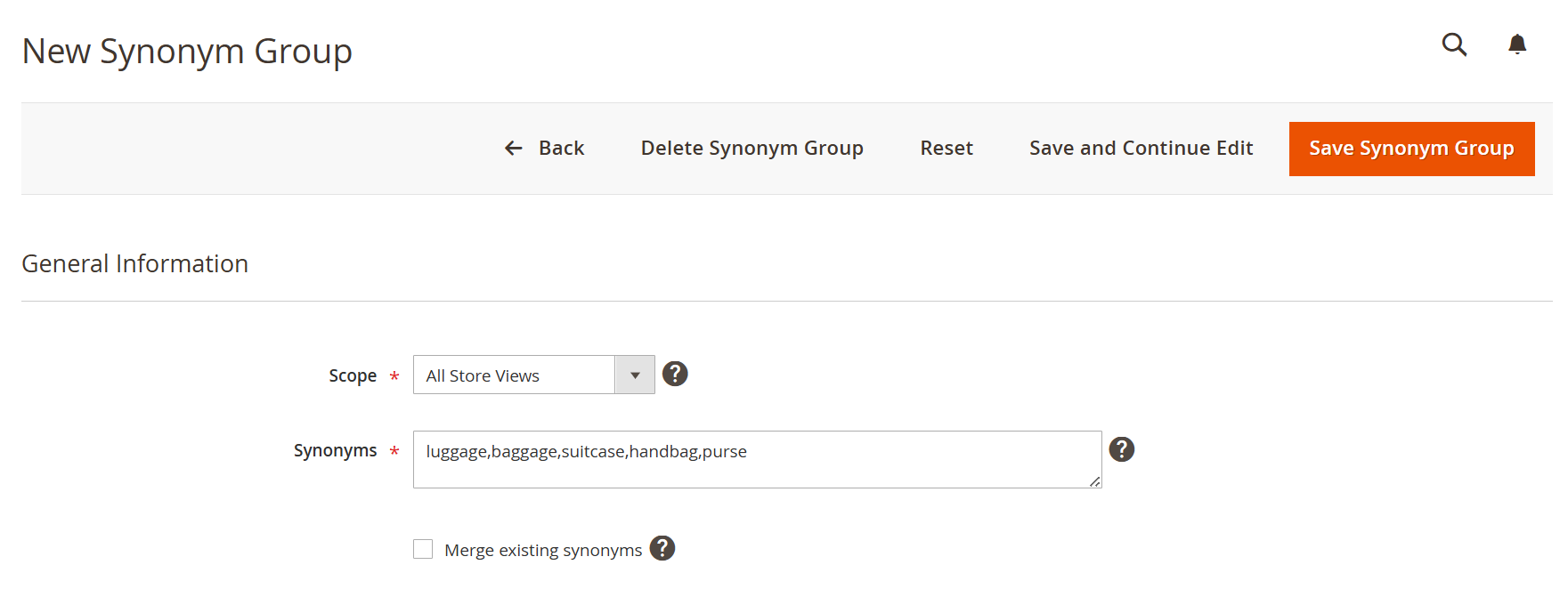 Image Added Image Added
|
- This section allows administrators to create and manage groups of related keywords that are treated as equivalent in search queries. It helps improve search accuracy by ensuring users find relevant results even when using different terms.
| Field | Description |
|---|
| Back | Navigates back to the synonym group listing page without saving changes. | | Delete Synonym Group | Deletes the current synonym group. | | Reset | Clears all unsaved changes and restores default values. | | Save and Continue Edit | Saves the synonym group and allows further modifications. | | Save Synonym Group | Saves the newly created synonym group. | | Scope | Defines the store view or website scope where the synonym group will be applied. | | Synonyms | Specifies a list of keywords separated by commas that will be treated as interchangeable in search queries. | | Merge Existing Synonyms | Merges the entered synonyms with any existing groups instead of creating duplicates. | | General Information | Section containing basic configuration for synonym group creation. |
|