Installation
Before installing the extension, please make sure to Backup your web directory and store database
You will require to install MageDelight Base Extension first. If it is not installed then please download it from https://www.magedelight.com/pub/extensions/magedelight-base.zip and unzip the package file into the root folder of your Magento 2 installation.
Root Directory is - "app/code/magedelight/#YourExtensionName#"
- Unzip the extension package file into the root folder of your Magento 2 installation.
- Connect to SSH console of your server:
- Navigate to the root folder of your Magento 2 setup
Run command as per below sequence,
php bin/magento setup:upgrade
php bin/magento setup:di:compile
php bin/magento setup:static-content:deploy
php bin/magento cache:clean
- log out from the backend and log in again
If you are using Magento 2.3 or later then you do not need to activate license. Extension will be activated with silent activation mechanism and does not require activation keys to be entered manually.
Installation with Composer
Composer repository using this command:
composer config repositories.magedelight-repo composer https://packages.magedelight.com/
Replace repo public key and private key with your public and private key
composer config http-basic.gitlab.magedelight.com $PUBLIC_KEY $PRIVATE_KEY
composer require mage_delight/ai_product_content_summarizer_module
composer require hyva-themes/hyva-magento2-magedelight-ai-product-content-summarizer
To obtain your public and private keys, please navigate to the "My Account" section. In the "Download Extension Packages" tab, you will find the keys available for your access.
Backend Configuration (Admin side)
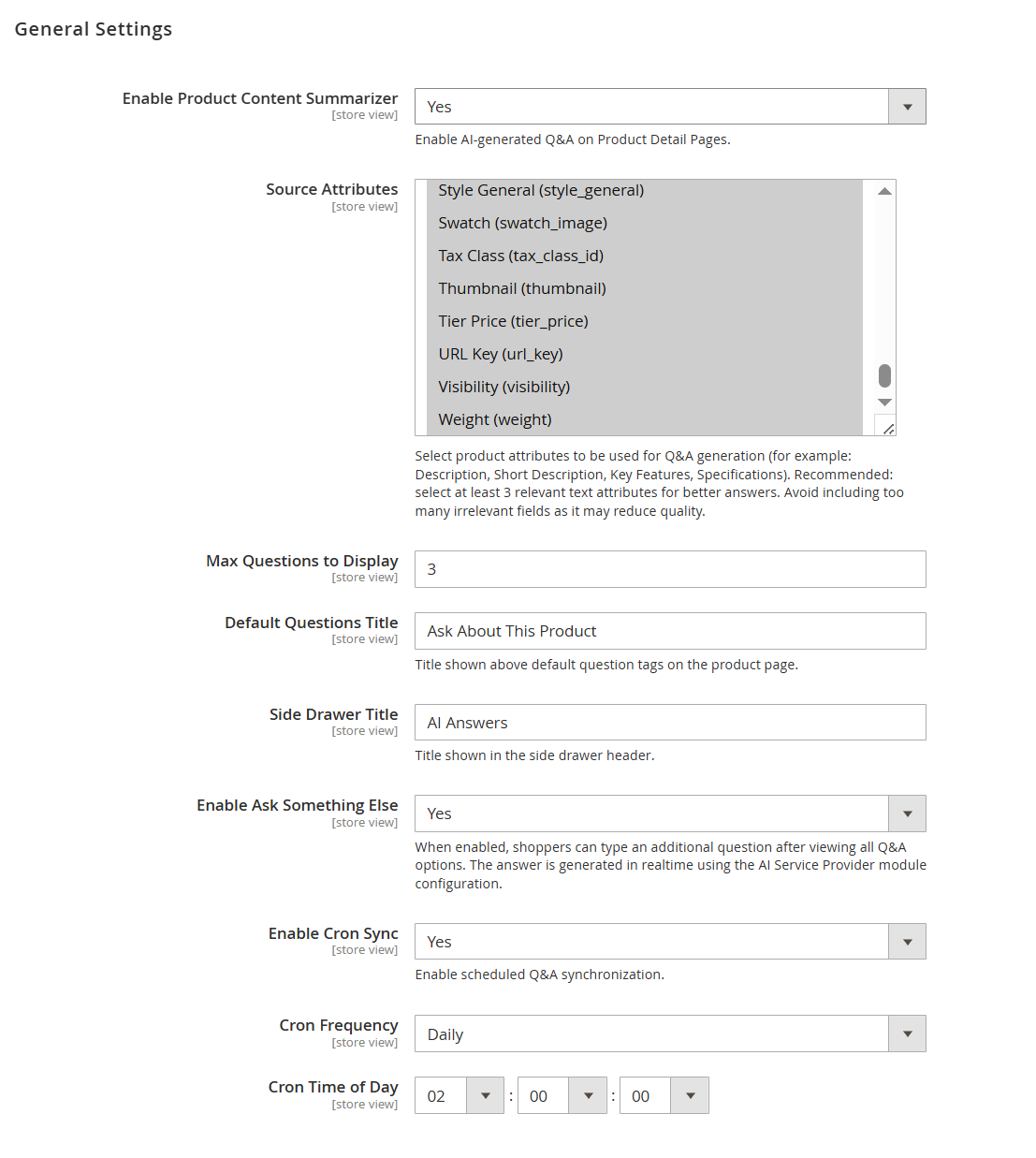
| Field | Description |
|---|---|
| Enable Product Content Summarizer | Enables or disables AI-generated Q&A functionality on product detail pages. |
| Source Attributes | Allows selection of product attributes used as input for generating AI-based answers (e.g., description, short description, key features). Selecting relevant attributes improves answer quality. |
| Max Questions to Display | Defines the number of predefined questions displayed on the product page. |
| Default Questions Title | Sets the title displayed above the predefined question section on the product page. |
| Side Drawer Title | Defines the title shown in the Q&A side drawer interface. |
| Enable Ask Something Else | Allows customers to ask custom questions beyond predefined ones. Responses are generated in real time using the configured AI provider. |
| Enable Cron Sync | Enables scheduled synchronization of Q&A data via cron job. |
| Cron Frequency | Specifies how often the cron job runs (e.g., daily). |
| Cron Time of Day | Defines the exact time when the cron job executes. |
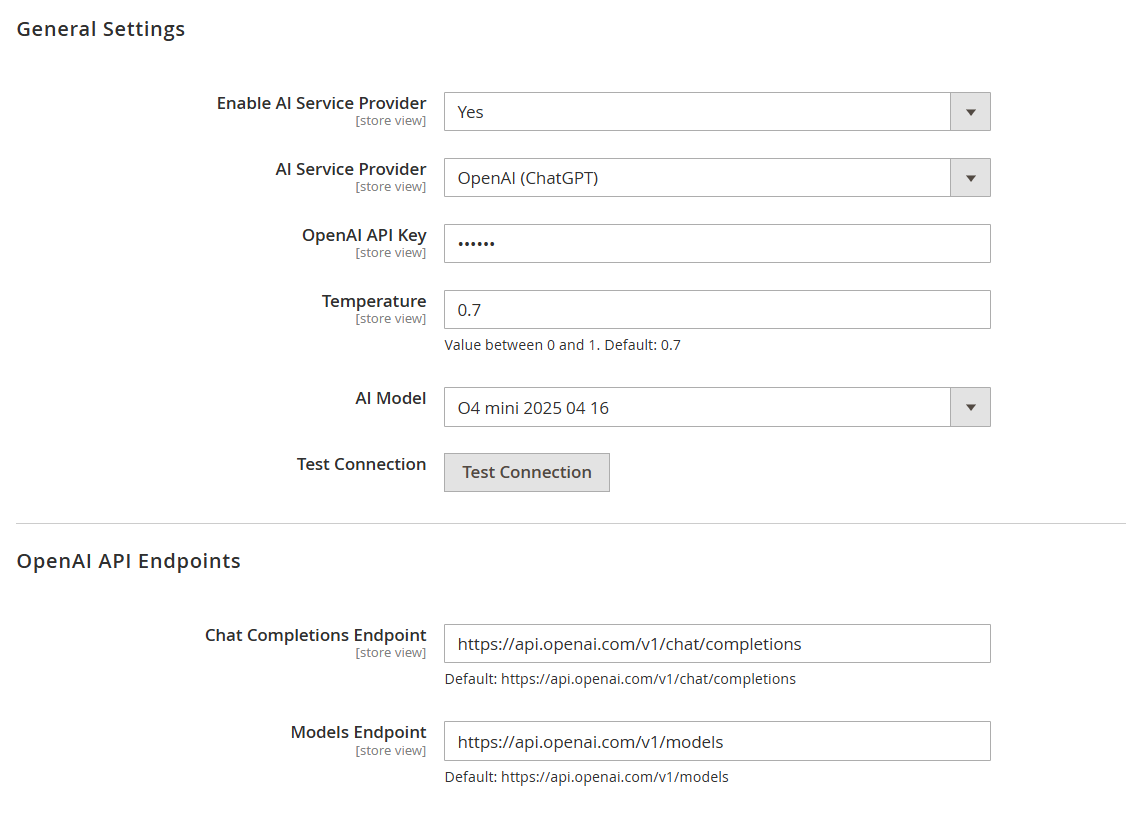
| Field | Description |
|---|---|
| Enable AI Service Provider | Enables or disables the AI service integration for generating product Q&A responses. |
| AI Service Provider | Selects the AI provider to be used (e.g., OpenAI, Claude, Gemini) for generating answers. |
| OpenAI API Key | Enter the API key provided by OpenAI to authenticate and enable communication with the AI service. |
| Temperature | Controls the randomness of AI responses. Lower values produce more consistent answers, while higher values generate more creative responses (range: 0–1). |
| AI Model | Selects the AI model used for generating responses. Different models vary in performance, cost, and capabilities. |
| Test Connection | Verifies the API connection using the provided credentials and configuration. |
| Chat Completions Endpoint | Defines the API endpoint used for chat-based response generation. Default value is provided and typically should not be changed. |
| Models Endpoint | Defines the API endpoint used to fetch available AI models. Default value is provided and typically should not be changed. |
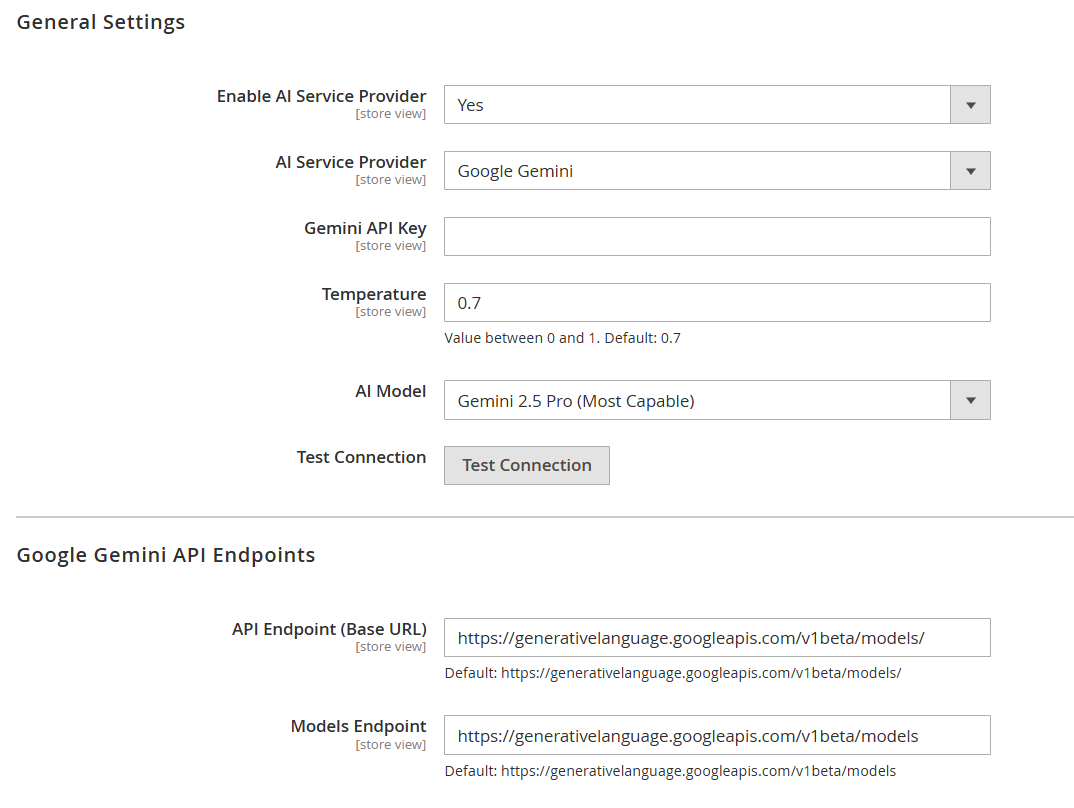
| Field | Description |
|---|---|
| Enable AI Service Provider | Enables or disables the AI service integration for generating product Q&A responses. |
| AI Service Provider | Selects the AI provider (e.g., Google Gemini) used to generate answers. |
| Gemini API Key | Enter the API key provided by Google Gemini to authenticate API requests. |
| Temperature | Controls the randomness of AI responses. Lower values give more precise answers, higher values make responses more creative (range: 0–1). |
| AI Model | Selects the Gemini model used for generating responses. Different models vary in capability and performance. |
| Test Connection | Verifies the connection with the configured Gemini API using the provided credentials. |
| API Endpoint (Base URL) | Defines the base API endpoint for Gemini requests. Default value is provided and should not be modified unless required. |
| Models Endpoint | Defines the endpoint used to retrieve available Gemini models. Default value is provided and typically remains unchanged. |
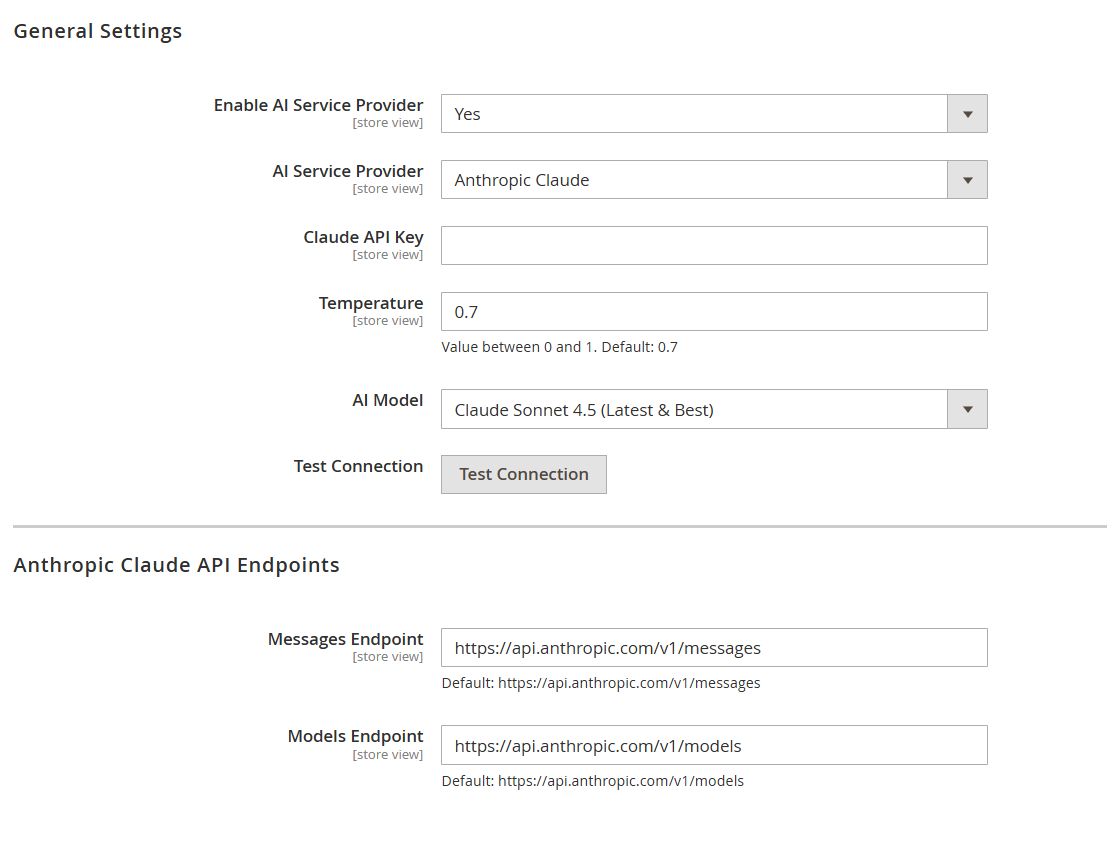
| Field | Description |
|---|---|
| Enable AI Service Provider | Enables or disables the AI service integration for generating product Q&A responses. |
| AI Service Provider | Selects the AI provider (e.g., Anthropic Claude) used to generate answers. |
| Claude API Key | Enter the API key provided by Anthropic Claude to authenticate API requests. |
| Temperature | Controls the randomness of AI responses. Lower values produce more accurate answers, while higher values generate more creative outputs (range: 0–1). |
| AI Model | Selects the Claude model used for generating responses. Different models vary in intelligence, speed, and cost. |
| Test Connection | Verifies the connection with the configured Claude API using the provided credentials. |
| Messages Endpoint | Defines the API endpoint used for sending message-based requests to Claude. Default value is provided and typically should not be modified. |
| Models Endpoint | Defines the endpoint used to retrieve available Claude models. Default value is provided and typically remains unchanged. |
Backend Functionality
AI Product Content Summary
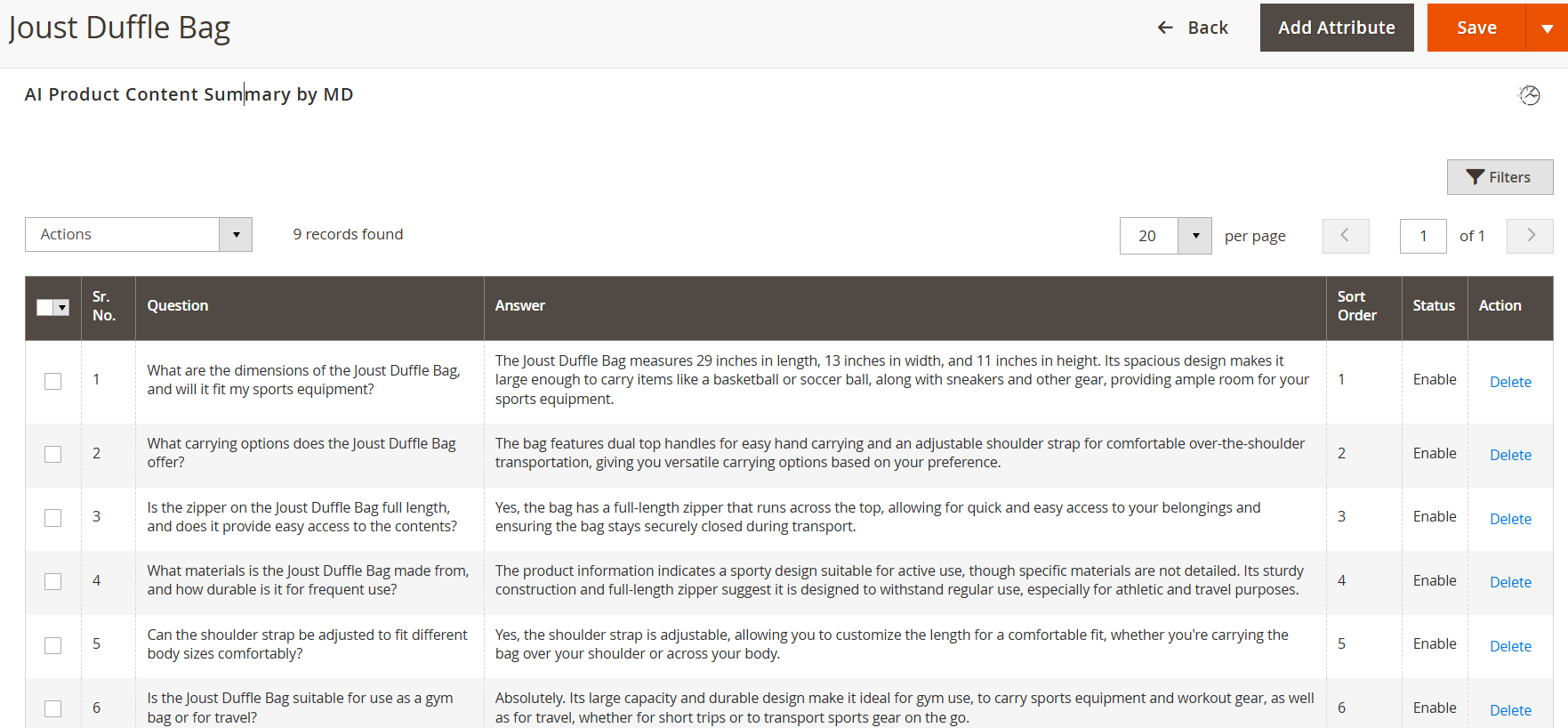
- This section is available in the Magento Admin panel under: Catalog → Products → Edit Product → AI Product Content Summary (tabs).
- All product-related questions and answers are listed here. Users can manage them by enabling, disabling, or deleting entries. Only enabled questions and answers will be displayed on the storefront.
| Field | Description |
|---|---|
| Actions | Allows bulk actions to be applied to selected Q&A records. |
| Select Checkbox | Used to select one or multiple Q&A entries for bulk operations. |
| Sr. No. | Displays the serial number of each question and answer entry. |
| Question | Displays the customer-facing question related to the product. |
| Answer | Displays the corresponding answer generated for the question. |
| Sort Order | Determines the display order of questions on the storefront. Lower values appear first. |
| Status | Indicates whether the Q&A is enabled or disabled. Only enabled entries are shown on the frontend. |
| Action | Provides the option to delete a specific question and answer entry. |
| Add Attribute | Allows adding new question and answer entries. |
| Save | Saves all the changes made in the Q&A section. |
| Filters | Helps in filtering and searching specific Q&A records. |
| Pagination | Controls the number of records displayed per page and allows navigation between pages. |
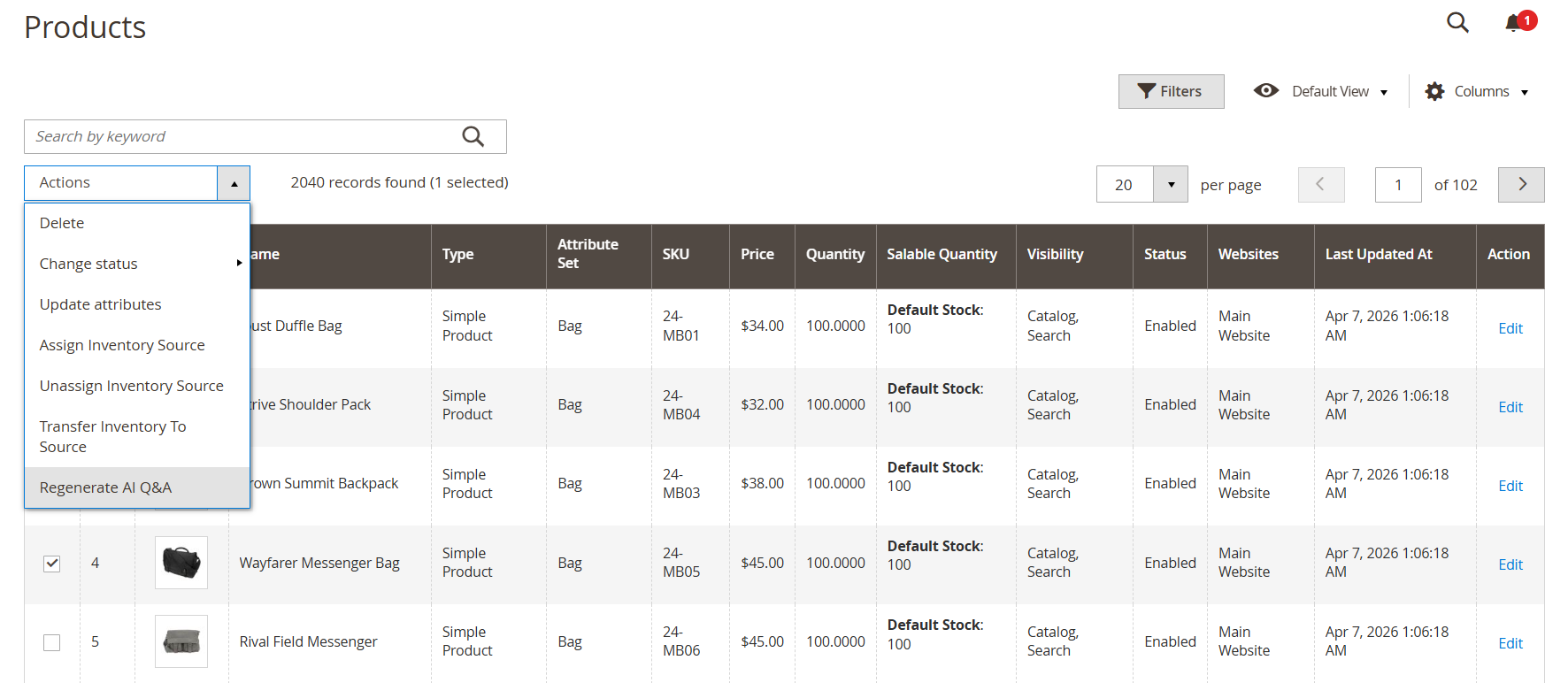
- This functionality is available in the Magento Admin panel under: Catalog → Products (Grid Actions)
- The “Regenerate AI Q&A” action allows admins to regenerate product-specific questions and answers using AI. This is useful when product data has been updated or when Q&A needs to be refreshed. The action can be applied to a single product or multiple products at once using bulk selection.
- The regeneration process follows the configured cron schedule and uses the selected AI provider settings. The action can be applied to a single product or multiple products at once using bulk selection.
Frontend Functionality
AI Q&A Functionality
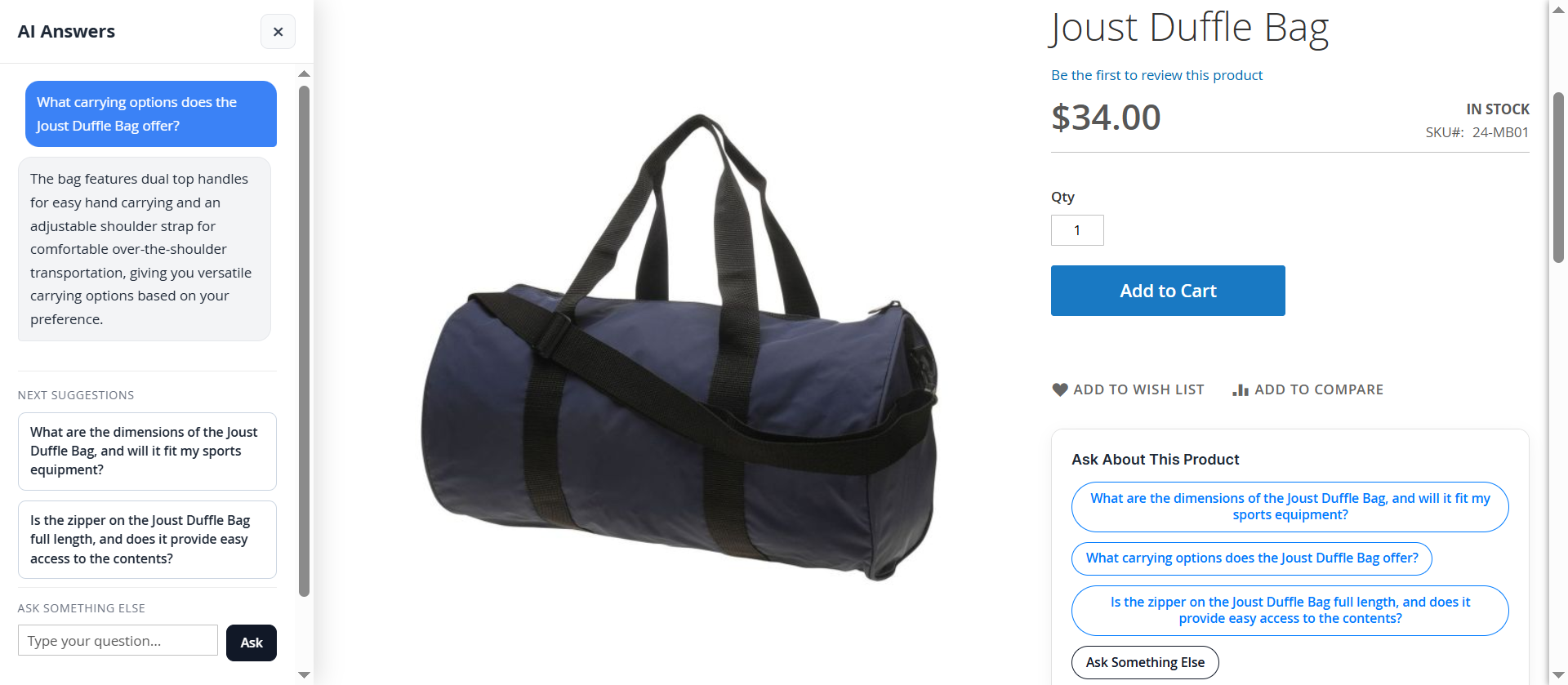
The AI-powered Q&A feature enhances the product detail page by providing an interactive way for customers to understand product information. It dynamically displays predefined questions based on product data and allows users to view instant answers without navigating away from the page. The interface is designed to improve user engagement, reduce confusion, and assist customers in making informed purchase decisions.
- Predefined questions are displayed on the product page for quick access to common queries
- Clicking on any question instantly shows the corresponding answer in the side panel
- Answers are generated based on product attributes and content configured in the admin
- “Next Suggestions” section provides additional related questions for better exploration
- “Ask Something Else” allows users to enter custom queries
- Custom questions are answered in real time using the configured AI service provider
- The side drawer interface ensures a smooth experience without page reload
- Only enabled questions from the admin panel are visible on the frontend
- Helps reduce customer hesitation and improves decision-making during purchase
Thank you for choosing MageDelight!