...
| Section | ||||||
|---|---|---|---|---|---|---|
Installation
|
| Section | ||
|---|---|---|
Installation with ComposerComposer repository using this command: composer config repositories.magedelight-repo composer https://packages.magedelight.com/ Replace repo public key and private key with your public and private key composer config http-basic.gitlab.magedelight.com $PUBLIC_KEY $PRIVATE_KEY composer require mage_delight/storelocator_module:* composer require mage_delight/storelocatorgraphql:*
|
| Section | ||||||||||||||||||||
|---|---|---|---|---|---|---|---|---|---|---|---|---|---|---|---|---|---|---|---|---|
Backend Configuration (Admin side)
|
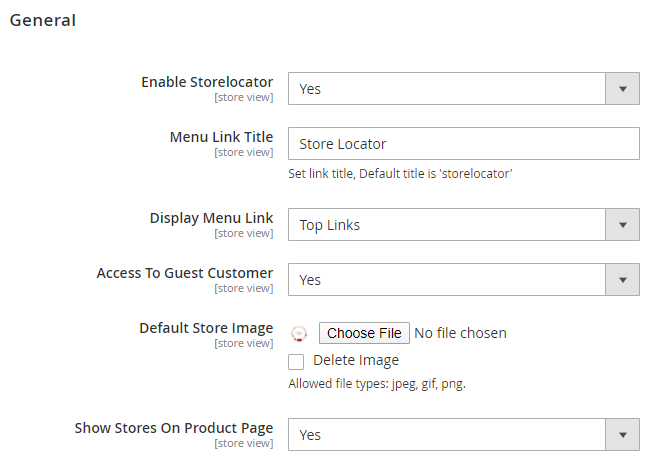
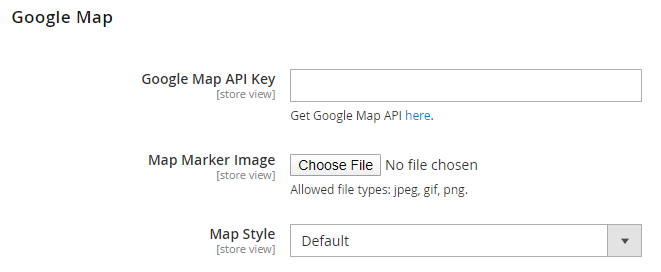


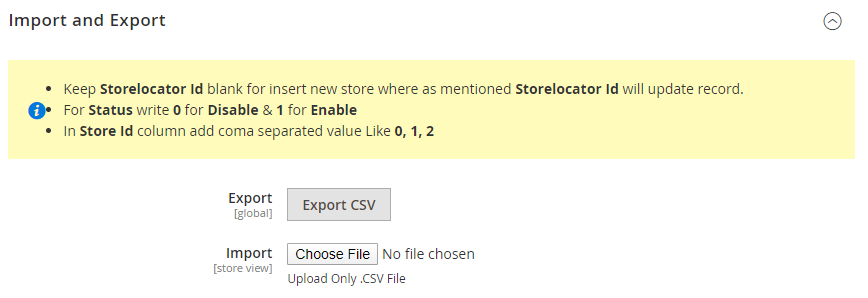
...
| Section |
|---|
Developer AccountThe three API's you have to enable in Google API Key for the correct work of the extension,
To configure these settings, please follow the link, https://console.cloud.google.com/apis/library/places-backend.googleapis.com |
| Section | ||||||||||||||||||
|---|---|---|---|---|---|---|---|---|---|---|---|---|---|---|---|---|---|---|
API
rest/V1/magedelight-storelocator/
|
| Section |
|---|
DemoClick here to visit frontend. Click here to visit backend admin panel. |
...