Backend Functionality
| Panel |
|---|
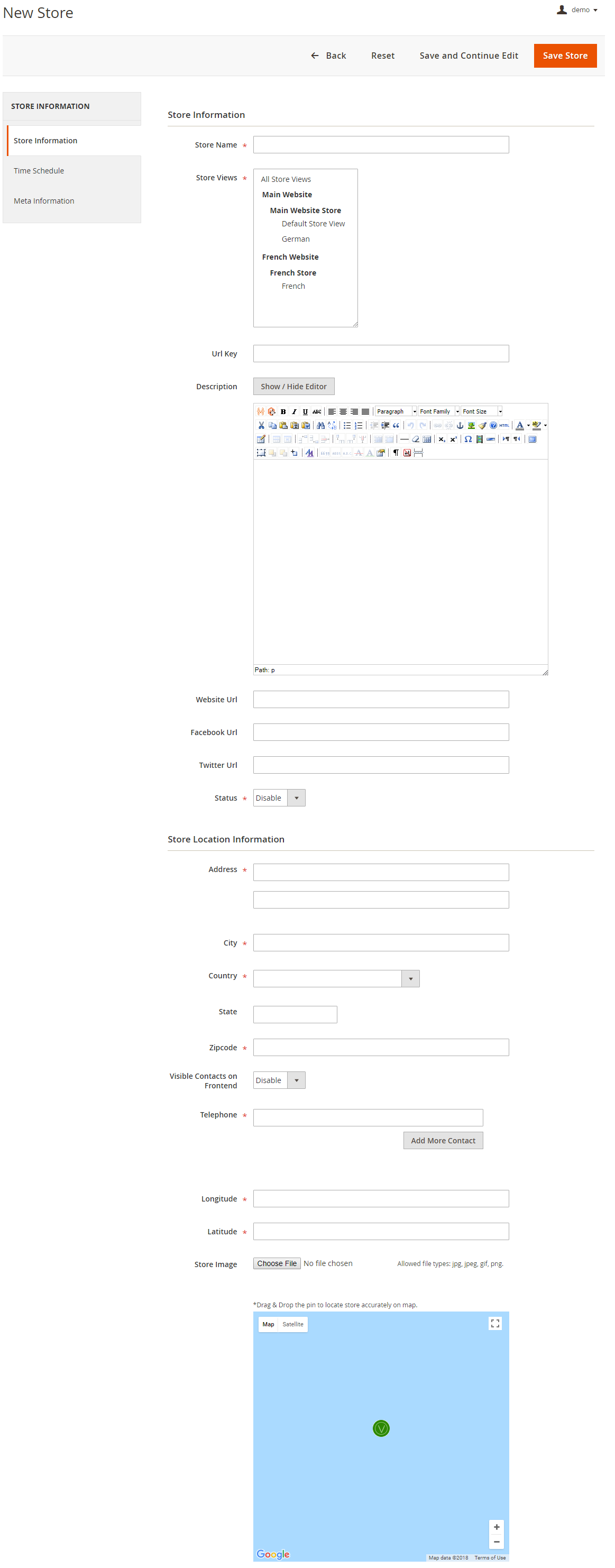 Image Added Image Added
|
- Store Name: Define store name
- URL Key: Define SEO friendly URL key for store details page. If not defined, it would be auto generated from store name
- Store Description: Describe store details to be shown on store detail page
- Website URL: Store website URL if have any
- Facebook URL: Facebook page to show link on store details page
- Twitter URL: Twitter URL to show link on store details page
- Status: Enable/Disable the store
- Address: Define store address details with city, state, country, zip code. Based on given address, store will be located on Google map
- Telephone: You can add multiple phone number for store
- Visible contact on frontend: Set visibility of phone number at frontend
- Store Image: upload store image/icon
- Google Map: Based on given address store will be located on Google map. However you can use drag & drop feature to show map accurately on map
- Longitude & latitude: Its value will be automatically set based on the store locate on Google map. However you can edit if needed
- Time Schedule: Here you can define the stores working days and working time of the store. You can define working time for each week day or even set close time too. As shown with below image
|