Versions Compared

Key

  • This line was added.
  • This line was removed.
  • Formatting was changed.

...

Section

Installation


Include Page
Installation Steps
Installation Steps


Section

Installation with Composer


Composer repository using this command:

composer config repositories.magedelight-repo composer https://packages.magedelight.com/


Replace repo public key and private key with your public and private key

composer config http-basic.gitlab.magedelight.com $PUBLIC_KEY $PRIVATE_KEY


composer require mage_delight/ai_product_content_summarizer_module

composer require hyva-themes/hyva-magento2-magedelight-ai-product-content-summarizer


Note

To obtain your public and private keys, please navigate to the "My Account" section. In the "Download Extension Packages" tab, you will find the keys available for your access.


Section

Backend Configuration (Admin side)


Panel


FieldDescription
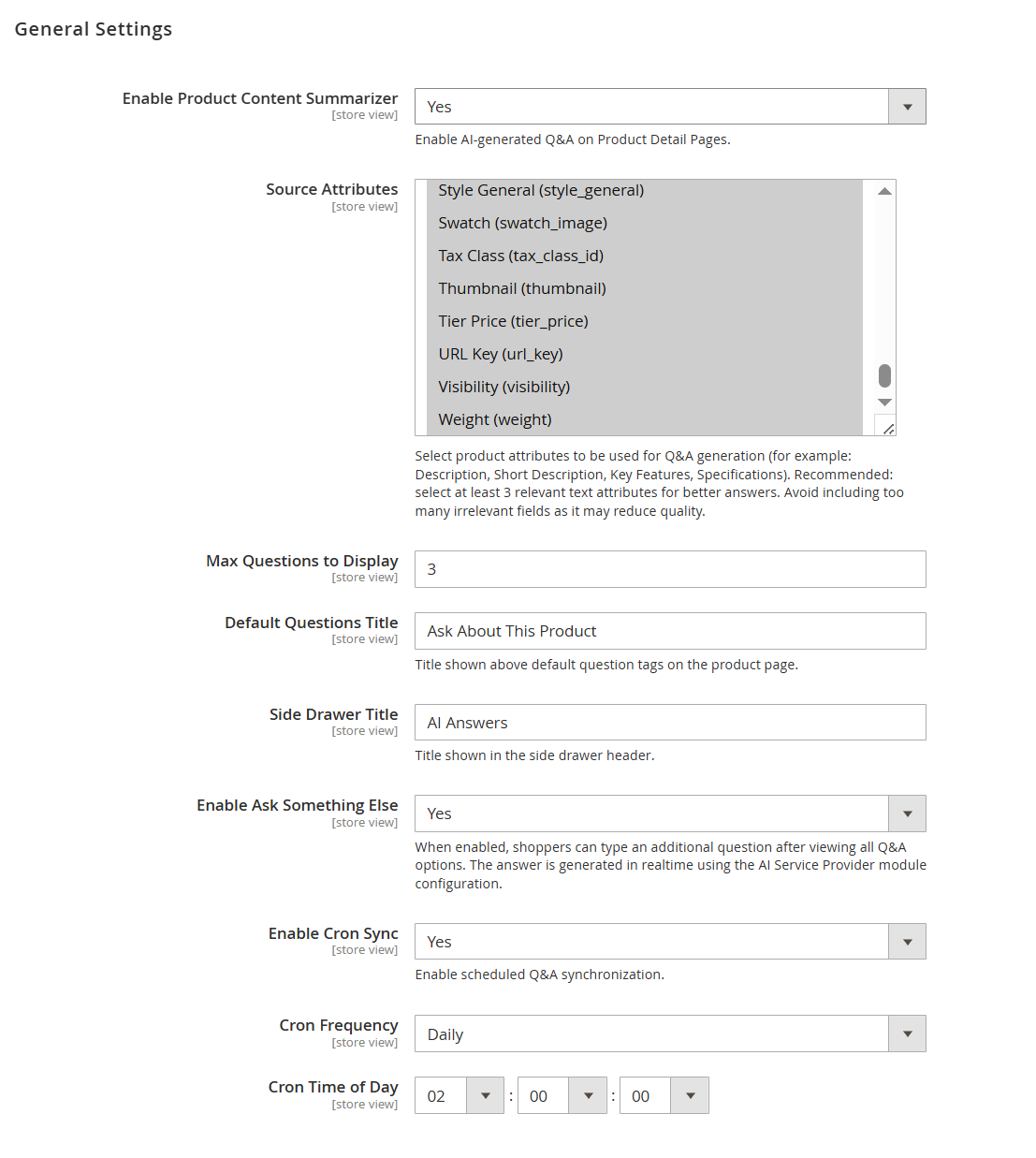
Enable Product Content SummarizerEnables or disables AI-generated Q&A functionality on product detail pages.
Source Attributes

Allows selection of product attributes used as input for generating AI-based answers (e.g.,

description, short description, key features). Selecting relevant attributes improves answer quality.

Max Questions to DisplayDefines the number of predefined questions displayed on the product page.
Default Questions TitleSets the title displayed above the predefined question section on the product page.
Side Drawer TitleDefines the title shown in the Q&A side drawer interface.
Enable Ask Something Else

Allows customers to ask custom questions beyond predefined ones. Responses are

generated in real time using the configured AI provider.

Enable Cron SyncEnables scheduled synchronization of Q&A data via cron job.
Cron FrequencySpecifies how often the cron job runs (e.g., daily).
Cron Time of DayDefines the exact time when the cron job executes.


Panel


FieldDescription
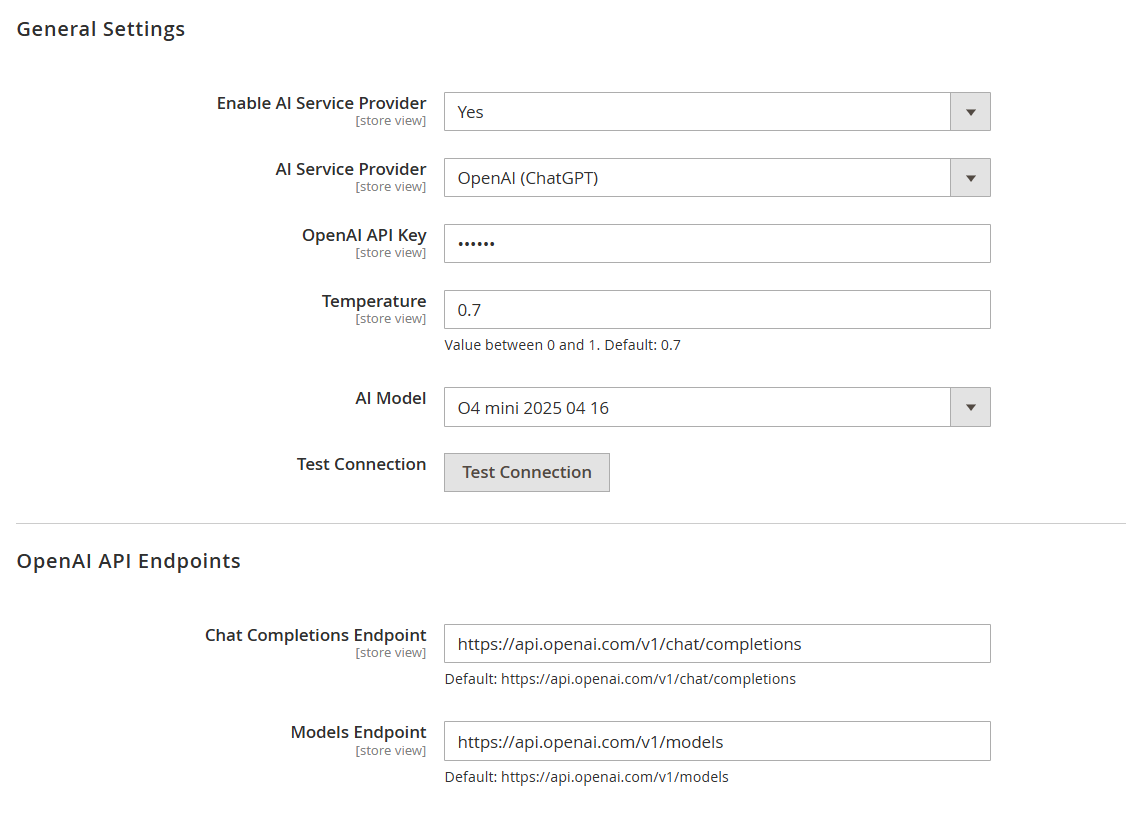
Enable AI Service Provider

Enables or disables the AI service integration for generating product Q&A

responses.

AI Service Provider

Selects the AI provider to be used (e.g., OpenAI, Claude, Gemini) for

generating answers.

OpenAI API Key

Enter the API key provided by OpenAI to authenticate and enable

communication with the AI service.

Temperature

Controls the randomness of AI responses. Lower values produce more consistent

answers, while higher values generate more creative responses (range: 0–1).

AI Model

Selects the AI model used for generating responses. Different models vary in

performance, cost, and capabilities.

Test ConnectionVerifies the API connection using the provided credentials and configuration.
Chat Completions Endpoint

Defines the API endpoint used for chat-based response generation. Default

value is provided and typically should not be changed.

Models Endpoint

Defines the API endpoint used to fetch available AI models. Default value is

provided and typically should not be changed.


Panel


FieldDescription
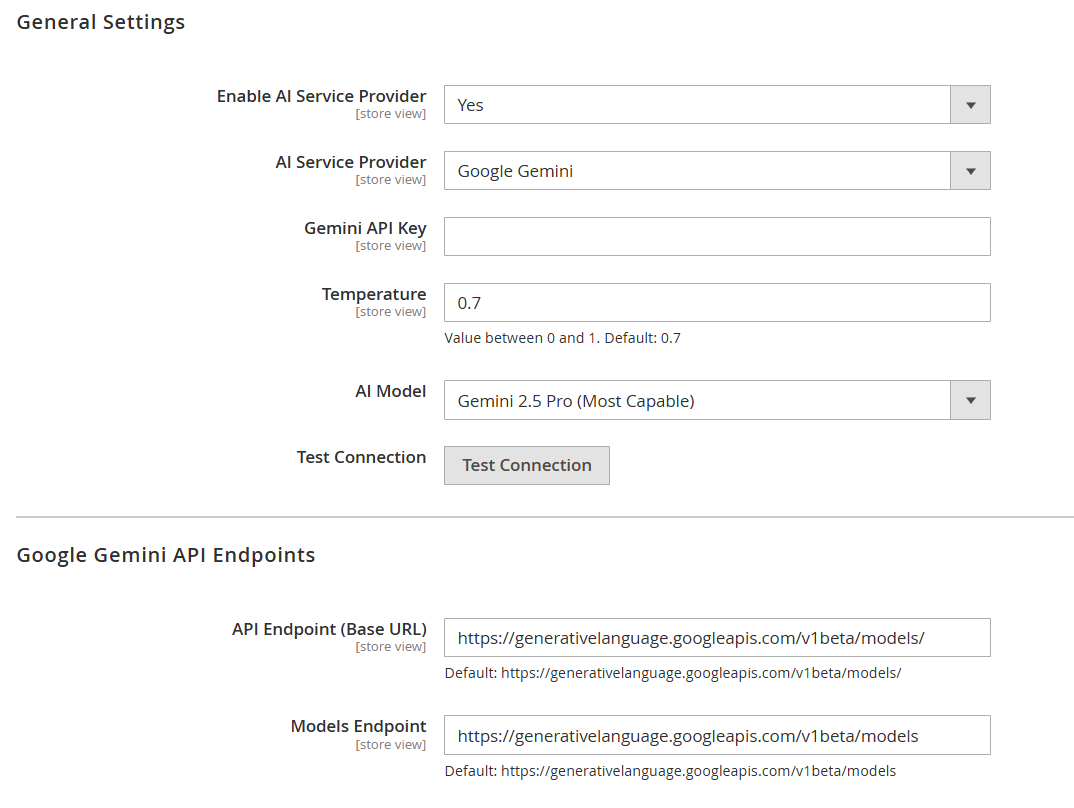
Enable AI Service Provider

Enables or disables the AI service integration for generating product Q&A

responses.

AI Service ProviderSelects the AI provider (e.g., Google Gemini) used to generate answers.
Gemini API KeyEnter the API key provided by Google Gemini to authenticate API requests.
Temperature

Controls the randomness of AI responses. Lower values give more precise

answers, higher values make responses more creative (range: 0–1).

AI Model

Selects the Gemini model used for generating responses. Different models

vary in capability and performance.

Test Connection

Verifies the connection with the configured Gemini API using the provided

credentials.

API Endpoint (Base URL)

Defines the base API endpoint for Gemini requests. Default value is provided

and should not be modified unless required.

Models Endpoint

Defines the endpoint used to retrieve available Gemini models. Default value

is provided and typically remains unchanged.


Panel


FieldDescription
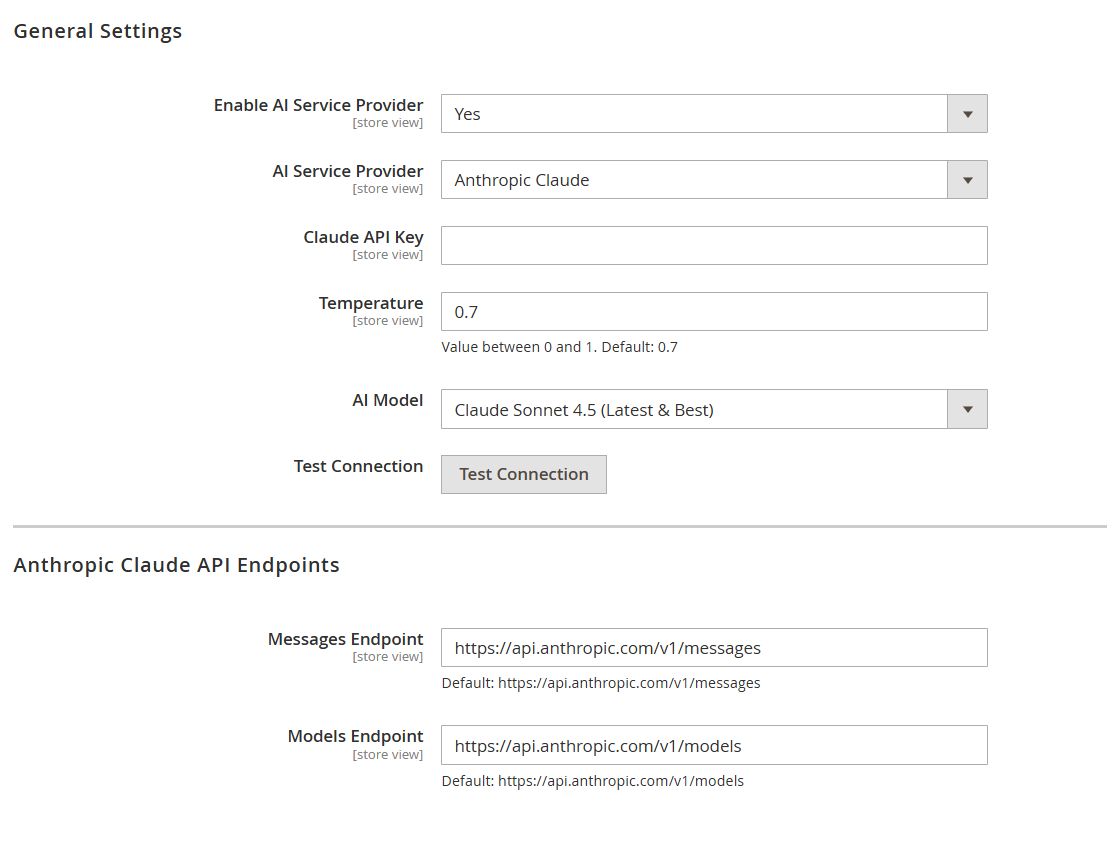
Enable AI Service Provider

Enables or disables the AI service integration for generating product Q&A

responses.

AI Service ProviderSelects the AI provider (e.g., Anthropic Claude) used to generate answers.
Claude API KeyEnter the API key provided by Anthropic Claude to authenticate API requests.
Temperature

Controls the randomness of AI responses. Lower values produce more accurate

answers, while higher values generate more creative outputs (range: 0–1).

AI Model

Selects the Claude model used for generating responses. Different models vary

in intelligence, speed, and cost.

Test ConnectionVerifies the connection with the configured Claude API using the provided credentials.
Messages Endpoint

Defines the API endpoint used for sending message-based requests to Claude. Default

value is provided and typically should not be modified.

Models Endpoint

Defines the endpoint used to retrieve available Claude models. Default value is

provided and typically remains unchanged.


Panel


...