Versions Compared

Key

  • This line was added.
  • This line was removed.
  • Formatting was changed.

...

Section

Backend Configuration (Admin side)


Panel

Image Added


FieldDescription
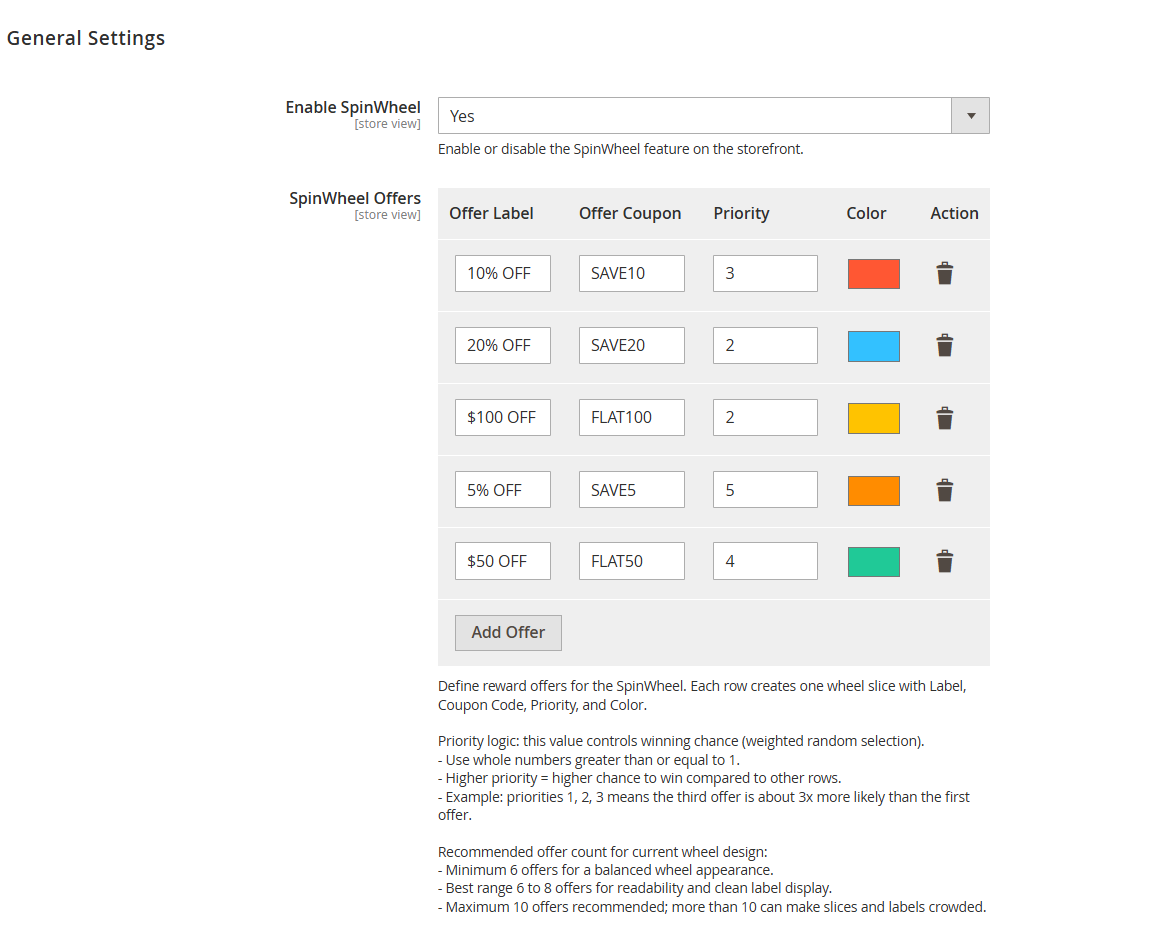
Enable SpinWheel

Enables or disables the Spin Wheel functionality on the storefront. When enabled,

users will see the spin wheel popup based on configured conditions.

SpinWheel Offers

Section to configure reward segments displayed on the spin wheel. Each row

represents one slice of the wheel.

Offer LabelDefines the display text shown on the spin wheel segment (e.g., 10% OFF, $50 OFF).
Offer Coupon

Specifies the coupon code assigned to the selected offer. This coupon will be provided

to the user upon winning.

Priority

Determines the probability of an offer being selected. Higher values increase the

chances of that offer being won.

ColorSets the visual color of the wheel segment for better differentiation and UI presentation.
ActionAllows deletion of a specific offer row from the configuration.
Add OfferAdds a new offer row to define an additional wheel segment.
Priority Logic

Explains how priority values influence winning probability. Higher priority means higher

chances in weighted random selection.

Recommended Offer Count

Suggests optimal number of offers for better UI and user experience

(minimum 6, recommended 6–8, maximum 10).


Backend Functionality

Panel
Panel
Panel
Panel
Section
Panel

Image Added


FieldDescription
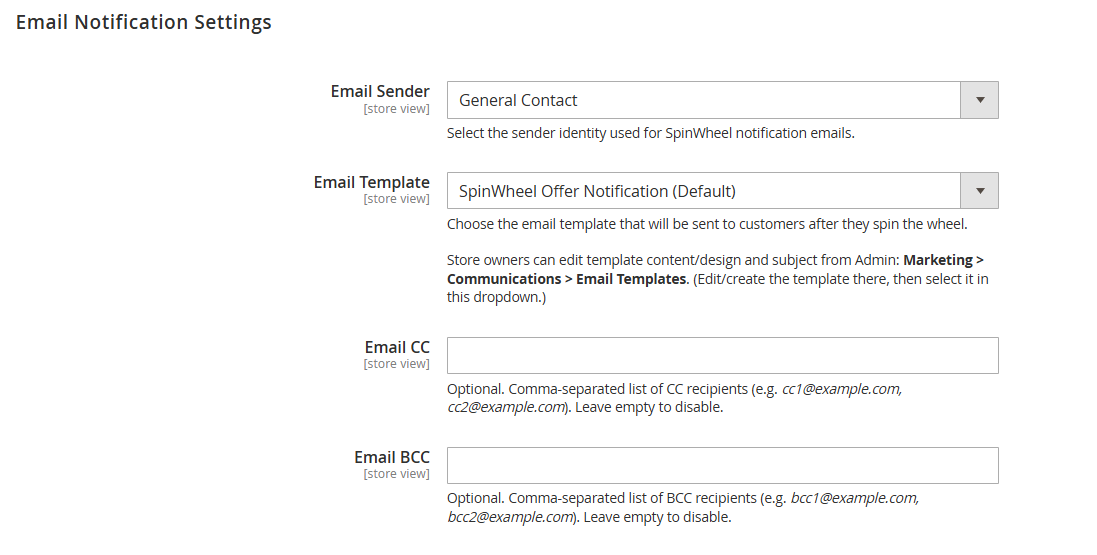
Email Sender

Selects the sender identity used for Spin Wheel notification emails. This defines the “From” name

and email address visible to recipients.

Email Template

Specifies the email template sent to customers after they spin the wheel. Templates can be

customized from Marketing → Communications → Email Templates.

Email CC

Allows adding additional recipients (carbon copy) who will receive the same email. Multiple

email addresses should be separated by commas.

Email BCC

Allows adding hidden recipients (blind carbon copy) who will receive the email without being

visible to other recipients. Multiple email addresses should be separated by commas.


Section

Backend Functionality


Spin Wheel Results Management

Panel

Image Added

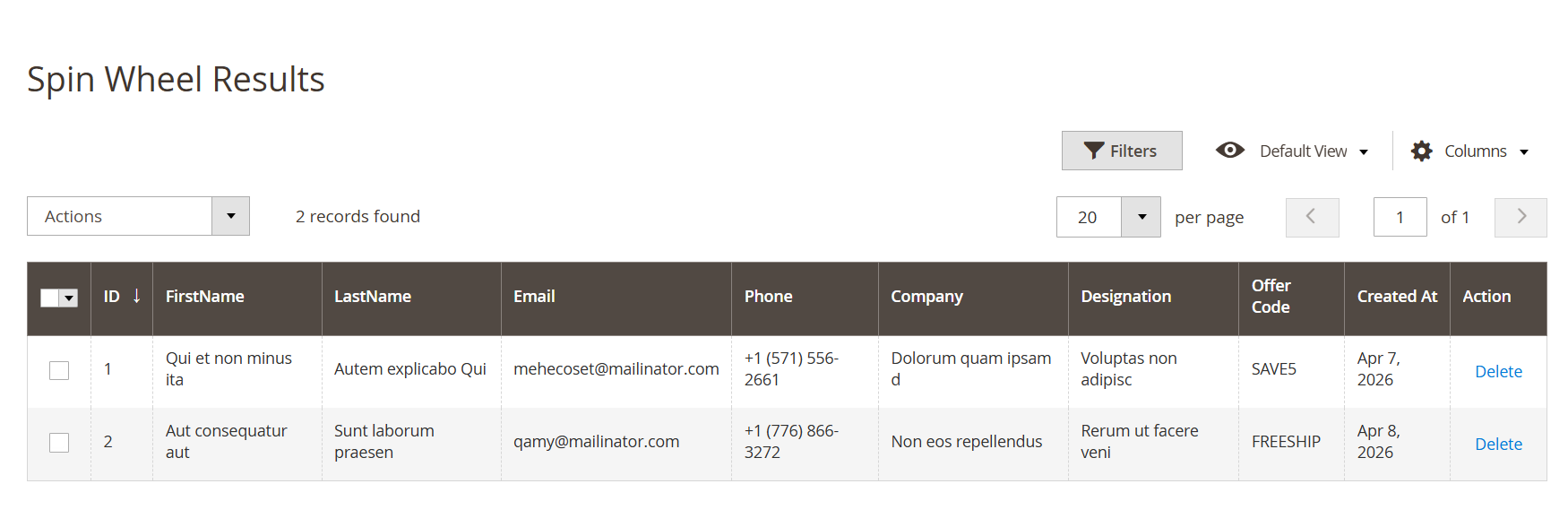
  • The Spin Wheel Results section allows administrators to view and manage all user interactions with the spin wheel. It captures customer details along with the reward (coupon) they received. This helps in tracking participation, analyzing campaign performance, and managing collected lead data.


FieldDescription
ActionsAllows bulk actions to be applied to selected records.
Select CheckboxUsed to select one or multiple records for bulk operations.
IDUnique identifier for each spin wheel entry.
FirstNameDisplays the first name of the user who participated.
LastNameDisplays the last name of the user.
EmailShows the email address provided by the user.
PhoneDisplays the contact number entered by the user.
CompanyShows the company name provided (if applicable).
DesignationDisplays the user’s designation or role (if provided).
Offer CodeIndicates the coupon code won by the user.
Created AtDisplays the date when the spin action was performed.
ActionProvides option to delete a specific record.
FiltersAllows filtering and searching of records for easy data management.
ColumnsEnables customization of visible columns in the grid.
Pagination

Controls the number of records displayed per page and navigation between

pages.

Email Template Customization for Spin Wheel

Panel

Image Added

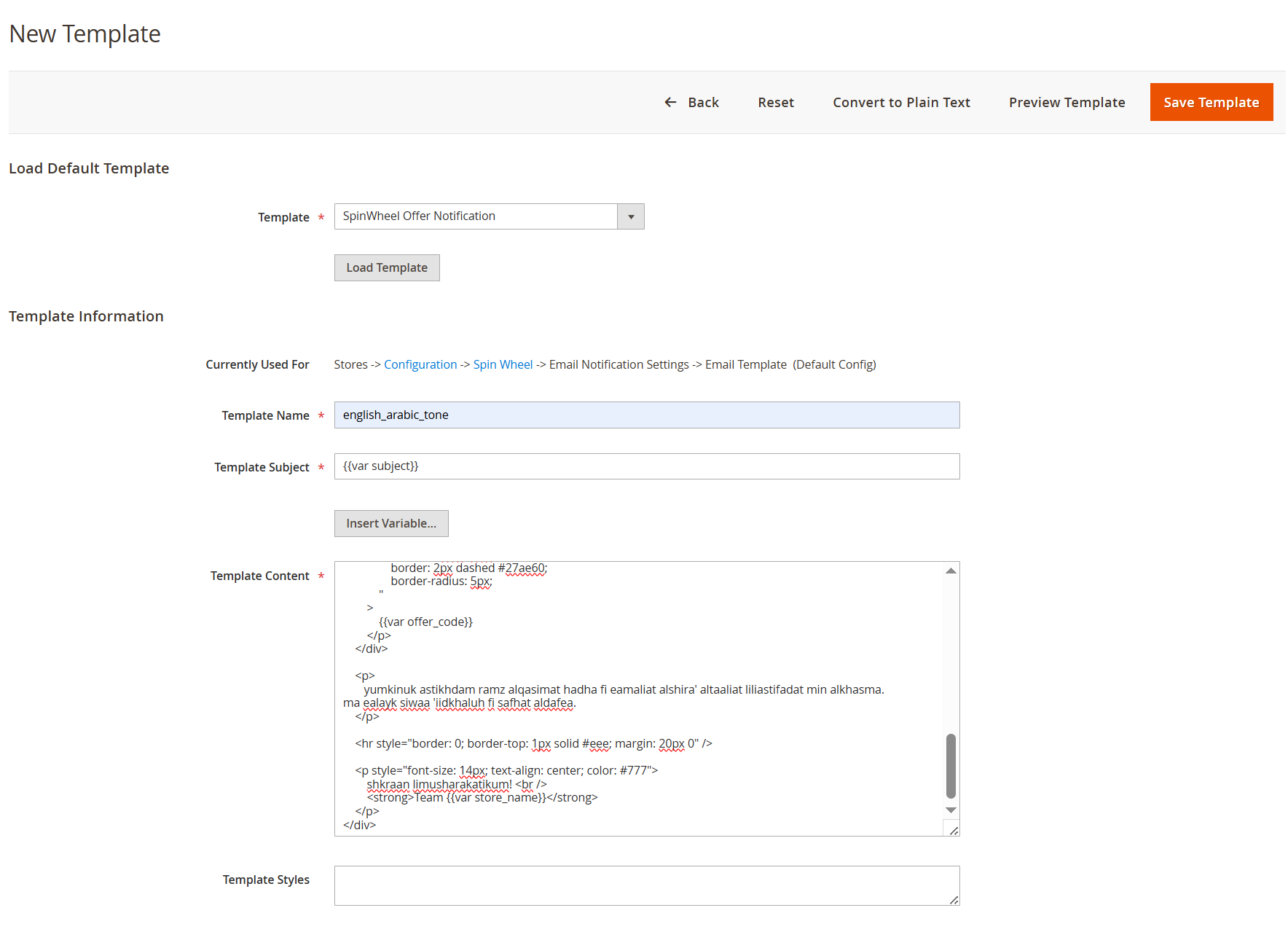
  • Users can customize the Spin Wheel email notification template from the Magento Admin panel via Marketing → Communications → Email Templates. By loading the default template, users can modify the subject and content to match their branding or communication style. Any changes made here will be reflected in the emails sent to customers after they spin the wheel.


FieldDescription
TemplateSelects the default Spin Wheel email template to load for editing.
Load TemplateLoads the selected template into the editor for customization.
Currently Used ForDisplays the configuration path where the template is currently applied.
Template NameDefines a unique name for the customized email template.
Template SubjectSpecifies the subject line of the email. Supports dynamic variables.
Insert Variable

Allows insertion of dynamic variables (e.g., offer code, store name) into the

template.

Template ContentMain editor to modify the email body using HTML and dynamic variables.
Template StylesAllows adding custom CSS for styling the email template.
Convert to Plain TextConverts the HTML template into a plain text version.
Preview TemplateDisplays a preview of the email before saving.
Save TemplateSaves the customized template for use in Spin Wheel notifications.


Section

Frontend Functionality


Panel


Panel


Panel


Panel


Panel


Panel


...