Backend Configuration (Admin side)
| Panel |
|---|
|
| Field | Description |
|---|
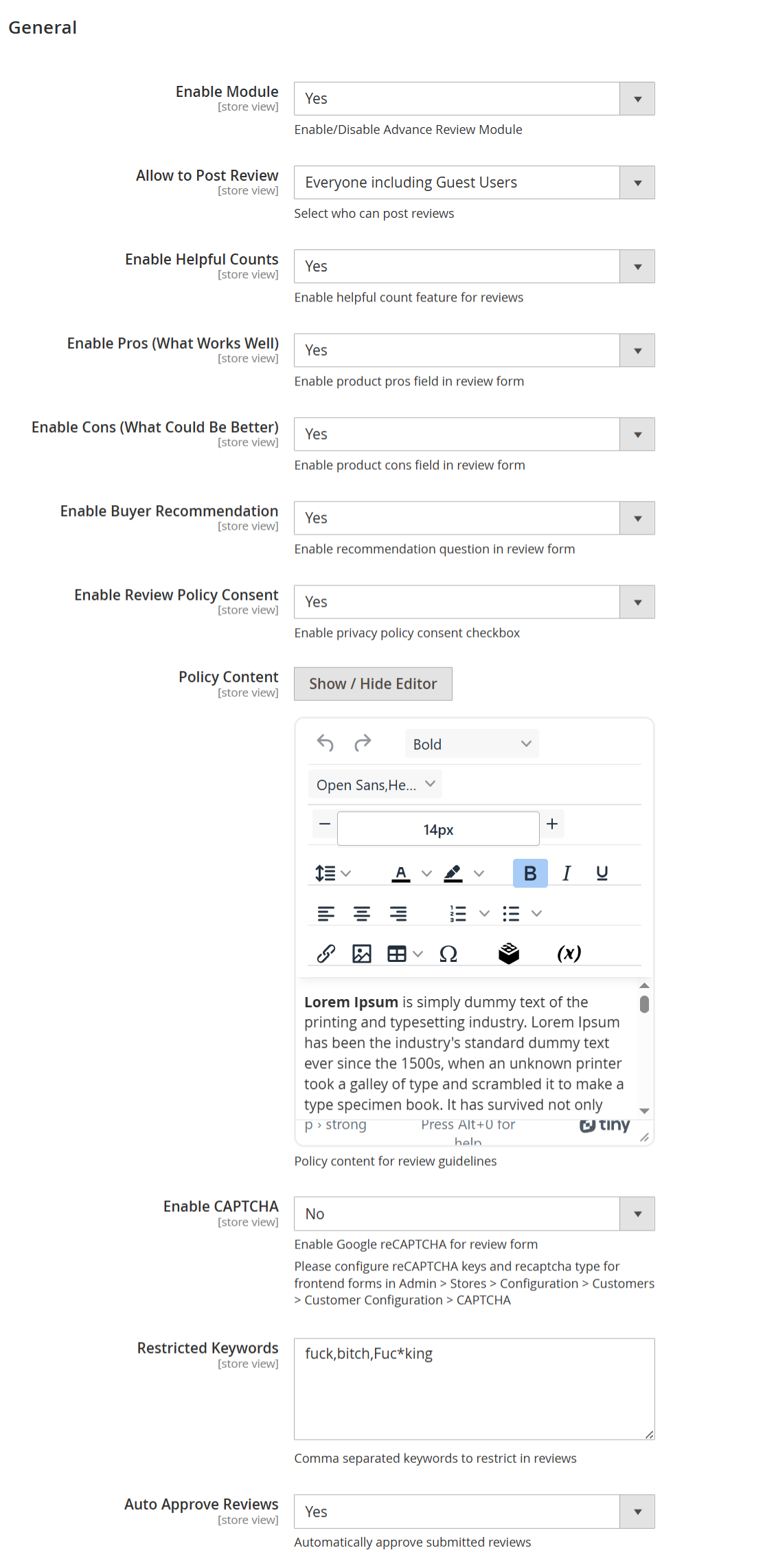
| Enable Module | Enables or disables the Advanced Product Reviews module for the selected store view.
When enabled, all advanced review features become active on the storefront. | | Allow to Post Review | Determines who is allowed to submit product reviews. Available options:
• Everyone including Guest Users – Allows both registered customers and guest users to
submit reviews.
• Registered Customer – Only logged-in customers can submit reviews.
• Verified Buyers – Only customers who have purchased the product can submit reviews,
ensuring authentic and trustworthy feedback. | | Enable Helpful Counts | Enables the “Was this review helpful?” voting feature, allowing customers to mark reviews as helpful or not helpful. This helps surface the most useful reviews. | | Enable Pros (What Works Well) | Displays an additional Pros field in the review form where customers can highlight positive aspects of the product. | | Enable Cons (What Could Be Better) | Displays a Cons field in the review form, allowing customers to share drawbacks or improvement areas. | | Enable Buyer Recommendation | Adds a recommendation option (for example, “I recommend this product”) in the review form and displays the recommendation status on submitted reviews. | | Enable Review Policy Consent | Displays a mandatory consent checkbox in the review form, requiring customers to agree to the review policy or privacy guidelines before submitting a review. | | Policy Content | Allows the admin to define and format the review policy or guidelines displayed to customers using a rich text editor. | | Enable CAPTCHA | Enables Google reCAPTCHA on the review submission form to prevent spam and automated review submissions. CAPTCHA keys must be configured separately in Magento settings. | | Restricted Keywords | A comma-separated list of restricted or inappropriate words. Reviews containing these keywords will be blocked or restricted from submission. | | Auto Approve Reviews | Automatically approves and publishes submitted reviews without manual admin moderation. When disabled, reviews require admin approval before appearing on the storefront. |
| Panel |
|---|
|
| Field | Description |
|---|
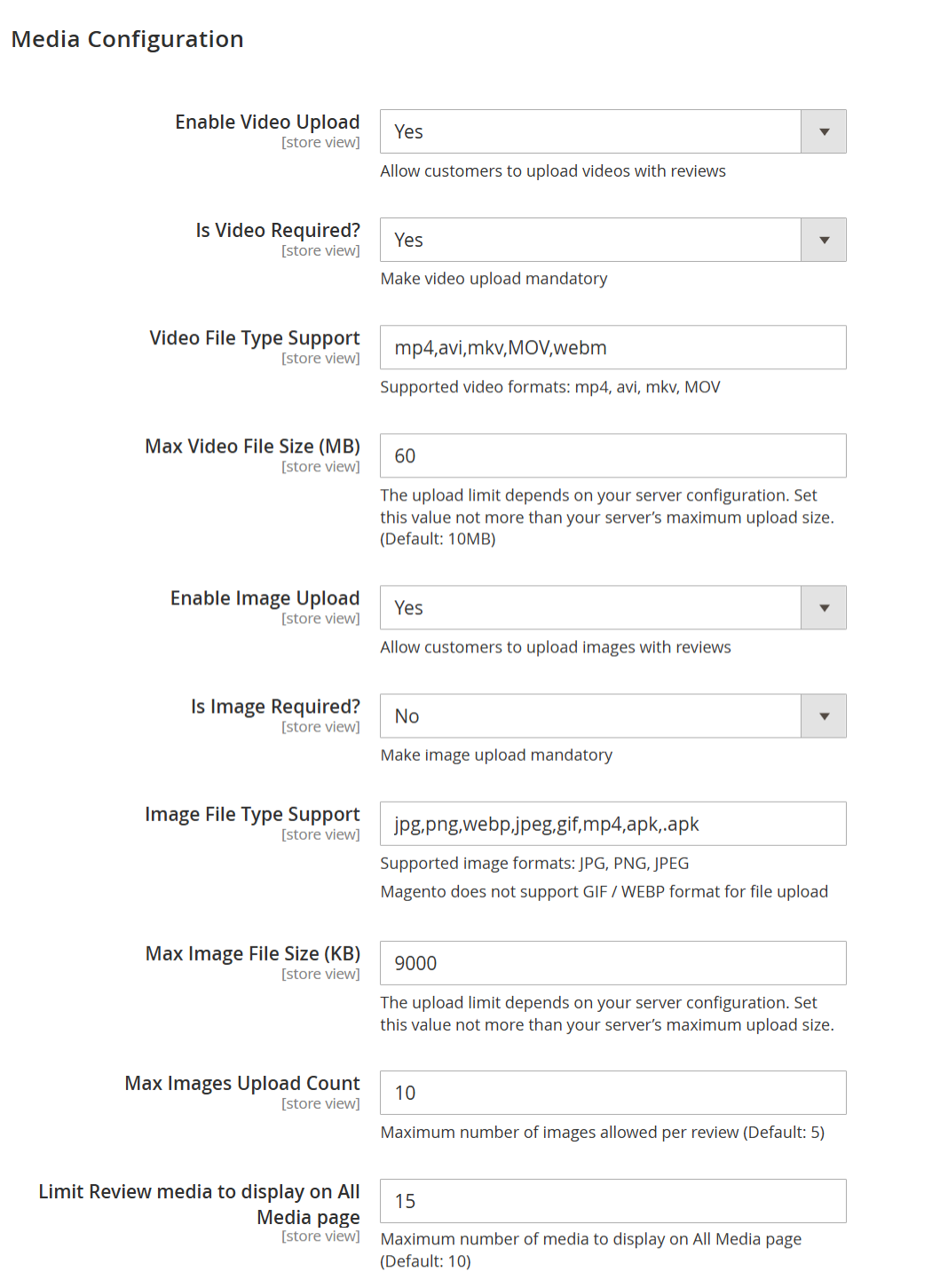
| Enable Video Upload | Allows customers to upload videos along with their product reviews. When enabled, a video upload option appears in the review submission form. | | Is Video Required? | Makes video upload mandatory for submitting a review. If set to Yes, customers must upload at least one video to submit their review. | | Video File Type Support | Specifies the allowed video file formats for upload. Only videos with the listed extensions (e.g., mp4, avi, mkv, MOV, webm) can be uploaded. | | Max Video File Size (MB) | Defines the maximum allowed size for each uploaded video file. This value must not exceed the server’s maximum upload limit. Default recommended value is 10 MB. | | Enable Image Upload | Allows customers to upload images with their product reviews. When enabled, image upload fields are displayed in the review form. | | Is Image Required? | Makes image upload mandatory for submitting a review. If set to No, images are optional for customers. | | Image File Type Support | Specifies the supported image file formats for upload. Common formats include JPG, PNG, and JPEG. Note: Magento does not natively support GIF and WEBP uploads. | | Max Image File Size (KB) | Defines the maximum allowed size for each uploaded image file. The value should be within the server’s configured upload size limit. | | Max Images Upload Count | Sets the maximum number of images a customer can upload per review. Helps control storage usage and review layout consistency. | | Limit Review Media to Display on All Media Page | Limits the total number of review images and videos displayed on the All Media page. This helps improve page performance and load time. |
| Panel |
|---|
|
| Field | Description |
|---|
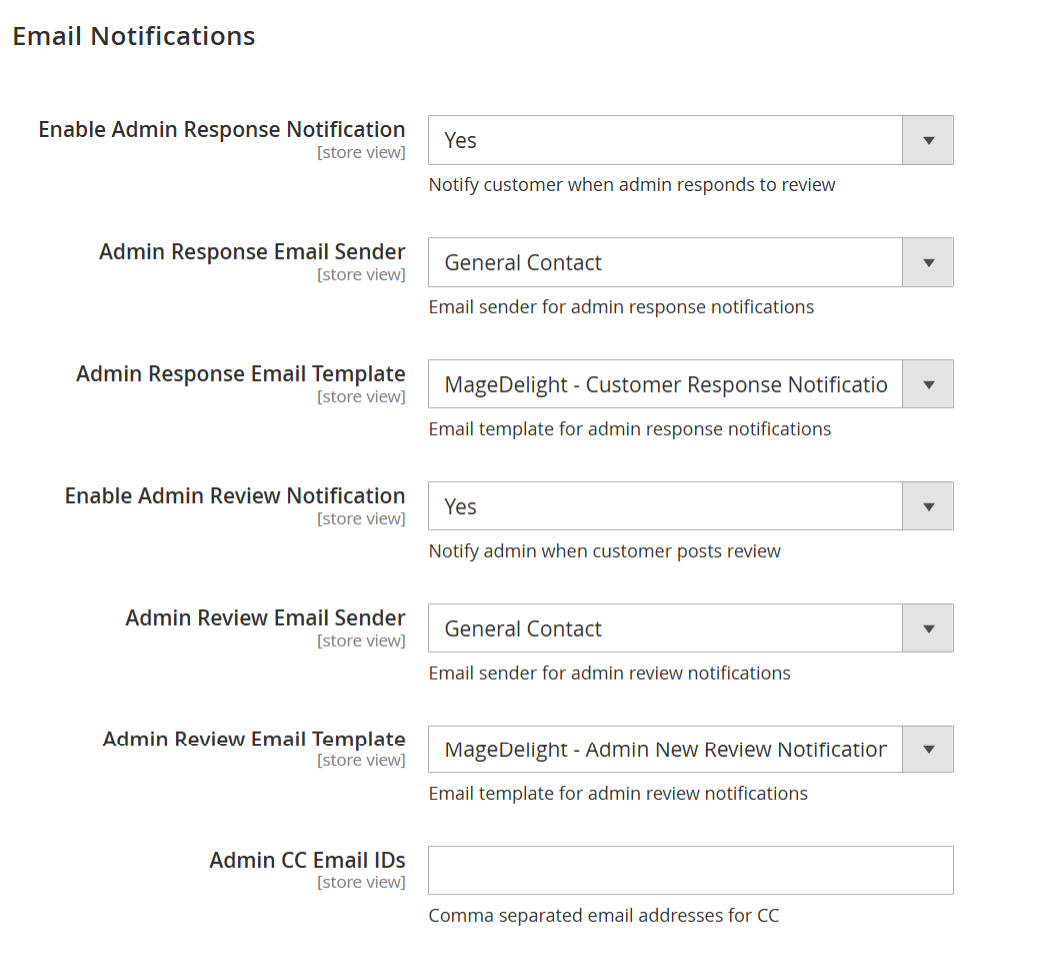
| Enable Admin Response Notification | When enabled, customers receive an email notification whenever an admin responds to their product review. | | Admin Response Email Sender | Specifies the sender identity used for emails sent to customers regarding admin responses to reviews. | | Admin Response Email Template | Selects the email template used to notify customers when an admin replies to their review. | | Enable Admin Review Notification | When enabled, the admin receives an email notification whenever a customer submits a new product review. | | Admin Review Email Sender | Specifies the sender identity used for emails sent to the admin about new product reviews. | | Admin Review Email Template | Selects the email template used to notify the admin when a new review is submitted by a customer. | | Admin CC Email IDs | Allows you to add one or more email addresses (comma-separated) to receive a carbon copy (CC) of admin review notification emails. |
| Panel |
|---|
|
| Field | Description |
|---|
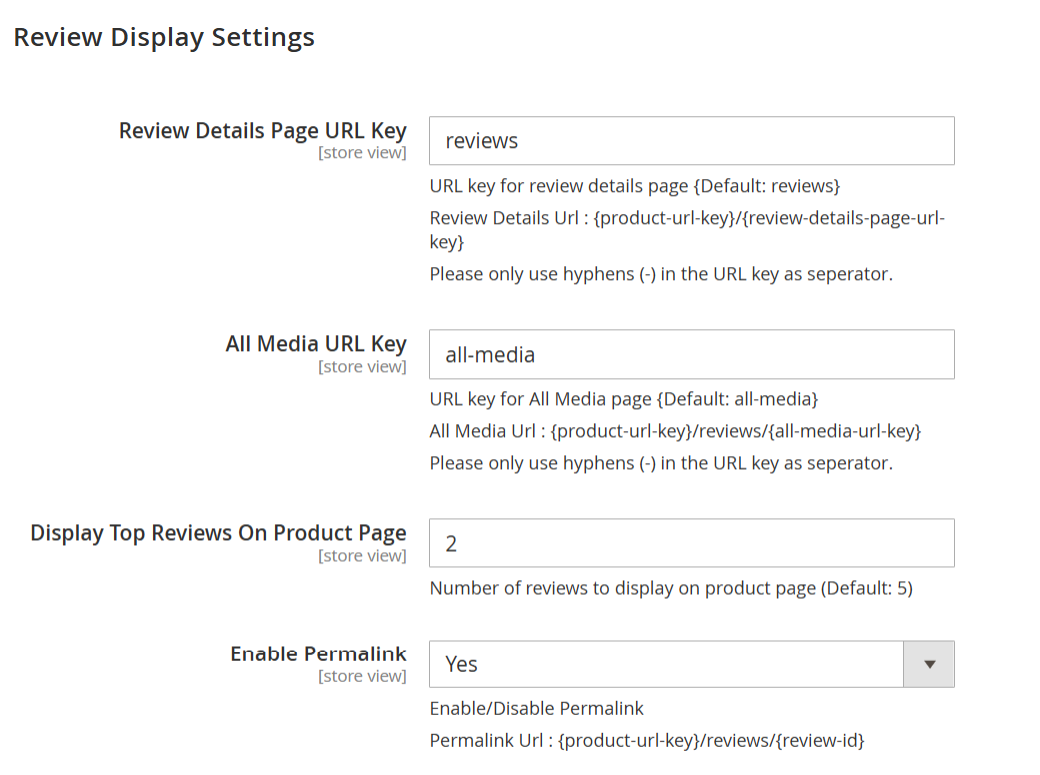
| Review Details Page URL Key | Defines the URL key used for the review details page. The review details page URL format will be: {product-url-key}/{review-details-page-url-key}. Only hyphens (-) are allowed as separators. | | All Media URL Key | Defines the URL key for the All Media page, where all review images and videos are displayed. The page URL format will be: {product-url-key}/reviews/{all-media-url-key}. Only hyphens (-) are allowed as separators. | | Display Top Reviews On Product Page | Specifies the number of top reviews displayed directly on the product detail page. This helps showcase the most relevant reviews without overcrowding the page. | | Enable Permalink | Enables or disables permanent URLs for individual reviews. When enabled, each review can be accessed using a unique URL in the format: {product-url-key}/reviews/{review-id}. |
| Panel |
|---|
|
| Field | Description |
|---|
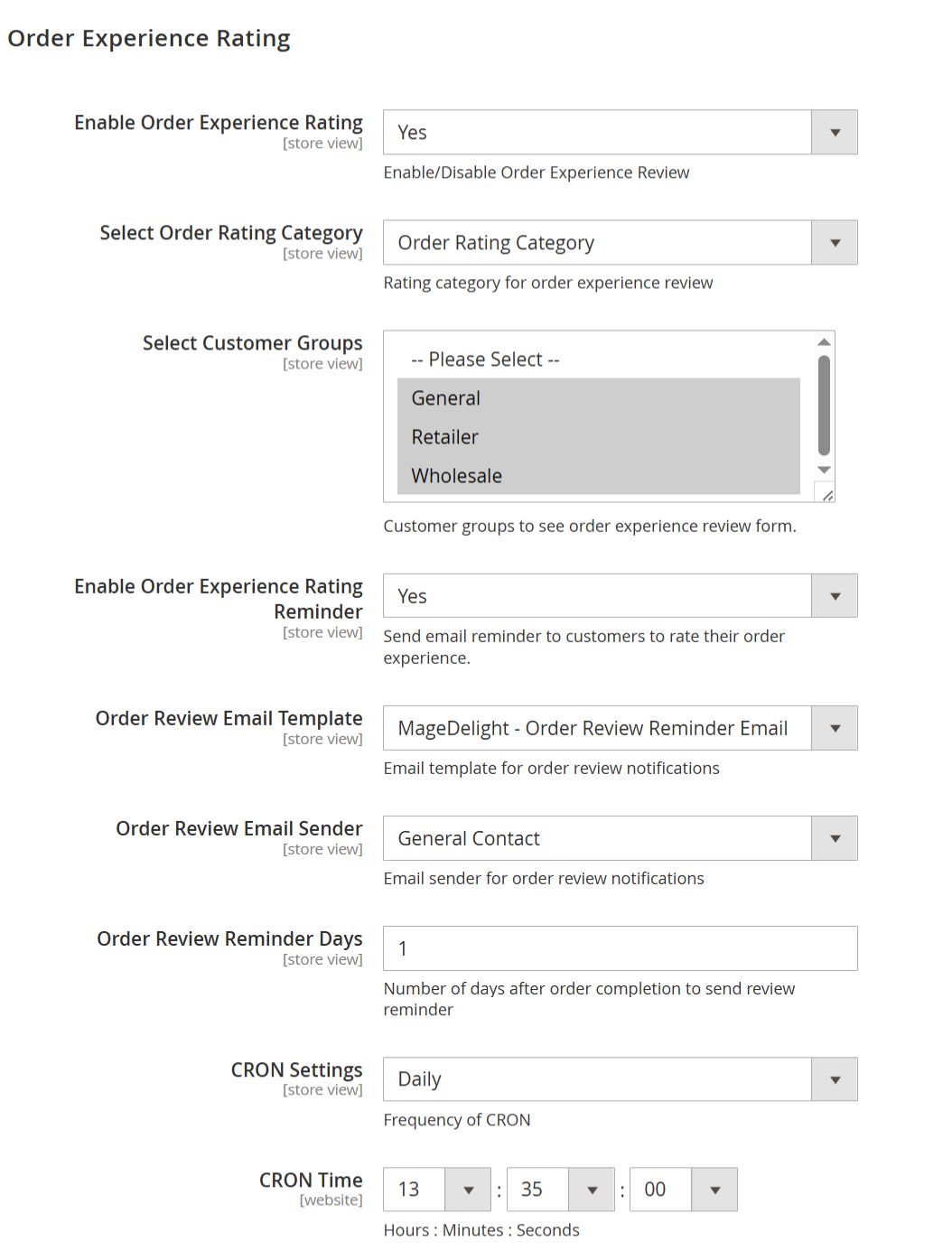
| Enable Order Experience Rating | Enables or disables the Order Experience Rating feature. When enabled, customers can rate their overall order experience in addition to product reviews. | | Select Order Rating Category | Defines the rating category used for order experience reviews. Available options: • Order Rating Category – Default category for collecting overall order experience feedback. • Shipping Testing – Allows collecting ratings specifically related to shipping and delivery experience. | | Select Customer Groups | Specifies which customer groups are allowed to see and submit the order experience rating form. Only the selected groups (e.g., General, Retailer, Wholesale) will be eligible. | | Enable Order Experience Rating Reminder | Enables email reminders prompting customers to rate their order experience after order completion. | | Order Review Email Template | Selects the email template used for sending order experience rating reminder emails. Available options: • MageDelight – Order Review Reminder Email (Default) – Default reminder email for order experience ratings. • MageDelight – Product Review Reminder Email – Reminder email focused on product reviews. • MageDelight – Order Review Reminder Email – Standard order experience reminder email. • MageDelight – Shipping Review Reminder Email – Reminder email focused on shipping experience reviews. • MageDelight – Product Review Promotional Coupons Email – Reminder email that includes promotional coupons for product reviews. | | Order Review Email Sender | Defines the sender identity used for order experience rating reminder emails (for example, General Contact). | | Order Review Reminder Days | Specifies the number of days after order completion when the order experience rating reminder email is sent to the customer. | | CRON Settings | Defines the frequency at which the CRON job runs to process and send order experience rating reminder emails (for example, Daily). | | CRON Time | Specifies the exact execution time (Hours : Minutes : Seconds) for the CRON job based on the selected frequency. |
| Panel |
|---|
|
| Field | Description |
|---|
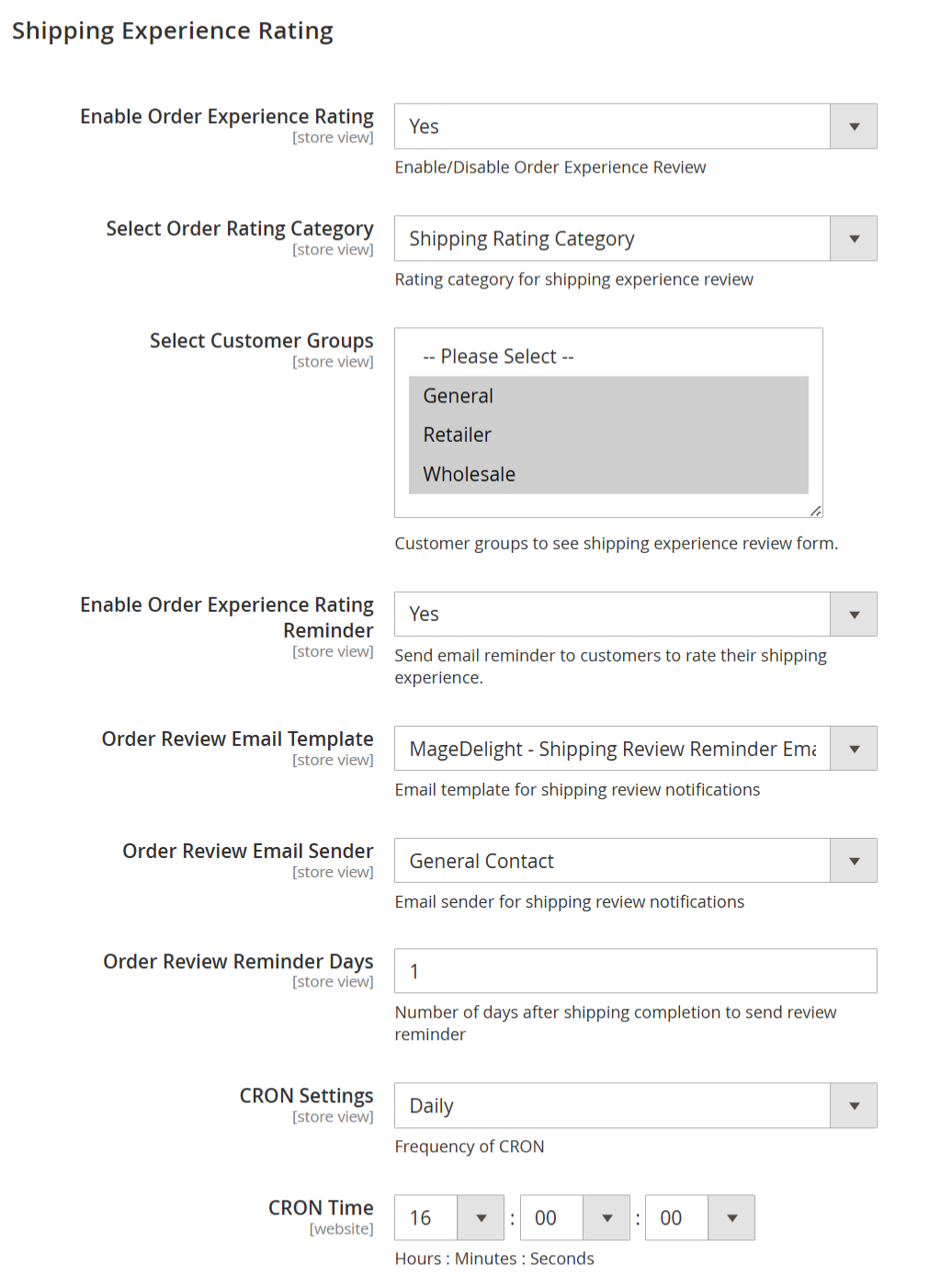
| Enable Order Experience Rating | Enables or disables the Shipping Experience Rating feature. When enabled, customers can rate their shipping and delivery experience separately from product and order reviews. | | Select Order Rating Category | Defines the rating category used for shipping experience reviews. Available option: • Shipping Rating Category – Used to collect feedback specifically related to shipping, delivery speed, and handling. | | Select Customer Groups | Specifies which customer groups are allowed to see and submit the shipping experience rating form. Only the selected groups (e.g., General, Retailer, Wholesale) will be eligible. | | Enable Order Experience Rating Reminder | Enables email reminders prompting customers to rate their shipping experience after shipping completion. | | Order Review Email Template | Selects the email template used for sending shipping experience rating reminder emails. Available options: • MageDelight – Shipping Review Reminder Email (Default) – Default email template for shipping experience reminders. • MageDelight – Product Review Reminder Email – Reminder email focused on product reviews. • MageDelight – Order Review Reminder Email – Reminder email focused on overall order experience. • MageDelight – Shipping Review Reminder Email – Standard shipping experience reminder email. • MageDelight – Product Review Promotional Coupons Email – Reminder email that includes promotional coupons for product reviews. | | Order Review Email Sender | Defines the sender identity used for shipping experience rating reminder emails (for example, General Contact). | | Order Review Reminder Days | Specifies the number of days after shipping completion when the shipping experience rating reminder email is sent to the customer. | | CRON Settings | Defines the frequency at which the CRON job runs to process and send shipping experience rating reminder emails (for example, Daily). | | CRON Time | Specifies the exact execution time (Hours : Minutes : Seconds) for the CRON job based on the selected frequency. |
| Panel |
|---|
|
| Field | Description |
|---|
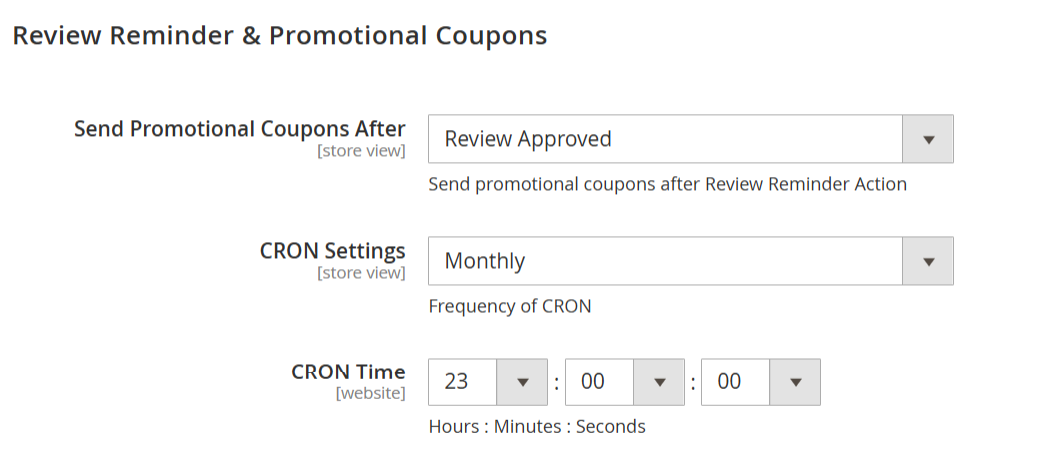
| Send Promotional Coupons After | Defines when promotional coupons are sent to customers after a review action. Available options: •Review Posted – Sends the promotional coupon immediately after the customer submits a review, before admin approval. • Review Approved – Sends the promotional coupon only after the review is approved by the admin. This option helps prevent misuse and ensures only valid reviews receive coupons. | | CRON Settings | Specifies how frequently the CRON job runs to process and send promotional coupons (for example, Monthly). | | CRON Time | Defines the exact execution time (Hours : Minutes : Seconds) at which the CRON job will run based on the selected frequency. |
| Panel |
|---|
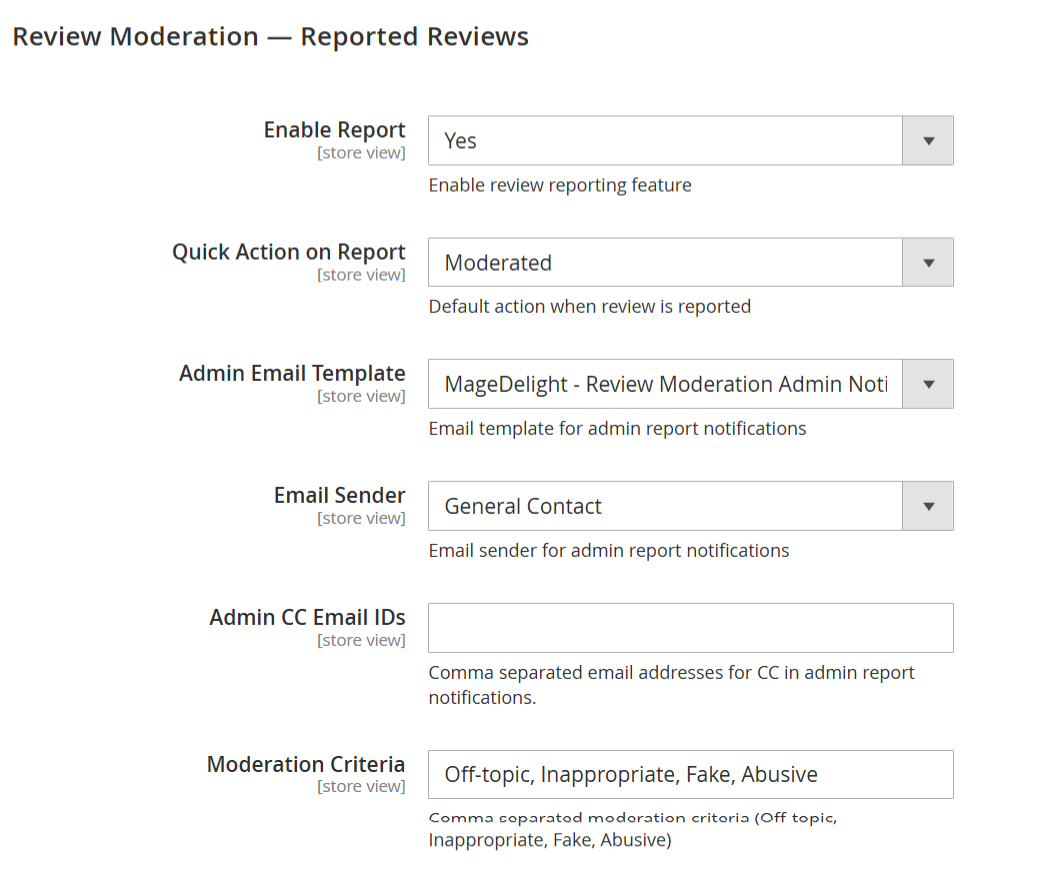 Image Removed Image Removed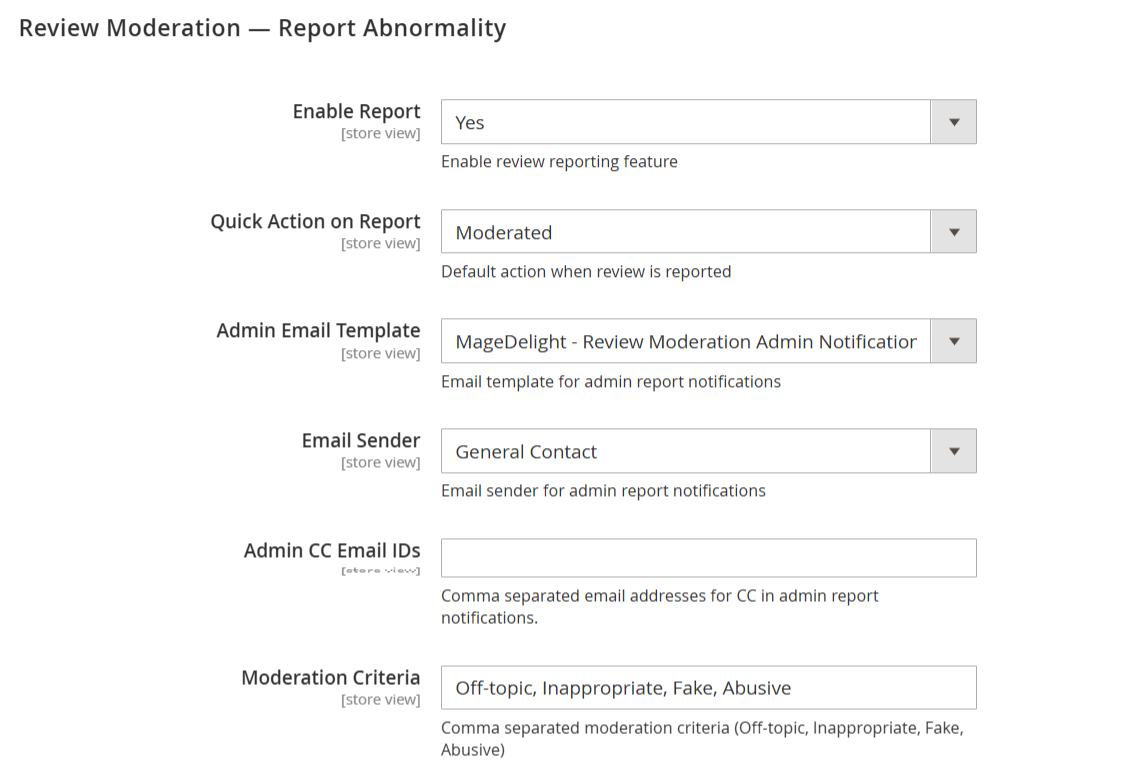 Image Added Image Added
|
| Field | Description |
|---|
| Enable Report | Enables or disables the review reporting feature on the storefront. When enabled, customers can report reviews they believe are inappropriate or violate marketplace policies. | | Quick Action on Report | Defines the default system action applied when a review is reported by a customer. Commonly used option: • Moderated – The reported review is flagged and moved into moderation, requiring admin review before further action.
• Pending – The review status is changed to pending and awaits admin approval.
• Rejected – The review is automatically rejected upon being reported. | | Admin Email Template | Selects the email template used to notify the admin when a review is reported by customers. | | Email Sender | Specifies the sender identity used for admin report notification emails (for example, General Contact). | | Admin CC Email IDs | Allows adding one or more email addresses (comma-separated) to receive a carbon copy (CC) of reported review notification emails. | | Moderation Criteria | Defines the list of reasons displayed to customers when reporting a review. Multiple criteria can be configured using comma-separated values (for example, Off-topic, Inappropriate, Fake, Abusive). |
| Panel |
|---|
|
| Field | Description |
|---|
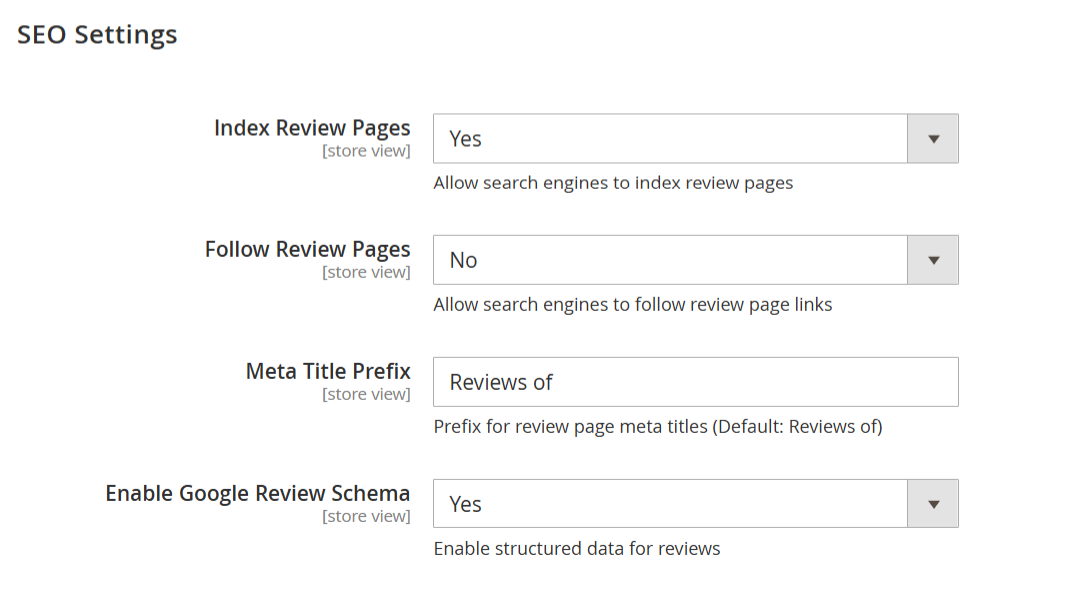
| Index Review Pages | Allows search engines to index review pages. When enabled, review-related pages can appear in search engine results, improving organic visibility. | | Follow Review Pages | Controls whether search engines are allowed to follow links on review pages. Setting this to No prevents passing link equity from review pages to other URLs. | | Meta Title Prefix | Defines the prefix added to the meta title of review pages. This helps standardize review page titles for better search visibility (default value: “Reviews of”). | | Enable Google Review Schema | Enables structured data (schema markup) for product reviews. This allows search engines to display rich results such as star ratings and review counts in search listings. |
|