Versions Compared

Key

  • This line was added.
  • This line was removed.
  • Formatting was changed.

...

Section

Backend Functionality


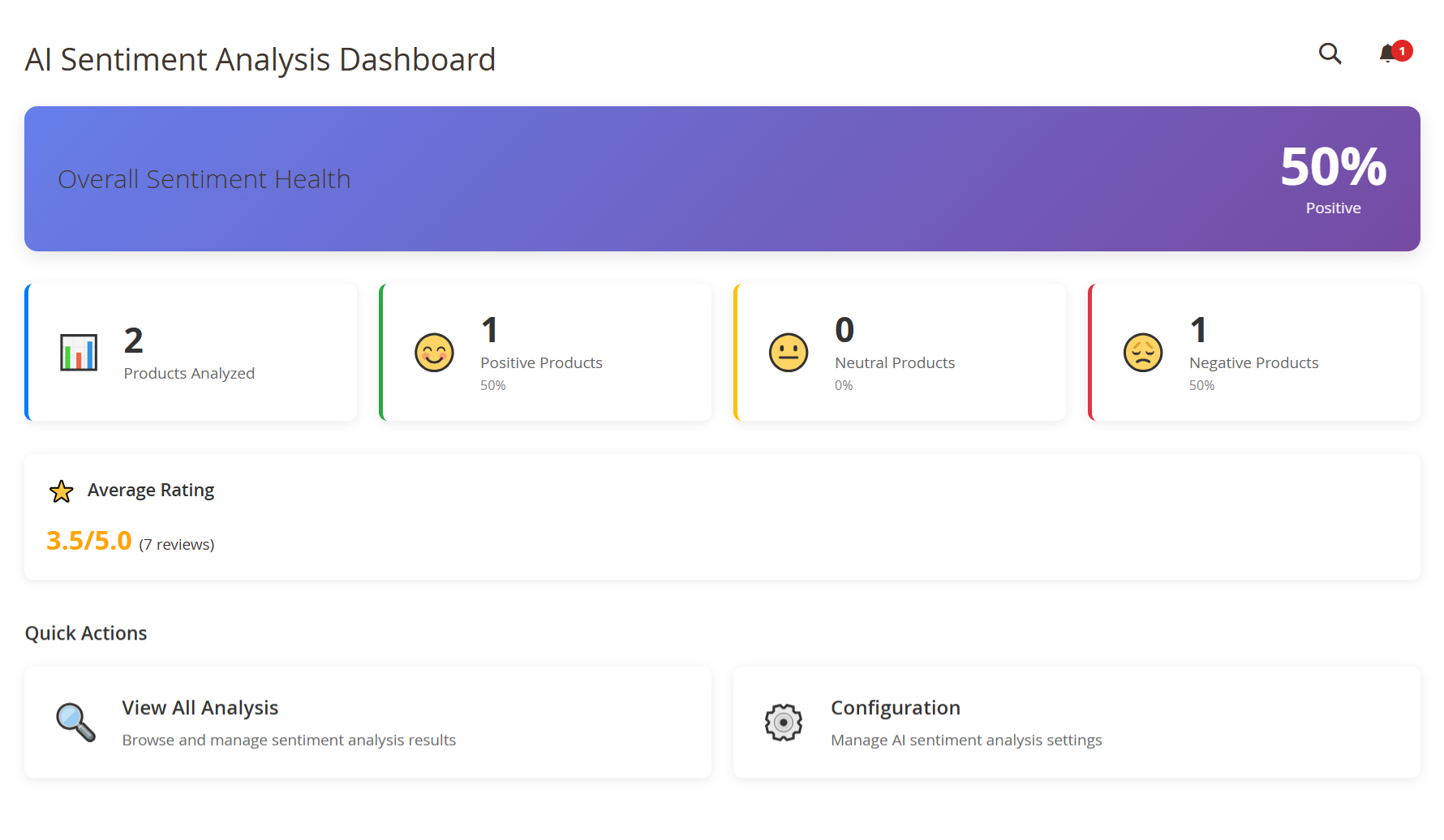
AI Sentiment Analysis Dashboard

Panel


FieldDescription
Overall Sentiment HealthQuickly view the overall sentiment status of your products. A higher percentage means your products are receiving positive feedback.
Products AnalyzedSee how many products have been successfully analyzed. This gives you an idea of your current AI coverage.
Positive ProductsCheck how many products received mostly positive sentiment. Aim to increase this number for better customer perception.
Neutral ProductsMonitor products with mixed or neutral sentiment. These may benefit from improvements or more customer engagement.
Negative ProductsIdentify products with negative sentiment so you can take corrective action, such as updating content or addressing issues.
Average RatingReview the average customer rating across all analyzed products. Use this to measure overall satisfaction and spot trends.
View All AnalysisClick here to dive into detailed sentiment data. You can explore summaries, pros and cons, and sentiment distribution per product.
ConfigurationAccess and update your AI settings. Customize how sentiment is analyzed and displayed across your store.

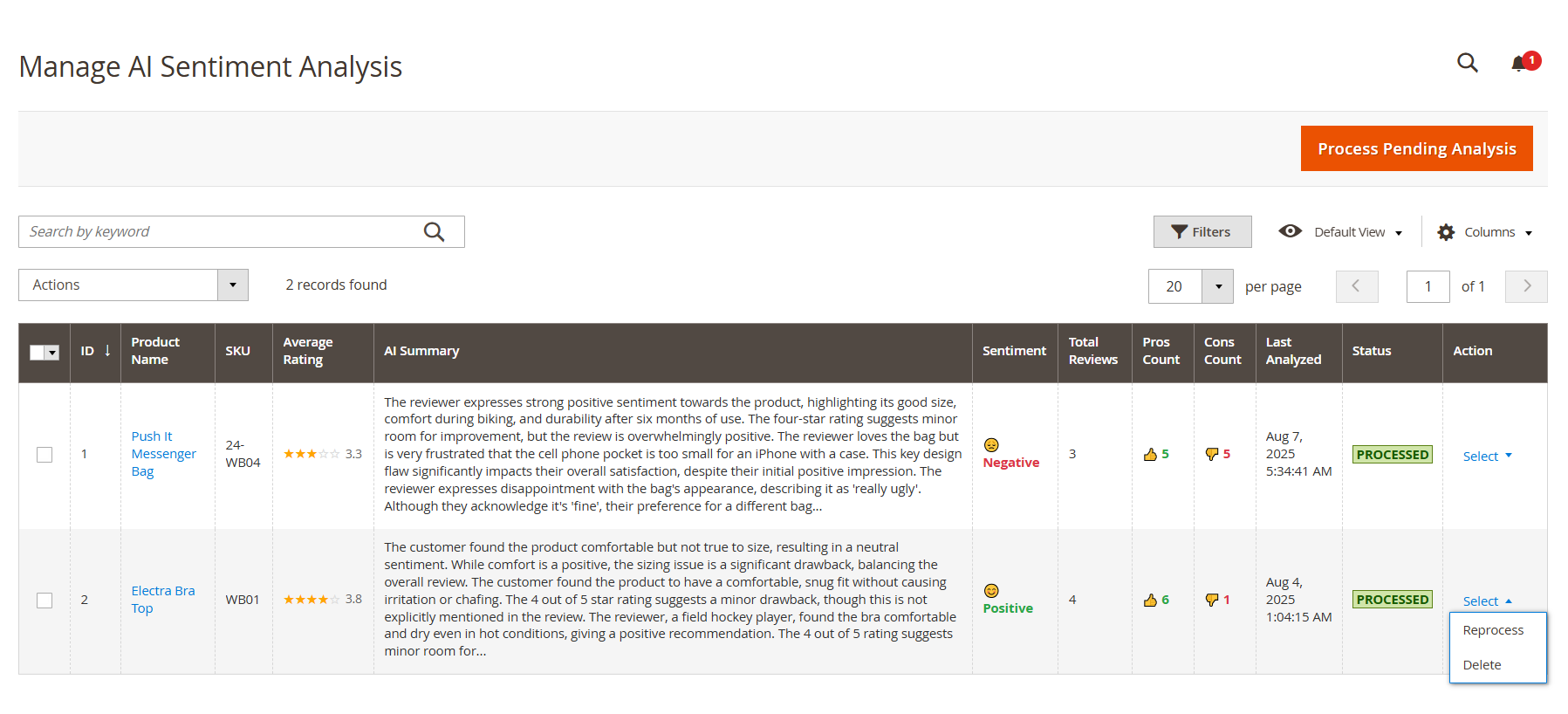
Manage AI Sentiment Analysis

Panel


FieldDescription
IDUse this unique identifier to track and reference each analyzed product easily within the system.
Product NameClick the product name to open detailed sentiment insights. This helps you understand customer perception at a glance.
SKUIdentify the product using its SKU. Useful for inventory tracking and quickly locating products in your catalog.
Average RatingSee the product's average customer rating (out of 5 stars). Use this to recognize top performers or flag items for improvement.
AI SummaryReview a concise AI-generated summary of what customers are saying. This helps you save time and gain insights without reading every individual review.
SentimentUnderstand how the AI classifies the overall sentiment — Positive, Neutral, or Negative — so you can take informed action quickly.
Total ReviewsCheck how many reviews were analyzed. A higher count means more reliable insights for making business decisions.
Pros CountSee how many positive points the AI found in customer feedback. Use this to highlight strengths in product listings or promotions.
Cons CountFind out how many negative points were detected. These help you identify and address specific customer concerns to improve satisfaction.
Last AnalyzedView the last time the product was processed for sentiment analysis. Reprocess if you've received new reviews or changed configuration settings.
StatusConfirm whether the product has been analyzed. When marked Processed, it means the AI has completed review analysis for that product.
ActionManage each product’s sentiment data:
Reprocess – Run analysis again to reflect new reviews or setting changes.
Delete – Remove the sentiment result if you want to reset or clear outdated data.


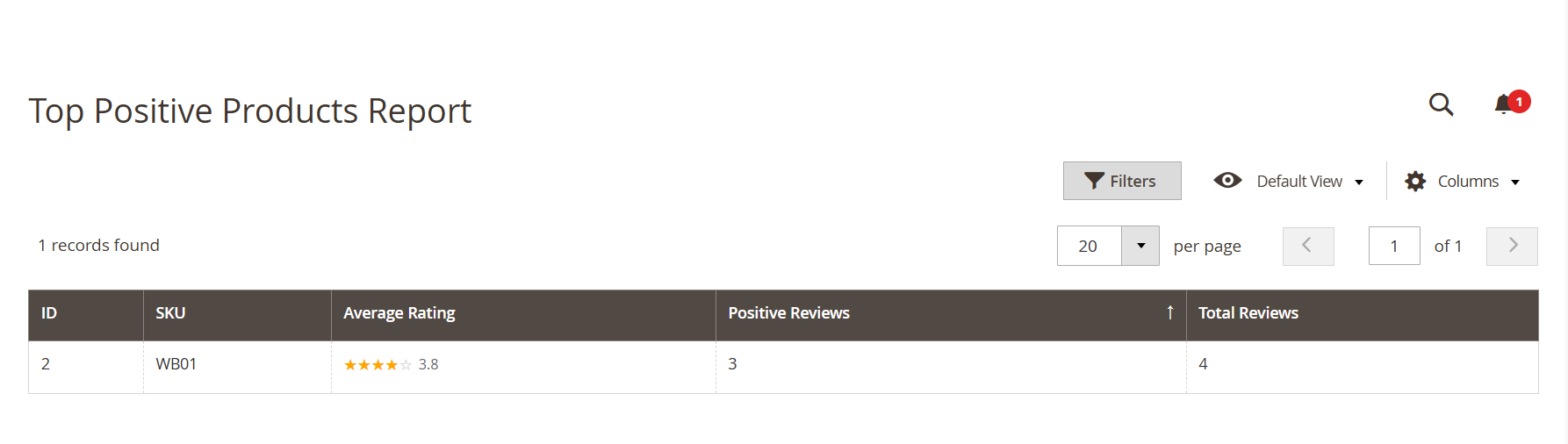
Top Positive Products Report

Panel


FieldDescription
IDUse this unique ID to quickly reference each product listed in the report.
SKUIdentify the product by its SKU so you can easily locate or manage it within your catalog.
Average RatingView the average customer rating for each product. Use this to recognize well-received products.
Positive ReviewsSee how many reviews are considered positive by AI. Focus on these products to promote what customers love.
Total ReviewsUnderstand how many total reviews the product has. Use this to measure engagement and review quality balance.


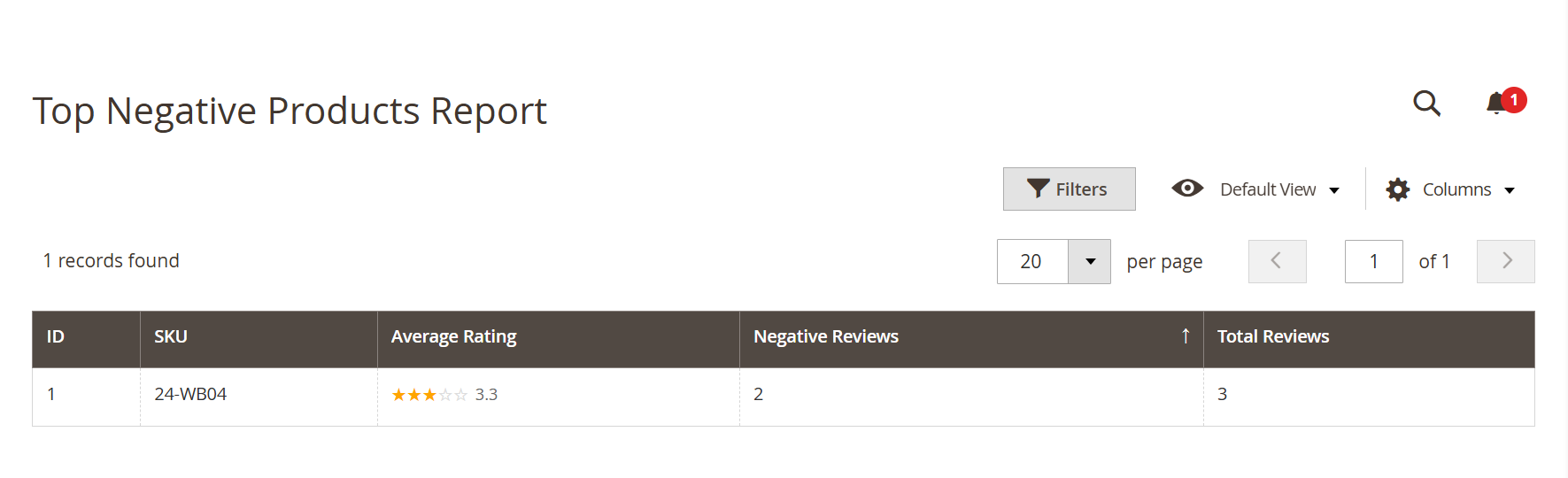
Top Negative Products Report

Panel


ColumnHow You’ll Use It to Improve Product Experience
IDUse this internal product ID to quickly locate and manage items that need improvement.
SKUIdentify the product by its SKU to take targeted actions such as updates or inventory adjustments.
Average RatingReview the product’s average star rating. This helps you quickly identify which products may need attention or quality enhancements.
Negative ReviewsSee the number of reviews marked as negative. Use this to understand where customers are dissatisfied so you can act accordingly.
Total ReviewsCheck the total number of reviews for context. This helps you evaluate whether negative sentiment is a trend or an isolated case.


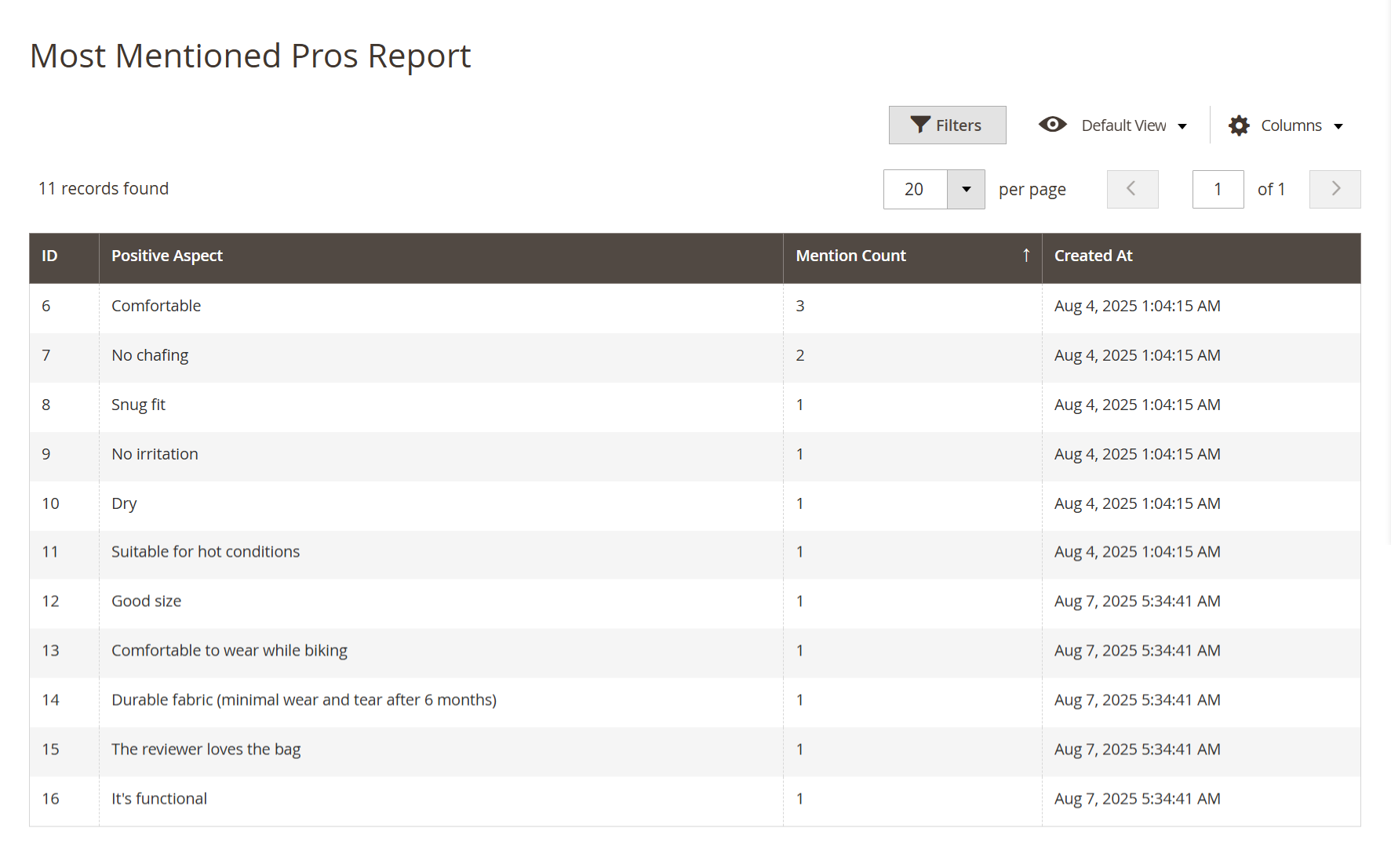
Most Mentioned Pros Report

Panel


FieldDescription
IDUse this ID to reference each positive aspect quickly. It helps you stay organized as you review or report insights.
Positive AspectDiscover the exact phrases customers mention most positively. You’ll use these to highlight your product's strongest selling points.
Mention CountSee how often each positive point was mentioned. Focus on the highest counts to promote what customers love the most.
Created AtCheck when each insight was generated. This ensures you’re always working with the most recent and relevant feedback.

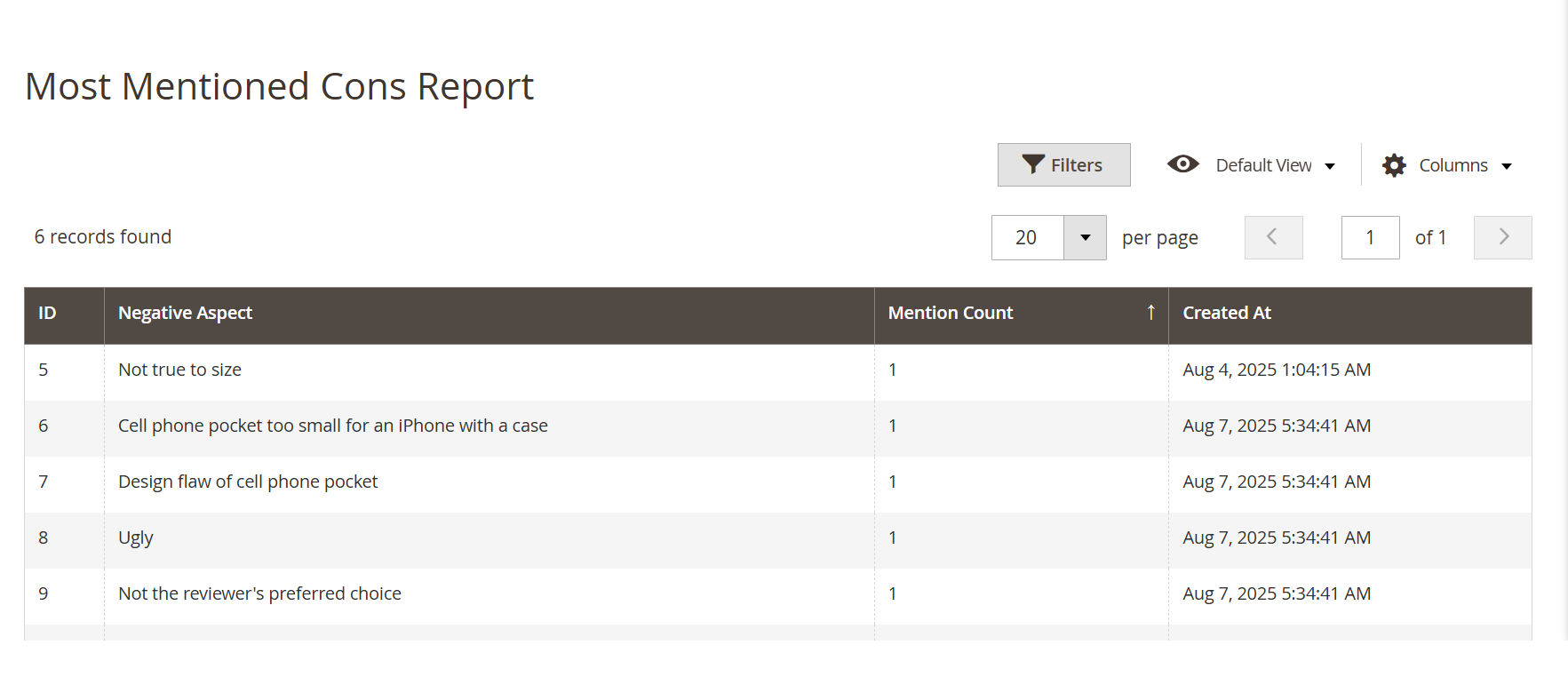
Most Mentioned Cons Report

Panel


FieldDescription
IDUse this ID to reference each negative aspect for internal tracking and corrective action planning.
Negative AspectIdentify specific issues frequently mentioned by customers. Use this insight to spot product flaws or improvement opportunities.
Mention CountView how many times each con was raised. Focus on the most frequently mentioned ones to prioritize your fixes and enhancements.
Created AtKeep track of when each issue was first identified. This helps you monitor patterns and react quickly to recurring concerns.


Section

Frontend Functionality


Panel

Image Added

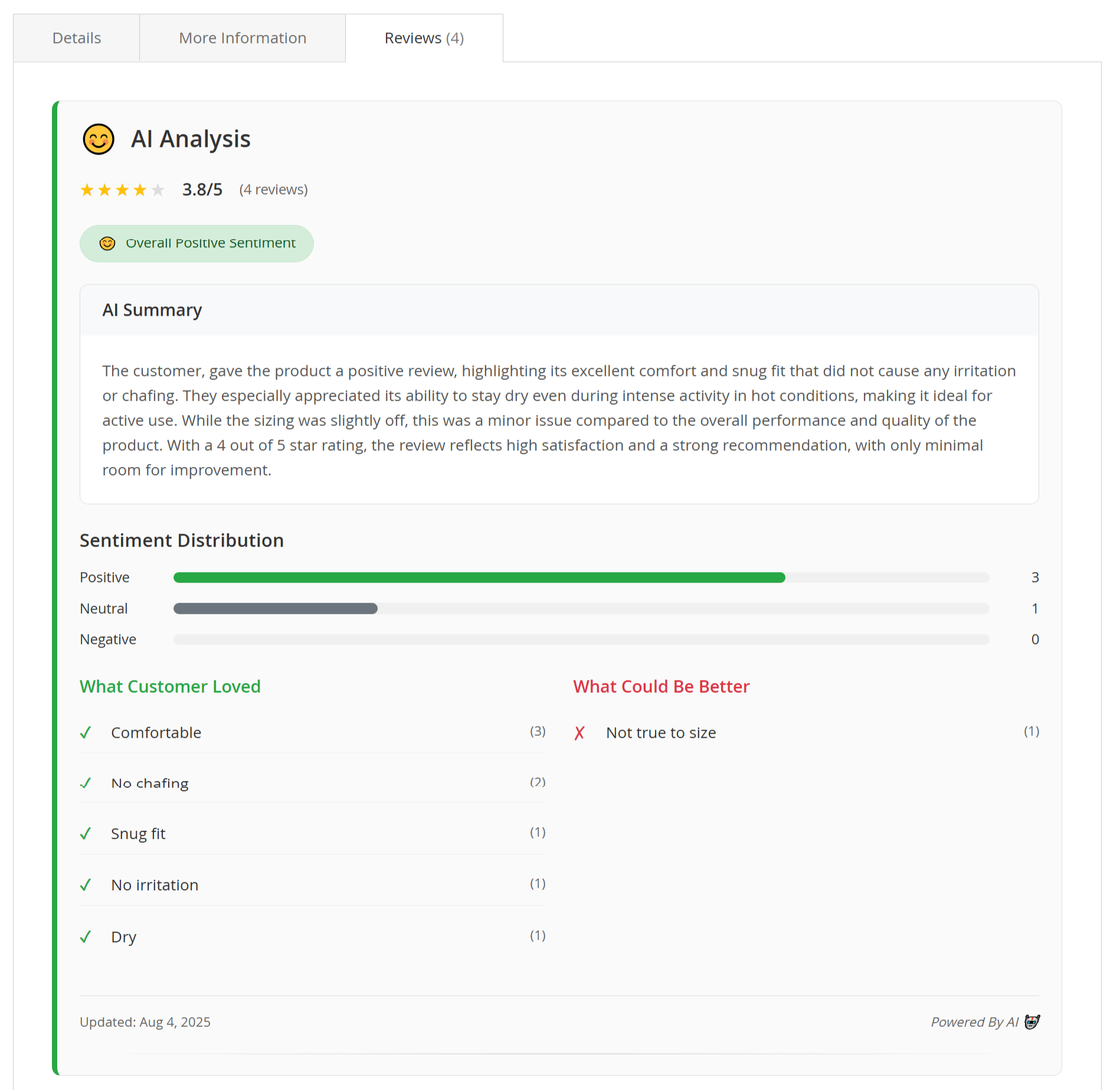
  • Once the sentiment analysis is processed for a product, the results will appear on the product page under the Reviews tab in a section titled AI Analysis. This section helps customers understand overall product feedback at a glance, using AI-generated summaries and visual highlights.

What Customers Will See on the Frontend:

  1. AI Analysis Title & Emoji

    • A smiley, neutral, or sad emoji is displayed based on overall product sentiment.

    • The title “AI Analysis” helps customers know this summary is generated by AI.

  2. Average Rating

    • Shows the average star rating from all submitted reviews.

    • Includes the total number of reviews counted.

  3. Sentiment Badge

    • A clear badge (e.g., Overall Positive Sentiment) tells customers the general feedback tone.

    • Helps in quick decision-making while browsing.

  4. AI Summary Box

    • A short, easy-to-read summary written by the AI.

    • Highlights the most common customer experiences, both positive and negative.

    • Focuses on clarity and objectivity to guide shoppers.

  5. Sentiment Distribution Bar

    • A visual breakdown of how many reviews were:

      • Positive (Green bar)

      • Neutral (Grey bar)

      • Negative (Red or light grey bar if 0)

    • Makes it easy to assess the general opinion trend.

  6. What Customers Loved (Pros)

    • Lists the most frequently praised product aspects, such as:

      • Comfortable

      • No chafing

      • Snug fit

    • Each point includes a count of how many times it was mentioned.

  7. What Could Be Better (Cons)

    • List the most common complaints or improvement suggestions, such as:

      • Not true to size

      • Pocket too small

    • Each point also includes the number of mentions.

    • Helps customers assess any potential drawbacks before purchase.

  8. Last Updated

    • Shows the date when the sentiment data was last updated.

    • Indicates the freshness of insights.

  9. Powered By Text (Optional)

    • Customizable text like Powered by AI to inform users that this section is AI-driven.

By enabling this feature, you're helping customers shop smarter by presenting meaningful insights upfront. This not only builds trust but also improves the overall shopping experience on your store.


Section

Demo


Click here to visit the frontend.

Click here to visit the backend admin panel.

...