Backend Configuration (Admin side)This extension will provide an option to manage schedule delivery date and time slots, for product delivery. Customer can choose particular date and time slot to deliver products, put message to merchant for special condition. | Panel |
|---|
Enable Schedule Shipping: Enable/Disable delivery date options.Label for Delivery Date: Merchant can manage delivery date label from here.Make Delivery Date Mandatory: Set schedule delivery mandatory or optional.Label for Delivery Charges: set label for delivery charges, will be reflected across the website.Enable Delivery Comments: Yes/No, you can turn on or off comment option for customer at checkout.Label for Delivery Comment: set label for delivery comment.Enable Call Me Before Delivery: Turn on or off call me check box before delivery.Show Additional Info: Set this option to “Yes” to display additional comment of admin on frontend.Do You Want Email Notification?: Enable/disable email notification about delivery.Send Reminder of Occurrence Before: Number of days before the deliveryEmail Notification Id: Set email id from which notification would be sent.
Allowed Customer Groups: Select customer groups to give access to delivery date functionality| Panel |
|---|
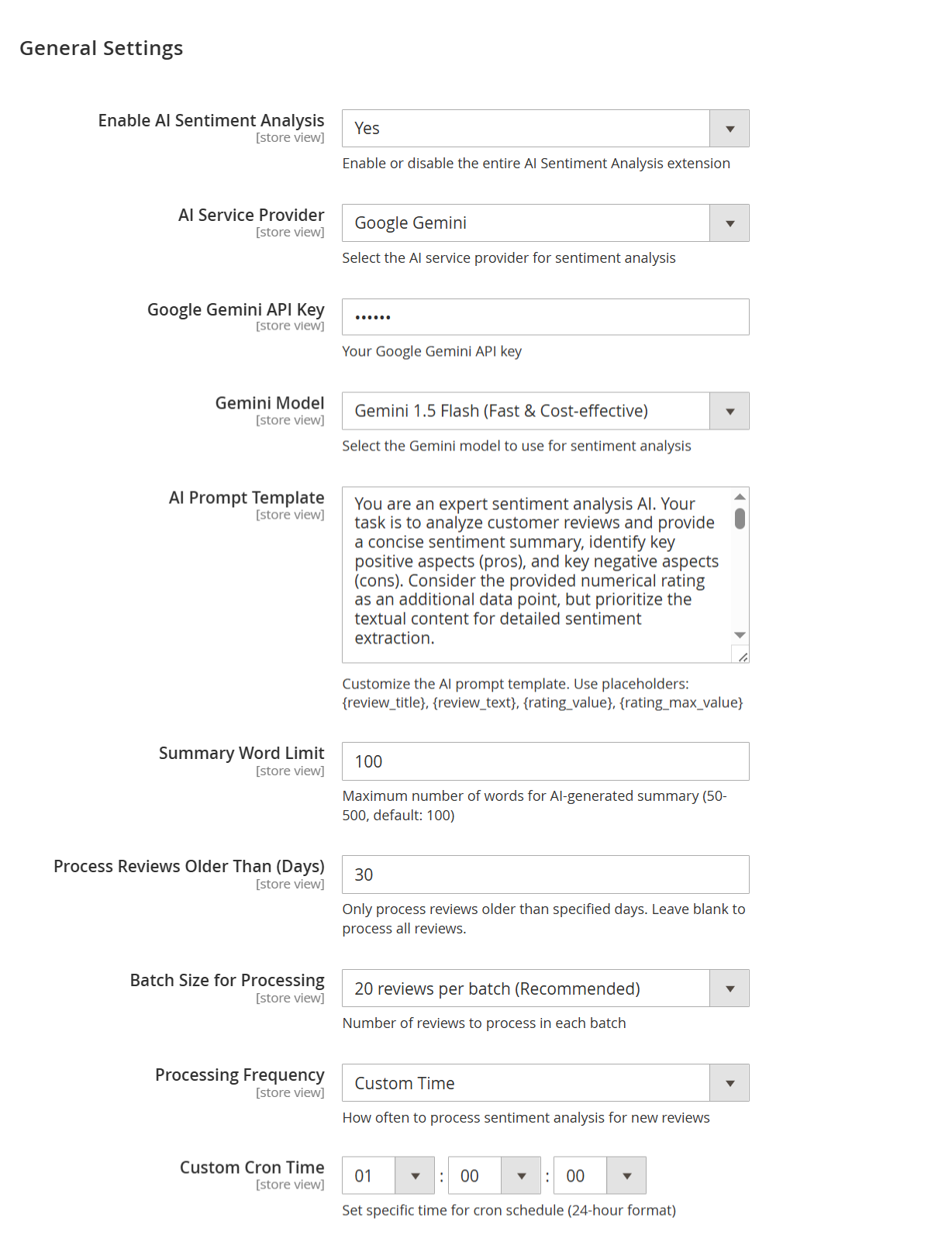 Image Added Image Added
|
| Field | Description |
|---|
| Enable AI Sentiment Analysis | Select "Yes" to activate the AI Sentiment Analysis extension and start analyzing customer reviews automatically. | | AI Service Provider | Choose your preferred AI provider for sentiment analysis. You can select either Google Gemini or OpenAI GPT based on your integration. | | Google Gemini API Key | Enter your Google Gemini API key here to enable secure communication between your store and Gemini services. | | Gemini Model | Select the specific Gemini model to use. We recommend Gemini 1.5 Flash for fast and cost-effective sentiment processing. | | AI Prompt Template | Customize the instruction sent to the AI. You can include placeholders like {review_title}, {review_text}, {rating_value} to guide the AI. | | Summary Word Limit | Set the maximum word count for the AI-generated summary. You can enter any number between 50 to 500 words. Default is 100. | | Process Reviews Older Than (Days) | Define how old the reviews must be to be processed. For example, entering 30 will only analyze reviews older than 30 days. Leave blank to include all. | | Batch Size for Processing | Select how many reviews you want the system to process in each batch. You can choose from 20, 30, 40, 100, 500, or 1000 reviews per batch. | | Processing Frequency | Choose how often the sentiment analysis should run. Available options are: Every Hour, Daily, Weekly, Monthly, or Custom Time. | | Custom Cron Time | If you selected Custom Time above, use this field to set the exact time (HH:MM:SS in 24-hour format) for the AI processing to run. |
Calendar view - Show delivery schedule in: calendar view/time slot. If set to calendar, customer can select date from calendar. If select time slot, customer will get option to choose time slop option from available times.
- Enable Time in Calendar: If calendar view is enabled, you can show option to show time slot in calendar to choose for customer.
- Minimum interval of days between the order and delivery date: You can define number of day after customer can choose date for schedule delivery.
- Maximum interval of days between the order and delivery date: You can define number of day before customer can choose date for schedule delivery.
- Same Day Delivery: Yes/No. You can enable same day delivery.
- Same Day Delivery Charges: If same day delivery is enabled, you can define charges for same day delivery.
- Next Day Delivery: Yes/No. You can enable next day delivery.
Next Day Delivery charges: If next day delivery is enabled, you can define charges for same day delivery.
| Note |
|---|
Minimum interval of days between the order and delivery date : You can define number of day after customer can choose date for schedule delivery. If Minimum interval of days between the order and delivery date set as blank than same day delivery is possible
Minimum interval of days between the order and delivery date set as 1 than same day delivery will not be possible
If set as 2 than for eg today date is 8th December 2020 than till 10th December customer cannot choose delivery date.
If set as 3 than for eg today date is 8th December 2020 than till 11th December customer cannot choose delivery date.| Note |
|---|
Maximum interval of days between the order and delivery date : You can define number of day before customer can choose date for schedule delivery.
If you set Maximum interval of days between the order and delivery date as 2 than for eg today date is 8th December than till 10th December only customer can choose delivery date
If you set 3 than for eg today date is 8th December than till 11th December only customer can choose delivery date.
Time Slot View - Show Delivery Schedule in: select TimeSlot View to allow customers to select the time slot of the day.
- Maximum Quota Per Time Interval: Set the maximum number of deliveries that can be sent per time slot. Once the delivery quota exceeds, customers will not be able to select that particular delivery time slot.
Time slot setting - Add Number of delivery days: Define number of days to show time slots for next days.
- Minimum interval hours between order placing time and delivery time: you can set time gap, after delivery slot can be chosen to schedule delivery.
- Add Time slot: you can define multiple number of slots and price for delivery date. This time slots will be common for all days. However, you can disable selected slots for particular days and dates.
- Disable time slot for day: Disable particular time slots for particular week days. I.e. 4 PM to 8 PM time slot wouldn’t be available for Sundays.
- Disable time slot for date: Disable particular time slots for particular date. I.e. 4 PM to 8 PM time slot wouldn’t be available on 1st January.
Holiday Management - Day Off: You can select days from week day for day off. That particular day will not be available for customer to choose schedule delivery.
- Single Day Off: You can choose specific date for holiday or day off. That will skip from schedule delivery calendar.
- From-to period off: Manage vacation period for multiple leave together. You can define start date and end date to define vacation period. Customer will not able to choose those days for schedule delivery.
|